Have a nice day Elliot Feldman!
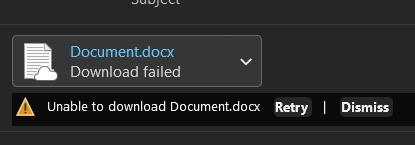
From what you described, I understand that you’re trying to attach files from OneDrive to Outlook emails, but instead of attaching normally, Outlook shows a “Download has failed” message.
First, please make sure Outlook and OneDrive are both signed in with the same Microsoft account. If they are using different accounts, Outlook may not be able to properly access the file from OneDrive for attachment
It may also help to first check the file in your local OneDrive folder and make sure it has fully synced. Sometimes OneDrive shows an online-only placeholder, and Outlook cannot attach it until the file has fully downloaded. Try opening the file once from your local OneDrive folder, wait for it to finish syncing, then close it and try attaching it again.
If that does not help, try downloading the file from OneDrive to your device first and attach that downloaded copy instead to see if that helps (as a workaround).
Updated: I've tested this on my device today and observed the same behavior specifically Classic Outlook, while New Outlook works as expected. So, if you're using Classic Outlook, please consider switching to New Outlook temporarily and see if that helps.
Please let me know how it goes on your device!
If the answer is helpful, please click "Accept Answer" and kindly upvote it. If you have extra questions about this answer, please click "Comment".
Note: Please follow the steps in our documentation to enable e-mail notifications if you want to receive the related email notification for this thread
' cx='32' cy='32' r='32' /%3E%3Ctext x='50%25' y='55%25' dominant-baseline='middle' text-anchor='middle' fill='%23FFF' %3EEF%3C/text%3E%3C/svg%3E)

' cx='32' cy='32' r='32' /%3E%3Ctext x='50%25' y='55%25' dominant-baseline='middle' text-anchor='middle' fill='%23FFF' %3EGB%3C/text%3E%3C/svg%3E)
' cx='32' cy='32' r='32' /%3E%3Ctext x='50%25' y='55%25' dominant-baseline='middle' text-anchor='middle' fill='%23FFF' %3ERB%3C/text%3E%3C/svg%3E)
' cx='32' cy='32' r='32' /%3E%3Ctext x='50%25' y='55%25' dominant-baseline='middle' text-anchor='middle' fill='%23FFF' %3ECH%3C/text%3E%3C/svg%3E)
' cx='32' cy='32' r='32' /%3E%3Ctext x='50%25' y='55%25' dominant-baseline='middle' text-anchor='middle' fill='%23FFF' %3ENL%3C/text%3E%3C/svg%3E)
' cx='32' cy='32' r='32' /%3E%3Ctext x='50%25' y='55%25' dominant-baseline='middle' text-anchor='middle' fill='%23FFF' %3EMH%3C/text%3E%3C/svg%3E)