Hi All
I am just posting this for a friend who i am trying to help with their Microsoft Teams issue and wondering if you are able to assist, any help is greatly appreciated please as i am out of ideas on how to help to fix issue thanks.
Description of issue:
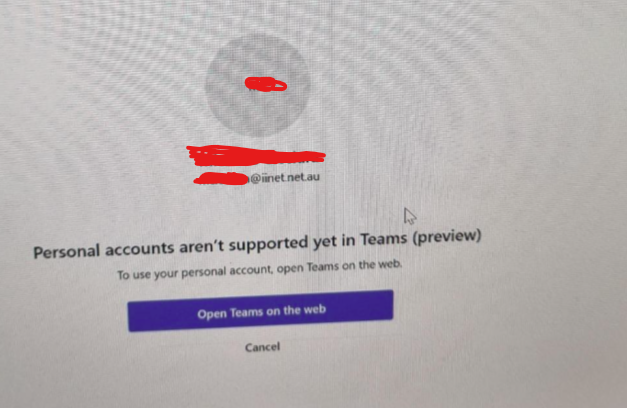
They have Microsoft Teams Desktop application installed version 26072.521.4595.7966 and when they try to log into the Teams app on their laptop with their personal account they receive a message "Personal Accounts aren't supported yet in Teams (preview)"
Please note the account they are using to sign in to Teams app on their laptop is a personal account which has a Microsoft 365 Family subscription (Note they use this account to sign into Teams via the web fine just not via the Teams app on their laptop and i not sure why.
Troubleshooting performed:
Checked other office apps installed on the laptop their signed in with this personal account and works fine.
Checked the Office 365 subscription to ensure all was ok their and was fine.
Uninstalled Teams rebooted the machine and reinstalled from Microsoft website then rebooted machine and tested but same issue. Note also tried downloading and installing from Microsoft store and from the Teams web and it downloaded and installed but still same issue. Version currently showing installed is 26072.521.4595.7966
Cleared Teams client cache tried again same issue.
In windows went to Settings > Aps > Installed Apps > Microsoft Teams and did a repair and also a reset but same issue
Have tried rebooting again same issue.
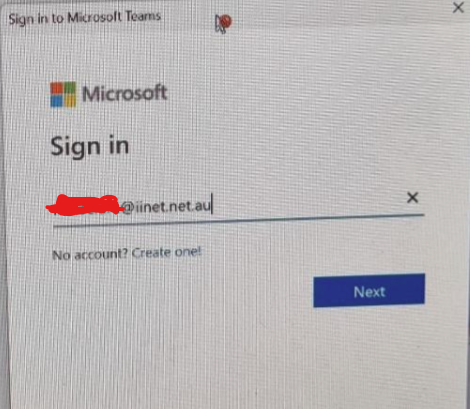
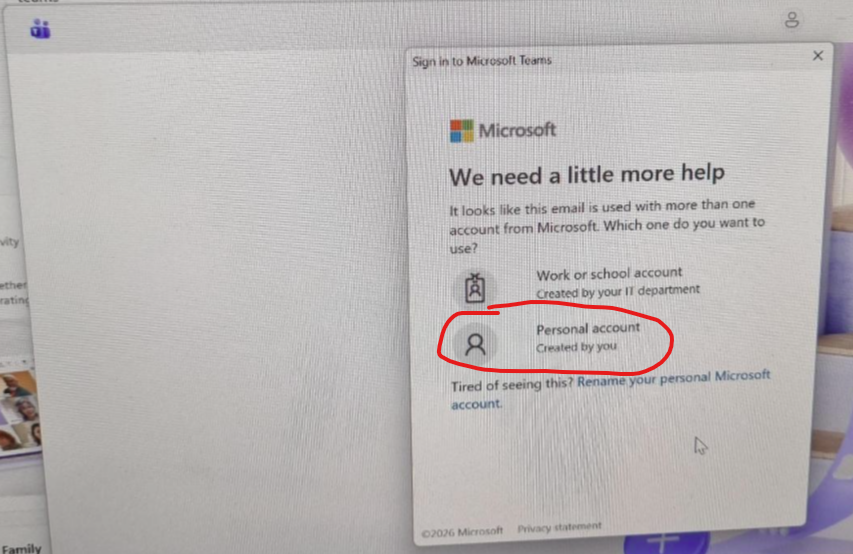
I have attached the screenshots in order of what comes up screen by screen when logging into Teams application on their end.
- Launches Microsoft Teams application on their laptop and enters the personal email address (The one that has a Microsoft 365 Family subscription)
- Clicks on "Personal account"
- Teams tries to sign in and then comes up with this error.
' cx='32' cy='32' r='32' /%3E%3Ctext x='50%25' y='55%25' dominant-baseline='middle' text-anchor='middle' fill='%23FFF' %3EOB%3C/text%3E%3C/svg%3E)

