Share via

Select and update variables in Single step among multiple steps by same name using powershell cmdlets for Task Sequence

Siddhesh Mervekar 1 Reputation point
2022-03-08T18:16:38.257+00:00

Hi ,
I am trying to remove one Variable from step

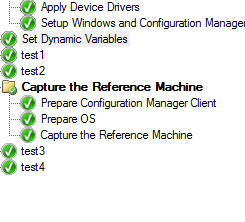
Unfortunately we have multiple steps with same name

If I use Set-CMTSStepSetDynamicVariable -Stepname <stepname> , this changes all steps by name <stepname>

How can select only one step as object and edit it and save ?

Windows for business | Windows Server | User experience | PowerShell
Microsoft Security | Intune | Configuration Manager | Other

3 answers

Sort by: Most helpful
  1. Limitless Technology 45,226 Reputation points
    2022-03-09T09:18:53.393+00:00

    Hello @Siddhesh Mervekar

    Simpliest scenario would be to change the Step names in order to improve the manageability and admnistration. There is no other alternative to the name like IDs or similar. It is always a best practice to assign specific names to similar Items, in order to be manageable on single basis later.

    Additionally, there are other settings that may help to filter, such as TS name, TS intances, condition variables:

    Reference: https://learn.microsoft.com/en-us/powershell/module/configurationmanager/set-cmtsstepsetdynamicvariable?view=sccm-ps

    Hope this helps with your query,

    --
    --If the reply is helpful, please Upvote and Accept as answer--

    1 person found this answer helpful.
    0 comments No comments

  2. Siddhesh Mervekar 1 Reputation point
    2026-04-13T12:25:05.43+00:00

    removing this comment

    0 comments No comments

  3. Amandayou-MSFT 11,166 Reputation points
    2022-03-10T09:15:20.777+00:00

    Hi,

    Thanks for posting in the Q&A.

    I test it in my environment and find we could add the task sequence step with the same name using the following powershell, but it is difficult to remove it using powershell. Maybe we could remove it manually.

    https://learn.microsoft.com/en-us/powershell/module/configurationmanager/new-cmtsstepsetdynamicvariable?view=sccm-ps

    181863-310.png

    I will try the best to deliver the information to the product team to see if they have some additional comments about issue, but not guaranteed. Once there is a reply, i will get back to you at the first time. thank you for your kind understanding.


    If the answer is the right solution, please click "Accept Answer" and kindly upvote it. If you have extra questions about this answer, please click "Comment".
    Note: Please follow the steps in our documentation to enable e-mail notifications if you want to receive the related email notification for this thread.


Your answer

Answers can be marked as 'Accepted' by the question author and 'Recommended' by moderators, which helps users know the answer solved the author's problem.