Exchange | Exchange Server | Management
The administration and maintenance of Microsoft Exchange Server to ensure secure, reliable, and efficient email and collaboration services across an organization.
This browser is no longer supported.
Upgrade to Microsoft Edge to take advantage of the latest features, security updates, and technical support.
' cx='32' cy='32' r='32' /%3E%3Ctext x='50%25' y='55%25' dominant-baseline='middle' text-anchor='middle' fill='%23FFF' %3EEG%3C/text%3E%3C/svg%3E)
We have Exchange 2016 CU22
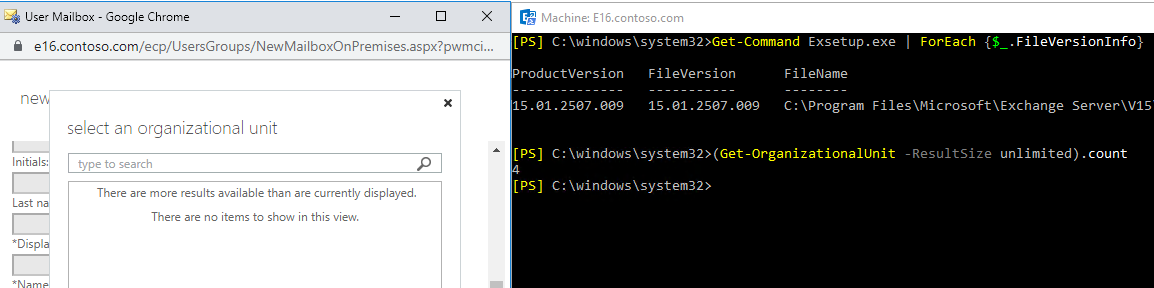
When trying to choose OU while creating anew user or group, I'm getting the blank screen with "There are more results..." and "there are no items...".
The issue itself is familiar. We have more then 500 OUs, so <add key="GetListDefaultResultSize" value="5000" /> was added a few years ago.
After May updates, as usual, this line disappeared from the C:\Program Files\Microsoft\Exchange Server\V15\ClientAccess\ecp\web.config
It happens after every Exchange update, so as usually I added it again on all servers. But his time it did not help!
I tried removing it, re-adding it, changing the number, restarting ECP pool and IIS - nothing.
I also saw a solution for Exchange 2013 to add the same line to C:\Program Files\Microsoft\Exchange Server\V15\FrontEnd\HttpProxy\ecp\web.config, but in my case I gott 502 error and ECP didn't work at all until I removed it.
Any Ideas, guys?
The administration and maintenance of Microsoft Exchange Server to ensure secure, reliable, and efficient email and collaboration services across an organization.

Gald to see this issue is solved now. Due to the update of policy, the question author cannot accept their own answer. They can only accept answers by others.
If you could, you accept the summary below as an answer to close this thread. It also could be beneficial to other community members reading this thread.
' cx='32' cy='32' r='32' /%3E%3Ctext x='50%25' y='55%25' dominant-baseline='middle' text-anchor='middle' fill='%23FFF' %3EMM%3C/text%3E%3C/svg%3E)
I ran into this same issue and got tired of manually re-applying the web.config fix after every cumulative update, so I automated it.
The problem is that Exchange CUs overwrite the web.config file and remove the GetListDefaultResultSize key every time. I created a PowerShell script with a scheduled task that:
Checks the ECP web.config for the GetListDefaultResultSize key
Adds it automatically if missing or updates the value if too low
Creates timestamped backups before making changes
Restarts the MSExchangeECPAppPool to apply the fix
Runs daily so you never have to manually fix this post-CU again
GitHub repository: https://github.com/digitron64/ECPFix
Works on Exchange Server 2013, 2016, 2019, and Subscription Edition (SE). Must be deployed to all Exchange servers with the Mailbox role since ECP requests can hit any server in the environment.
The repo includes the PowerShell script and pre-configured scheduled task XML. Tested and working across our three-server environment.
Hope this helps!
Yes, you need to change it for all Exchange servers. I noticed you said "I added it again on all servers", so I didn't mention this one in the first step of troubleshooting.
When you login EAC from Exchange server A, this request may be redirected to another Exchange server (as far as I know, it effected by the DNS record and where your admin account hosted) , so you need to change this one on all Exchange servers.
If the answer is helpful, please click "Accept Answer" and kindly upvote it. If you have extra questions about this answer, please click "Comment".
Note: Please follow the steps in our documentation to enable e-mail notifications if you want to receive the related email notification for this thread.
@KyleXu-MSFT As I said, we do have more then 500 OUs and used this web.config trick for years, it just stopped working.
Anyway, I found the problem: After the last update when I copy/pasted the line into web.config on all servers, I didn't copy it right on 1 of them (out of 10). I'm not sure why all the servers were affected, but after correcting it it started to work!
Thanks everyone!
It happens after every Exchange update, so as usually I added it again on all servers. But his time it did not help!
From this article, we can know that this is expected behavior you need to add this value every time that you install a cumulative update.
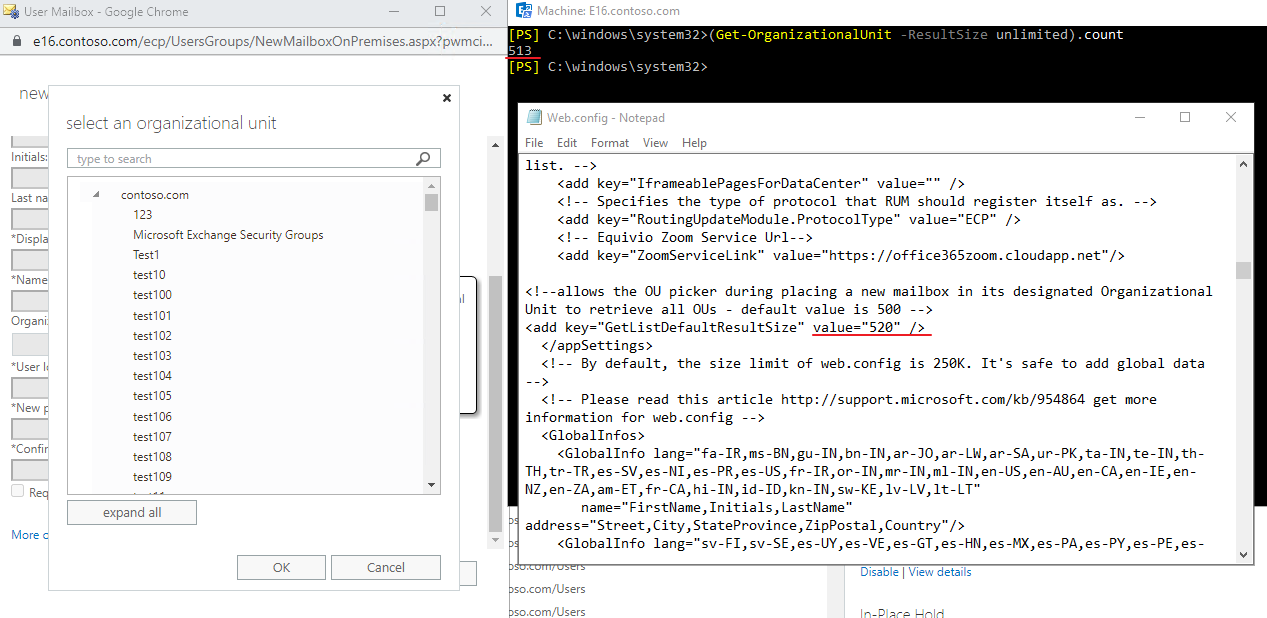
I suggest you use the command below to check the number of OU in your organization. Then use a use a close value in the configure file. Such as using 510, if there exist 500 OU in your AD.
(Get-OrganizationalUnit -ResultSize unlimited).count
If it doesn't work for your Exchange server, I would suggest you update it to the latest version Exchange Server 2016 CU23 + May22SU: This value could work in this CU (I set this value to 1)
If the answer is helpful, please click "Accept Answer" and kindly upvote it. If you have extra questions about this answer, please click "Comment".
Note: Please follow the steps in our documentation to enable e-mail notifications if you want to receive the related email notification for this thread.
I also tested it with 513 OU, it could works