
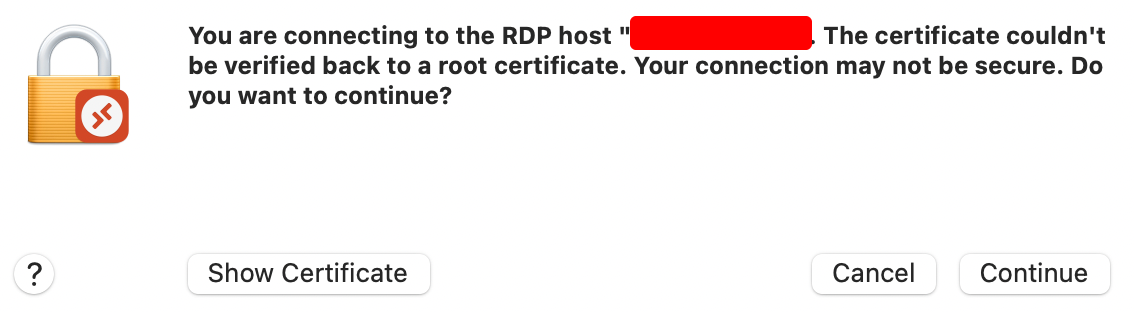
While you see certificate error, you should press "Show Certificate" and then "Always trust when connecting to "your_remote_pc"
Then you won't see certificate error prompt again.
This browser is no longer supported.
Upgrade to Microsoft Edge to take advantage of the latest features, security updates, and technical support.
' cx='32' cy='32' r='32' /%3E%3Ctext x='50%25' y='55%25' dominant-baseline='middle' text-anchor='middle' fill='%23FFF' %3ECP%3C/text%3E%3C/svg%3E)
To Developers of Microsoft Remote Desktop for MacOS:
Please stop annoying users with prompt 'The certificate couldn't be verified back to a root certificate. Your connection may not be secure. Do you want to continue?'
IIRC, the issue isn't reproducible with the Remote Desktop Connection client for Windows, as this has a feature that saves the user preference to not keep checking that exact certificate, or, alternatively, never check certificate authenticity.


Thank you for asking this question on the **Microsoft Q&A Platform. **
You have not received answers or comments to your question because it may be ambiguous or confusing.
I recommend you visit How to write a quality question and verify that your question meets some of the recommendations.
Hope this helps,
Carlos Solís Salazar
----------
NOTE: To answer you as quickly as possible, please mention me in your reply.
' cx='32' cy='32' r='32' /%3E%3Ctext x='50%25' y='55%25' dominant-baseline='middle' text-anchor='middle' fill='%23FFF' %3EAD%3C/text%3E%3C/svg%3E)
While you see certificate error, you should press "Show Certificate" and then "Always trust when connecting to "your_remote_pc"
Then you won't see certificate error prompt again.
' cx='32' cy='32' r='32' /%3E%3Ctext x='50%25' y='55%25' dominant-baseline='middle' text-anchor='middle' fill='%23FFF' %3EA%3C/text%3E%3C/svg%3E)