Note
Access to this page requires authorization. You can try signing in or changing directories.
Access to this page requires authorization. You can try changing directories.
Like most Azure platform as a service (PaaS) solutions, Azure web apps and function apps are publicly reachable over the internet by default. You can restrict inbound traffic to Azure web apps and function apps by using private endpoints.
Private endpoints provide clients in your private network with secure access to your app over Azure Private Link. Private endpoints use IP addresses from the Azure virtual network address space. Network traffic between the client and the app traverses the virtual network and Private Link on the Microsoft backbone, which eliminates exposure to the public internet. Private endpoints also support direct, cross-tenant access. A secure connection can run from a consumer virtual network in one tenant to a specific web app or function app in another tenant, so you don't need site-to-site VPNs or virtual network peering.
This guide presents an architecture that uses a private endpoint. The private endpoint securely exposes an Azure web app in one tenant to a client that consumes the web app in another Azure tenant. You can also use this approach for an Azure function app if you have a Premium or App Service plan for Azure Functions.
Architecture
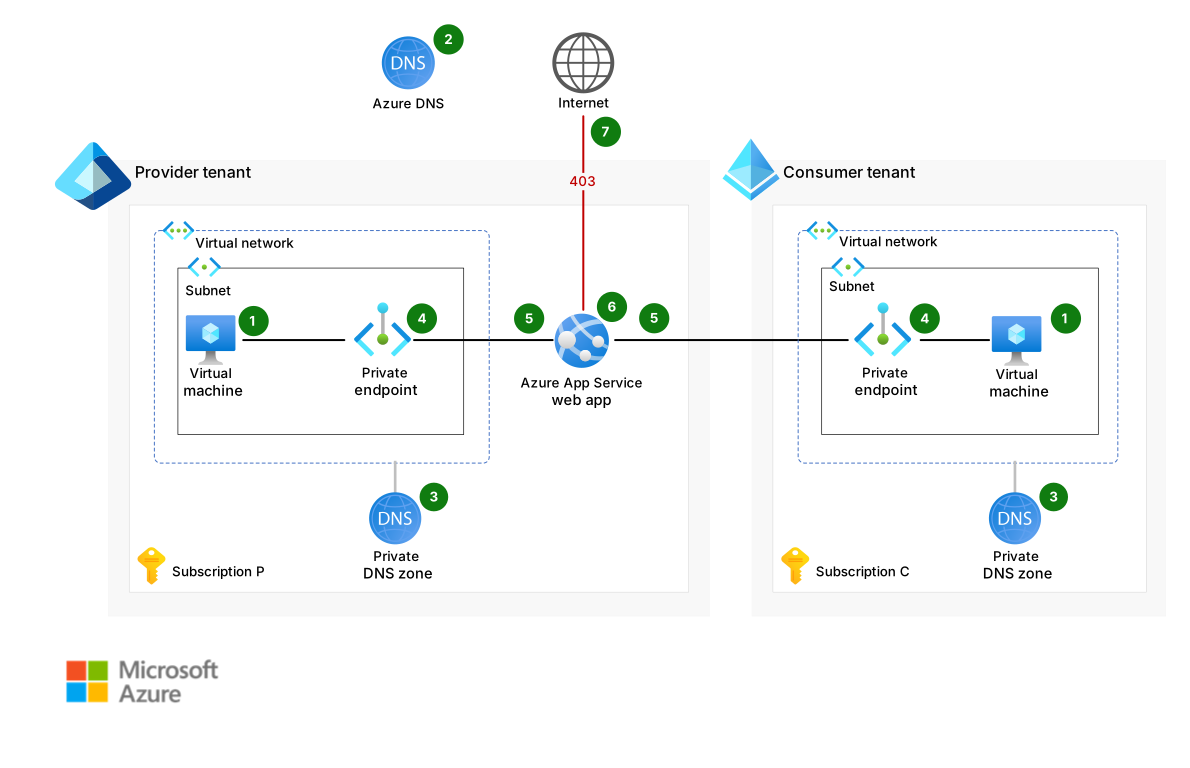
Download a Visio file of this architecture.
Data flow
The following data flow corresponds to the previous diagram:
A user or service on a virtual machine (VM) submits a Domain Name System (DNS) request for an Azure web app at
webapp.azurewebsites.net. The web app runs in a provider tenant.The Azure public DNS service handles the query for
webapp.azurewebsites.net. The response is a Canonical Name (CNAME) record,webapp.privatelink.azurewebsites.net.An Azure DNS private zone handles the DNS query for
webapp.privatelink.azurewebsites.net.The response is an A record with the IP address of a private endpoint.
The VM issues an HTTPS request to the web app via the IP address of the private endpoint.
The web app handles the request and responds to the VM.
If the user or service doesn't have access to the private DNS zone, the Azure public DNS service resolves the DNS query to
webapp.privatelink.azurewebsites.netby returning a public IP address. HTTPS requests to that public IP address receive a 403 Forbidden response.
Components
App Service and its Web Apps feature provide a managed platform for you to build, deploy, and scale web apps. In this architecture, the Web Apps feature hosts the web app in the provider tenant. Private endpoints restrict public access to the web app.
Functions is an event-driven serverless compute service. In this architecture, Functions can serve as an alternative to Web Apps. Private endpoints also secure Functions to ensure that cross-tenant access remains private.
Azure Virtual Network is the foundational networking layer in Azure that facilitates secure communication between Azure resources, the internet, and on-premises networks. In this architecture, virtual networks host the private endpoints and DNS zones, which facilitates secure connectivity between provider and consumer tenants.
Private Link facilitates secure, private connectivity between Azure services and virtual networks by mapping service endpoints to private IP addresses within a virtual network. You can use the private endpoint to connect to Azure PaaS services, customer services, or partner services. In this architecture, Private Link exposes the web app or function app securely to another tenant without traversing the public internet.
Azure DNS is a scalable DNS hosting service that uses Azure infrastructure to provide name resolution. The private Azure DNS service manages and resolves domain names in a virtual network and in connected virtual networks. This service doesn't require configuration of a custom DNS solution. In this architecture, Azure DNS handles public DNS queries and integrates with private DNS zones to resolve private endpoint addresses.
Azure DNS private zones provide DNS resolution within virtual networks without exposing records to the public internet. In this architecture, private DNS zones manage internal name resolution for private endpoints, which ensures secure and accurate routing within and across tenants.
Azure Virtual Machines provides scalable compute resources to run applications and services. In this architecture, a VM in the consumer tenant initiates DNS and HTTPS requests to the provider's web app via the private endpoint.
Provider setup
In the provider tenant, use a private endpoint to secure the web app and restrict access from the public internet.
Prepare a virtual network and subnet for the private endpoint NIC.
The NIC consumes one IP address from the subnet. Define your DNS strategy so you can register the NIC's A record in the appropriate DNS zone.
Create the private endpoint.
If you use the default Azure DNS services, we recommend that you use the Azure DNS private zone service and use automatic integration when you create the private endpoint. This approach ensures that:
The private DNS zone,
privatelink.azurewebsites.net, is created automatically if needed.The DNS zone is linked to the virtual network of the private endpoint's NIC.
The A record is registered and managed automatically in the private DNS zone.
If you don't use the default Azure DNS services, you must configure and manage your own DNS servers and zones:
Create a
privatelink.azurewebsites.netDNS zone.Ensure that
privatelink.azurewebsites.netcan be resolved in the virtual networks that need to resolve the NIC of the private endpoint.Register the A record in the
privatelink.azurewebsites.netDNS zone with the IP address of the private endpoint. You might need to configure a DNS forwarder to resolve the Azure DNS public zone,azurewebsites.net.
For more information, see Azure private endpoint DNS configuration.
Evaluate whether the service that you use requires extra access controls to block public access.
All Azure services implement their own public access behavior. If you don't complete extra configurations, some Azure services remain publicly available even after you associate them with a private endpoint. Web apps and function apps become unavailable publicly when they're associated with a private endpoint and the public access setting is turned off.
During the creation of the private endpoint, the Azure DNS public zone, azurewebsites.net, is automatically updated with the CNAME record that points to the private DNS zone. Users can try to reach the web app from sources that can't resolve the private DNS zone to retrieve the actual A record and its internal IP address. Those users get a public resolvable IP address, but the response is 403 Forbidden.
The provider can configure a custom domain name for the web app via a CNAME record that references the entry in the public zone azurewebsites.net. The CNAME record created for this custom domain shouldn't point to the privatelink.azurewebsites.net entry.
Consumer setup
In the consumer tenant, set up a client to reach the provider's Azure web app. The provider must manually approve the connection.
Step 1 (consumer): Create a private endpoint
Create a private endpoint resource in the consumer tenant. As with the provider tenant, you must prepare a virtual network and subnet where you deploy the NIC of the private endpoint. This step consumes one IP address from the subnet. There are no constraints on the private IP address range of the virtual network. The IP address ranges in the provider and consumer tenants can overlap.
The consumer doesn't own the target resource, so use the full resource ID of the web app in the provider tenant. The resource ID contains the provider's subscription ID, the name of the resource group, and the name of the web app resource. We recommend that the provider share this information with the consumer securely. You can't use an alias.
Some Azure resources have multiple subresources. For instance, an Azure Storage resource has blob, table, queue, file, web, and dfs subresources. The provider must also provide information about the subresources. Web apps and function apps have only one subresource, sites. For more information about private endpoint subresources and their values, see Private-link resource. Because the private endpoint connection isn't automatically approved, the consumer can enter a message for the provider to read.
You can't automate the DNS zone integration setup. The consumer must manually configure the DNS records.
After you create the private endpoint resource, the connection status is Pending. The connection remains in this unusable state until the provider approves the request.
Step 2 (provider): Review and approve the connection request
The consumer must notify the provider of the private endpoint connection request.
The provider can retrieve, review, and approve or reject pending requests in the Azure portal in the following places:
- On the Private Link Center page. The approver can enter an approval message on this page.
- Under Networking in the web app. Select Private endpoints.
Alternatively, the provider can use the Azure CLI or Azure PowerShell to retrieve, review, and approve or reject the pending requests.
The provider can view:
- The message that the consumer included after the private endpoint creation.
- The private endpoint name.
- The consumer's tenant ID, resource group name, and private endpoint resource name in the Azure CLI or Azure PowerShell.
The Azure portal creates a hyperlink to the private endpoint of the consumer. Because the consumer is in a different tenant, the provider typically can't access the hyperlink.
You can't automate private endpoint connection approvals. However, you can use the autoapproval property in Private Link to preapprove a set of subscriptions for automated access to the service.
Step 3 (consumer): DNS setup
You can take the steps in this section immediately after you create the private endpoint resource in step 1. However, we recommend that you wait until the provider approves the connection.
The consumer needs to set up and configure the private DNS zone to make sure its clients can find the NIC of the private endpoint. As with the provider, the DNS strategy in the tenant determines the required steps.
If the consumer uses the default Azure DNS services, we recommend that you use the Azure DNS private zone service. If necessary, the consumer can create the private DNS zone
privatelink.azurewebsites.netand link it to a virtual network that contains the NIC of the private endpoint. Automatic registration isn't needed for this DNS zone. Then, the consumer must add a new DNS configuration:- In the Azure portal, search for and select the private endpoint.
- Open DNS configuration.
- Select the private DNS zone and provide a connection name to add a new DNS configuration.
These actions create the A record in the private DNS zone. The fully qualified domain name (FQDN) is populated automatically when the connection is approved.
If the consumer manages their own DNS zones, the consumer needs to configure their environment.
If the provider creates a custom domain name, the consumer can access the web app via that name.
In this architecture, the consumer VM uses the private endpoint to access the web app. Access requires provider approval of the connection and correct DNS configuration.
Connection management
Both the provider and the consumer can manage the private endpoint connection after it's created and approved.
The consumer can remove the connection independently via the private endpoint resource, the Private Link Center page, the Azure CLI, or Azure PowerShell.
The provider can remove the connections to its service in the Azure CLI, Azure PowerShell, or under Networking in the web app. After the private endpoint is deleted, the consumer's access to the service is blocked. The consumer sees that the connection on the private endpoint has the status Disconnected and that the DNS record is removed from the private DNS zone. The consumer needs to delete the private endpoint resource manually.
You can't temporarily pause or deactivate a connection. After the consumer or the provider deletes a connection, you have to create a new private endpoint to restore the connection.
Cost optimization
In contrast to access restrictions, which are free, private endpoints come with fixed and variable costs for both the provider and consumer.
Fixed costs:
Variable costs:
- The volume of data processed on the private endpoint
- The bandwidth charges if you deploy the web app and the private endpoint in different regions
- The number of DNS queries
VMs aren't included in this pricing overview because they're not an absolute requirement for the architecture.
Other considerations
The provider needs to share the subscription ID, the resource group name, and the web app resource name with the consumer. The consumer shares the subscription ID, the resource group name, and the private endpoint resource name with the provider.
The number of private endpoints that you can create in a subscription are limited. This limit typically isn't a problem because consumers create the endpoints in their own subscriptions rather than the provider's. For more information, see Azure subscription and service limits, quotas, and constraints.
The subscription that contains the Private Link resource must be registered with the Microsoft network resource provider. The subscription that contains the private endpoint must also be registered with the Microsoft network resource provider. For more information, see Azure resource providers and types.
If you have connectivity problems, see Troubleshoot Azure private endpoint connectivity problems. In particular, verify the DNS configuration.
Deploy this scenario
To deploy this architecture, use the Bicep templates in Project Cross-Tenant Secure Access to Web Apps and Functions by Using Private Endpoints.
Other solutions
Access restrictions provide an alternative to private endpoints. You can configure the resource's internal firewall by using access restrictions to define allow and deny rules. You can base restrictions on IPv4 or IPv6 addresses, service tags, or service endpoints. Service endpoints permit traffic only from selected subnets and virtual networks. Access restrictions are free in all Azure App Service and Azure Functions plans. However, it's difficult to maintain rules, and non-Microsoft clients require listed IP addresses that might be dynamic or sensitive.
For some PaaS resources, such as Azure Storage accounts, Azure Key Vault, and Azure Event Hubs, you can use a network security perimeter to restrict inbound traffic. A network security perimeter defines a logical security boundary around certain Azure PaaS resources that aren't deployed inside a virtual network. You can control who and what can communicate with the resources. You can use a network security perimeter in combination with private endpoints.
Contributors
Microsoft maintains this article. The following contributors wrote this article.
Principal author:
- Robbie De Sutter | Digital Cloud Solution Architect
Other contributor:
- Rajkumar (Raj) Balakrishnan | Digital Cloud Solution Architect
To see nonpublic LinkedIn profiles, sign in to LinkedIn.
Next steps
- Azure private endpoint DNS configuration
- Azure role-based access control (Azure RBAC) permissions for Private Link
- Functions networking options
- Limit cross-tenant private endpoint connections in Azure
- Manage Azure private endpoints
- Network security perimeters
- Restrict your storage account to a virtual network for Functions
- Set up App Service access restrictions
- Use private endpoints for App Service apps
- What is a private endpoint?