Note
Access to this page requires authorization. You can try signing in or changing directories.
Access to this page requires authorization. You can try changing directories.
Azure Private Link
Azure DNS
Azure Firewall
Azure Virtual WAN
This article shows how to expose a PaaS resource to a workload over a private endpoint in a single region with an Azure Virtual WAN hub-spoke topology.
Important
This article is part of a series on Azure Private Link and Azure DNS in Virtual WAN and builds on the network topology defined in the scenario guide. Read the overview page first to understand the base network architecture and key challenges.
Scenario
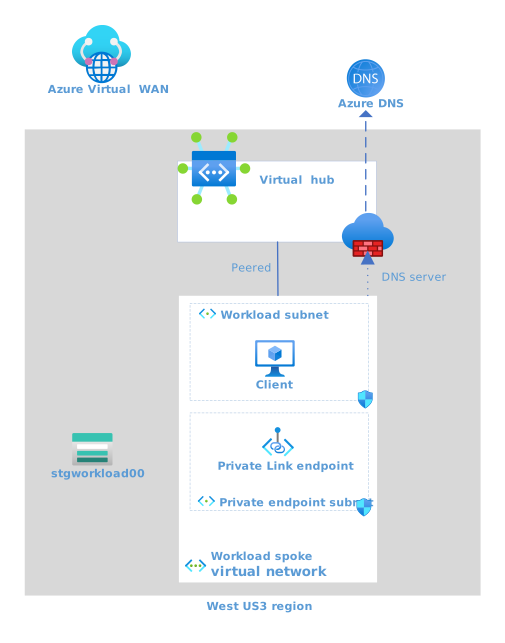
Figure 1: Single-region scenario for Virtual WAN with Private Link and Azure DNS - the challenge
Download a Visio file of this architecture. This section outlines the scenario and restates the challenge from the nonworking example in the overview. The architecture builds on the starting network topology with the following additions:
- There's only one region with one virtual hub.
- There's an Azure Storage account in the region that has public network access disabled. The assumption in this scenario is that only one workload accesses the storage account.
- There's initially a single virtual network connected to the virtual hub.
- The virtual network has a workload subnet that contains a virtual machine (VM) client.
- The virtual network contains a private endpoint subnet that contains a private endpoint for the storage account.
Successful outcome
The VM client can connect to the storage account via the private endpoint in the same virtual network, and all other access to the storage account is blocked.
Impediment
You need a DNS record in the DNS flow that resolves the fully qualified domain name (FQDN) of the storage account to the private IP address of the private endpoint. As identified in the overview, the challenge in this scenario is twofold:
- It isn't possible to link a private DNS zone that maintains the storage account's required DNS records to a virtual hub.
- You can link a private DNS zone to the workload network, so it might seem viable, but the baseline architecture stipulates that each connected virtual network has DNS servers configured to use the Azure Firewall DNS proxy.
Because you can't link a private DNS zone to a virtual hub, and the virtual network is configured to use the Azure Firewall DNS proxy, Azure DNS cannot resolve the FQDN of the storage account to the private IP address. The result is that the client receives the public IP address instead.
DNS and HTTP flows
Let's review the DNS and resulting HTTP request flows to visualize the impediment.
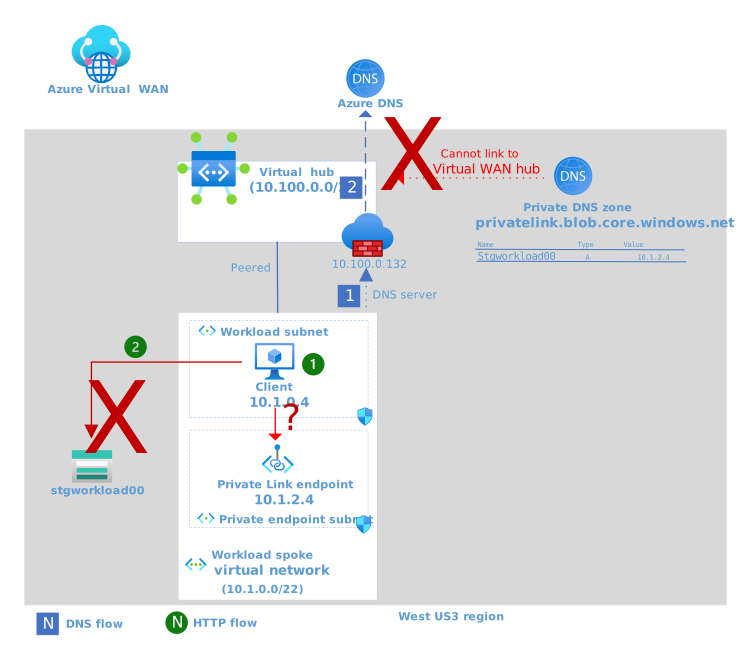
Figure 2: Single-region scenario for Virtual WAN with Private Link and Azure DNS - the challenge
Download a Visio file of this architecture.
DNS flow
- The DNS query for
stgworkload00.blob.core.windows.netfrom the client is sent to the configured DNS server, which is Azure Firewall in the peered regional hub. - Azure Firewall proxies the request to Azure DNS. Because it isn't possible to link a private DNS zone to a virtual hub, Azure DNS doesn't know how to resolve the FQDN to the private endpoint's IP address. Azure DNS resolves the FQDN to the public IP address of the storage account and returns that value.
HTTP flow
With the DNS result (the public IP address of the storage account), the client issues an HTTP request to
stgworkload00.blob.core.windows.net.The request is sent to the public IP address of the storage account. This request fails for many reasons:
- The NSG on the workload subnet might not allow this Internet-bound traffic.
- The Azure Firewall that is filtering Internet-bound egress traffic likely doesn't have an application rule to support this flow.
- Even if both the NSG and Azure Firewall had allowances for this request flow, the storage account is configured to block all public network access.
This attempt violates the goal of allowing access only via the private endpoint.
Solution - Establish a virtual hub extension for DNS
The recommended solution for DNS in Virtual WAN environments is to implement a virtual hub extension for DNS. This pattern is detailed in the associated architecture article and provides the foundation for the working single‑region scenario shown here. The DNS virtual hub extension enables workload teams to use private DNS zones within the starting Virtual WAN hub topology.
The DNS extension is implemented as a virtual network spoke that is peered to its regional virtual hub. Private DNS zones can link to this virtual network. The virtual network also contains an Azure DNS Private Resolver that enables services outside of this virtual network, like Azure Firewall, to query and receive values from all linked private DNS zones. The following are the components of a typical virtual hub extension for DNS, along with some required configuration changes:
- A new spoke virtual network that is peered with the region's virtual hub. This spoke is configured like any other spoke, meaning default DNS server and routing rules force the use of Azure Firewall in the regional hub.
- A DNS Private Resolver resource is deployed with an inbound endpoint in the spoke virtual network.
- A private DNS zone resource named
privatelink.blob.core.windows.netis created.- This zone contains an
Arecord that maps the storage account FQDN to the private IP address of the private endpoint for the storage account. - The private DNS zone is linked to the spoke virtual network.
- If Azure role-based access control (Azure RBAC) allows, you can use auto registration or service-managed entries to maintain these DNS records. If not, you must maintain them manually.
- This zone contains an
- In the regional hub, the Azure Firewall's DNS server is changed to point at the DNS Private Resolver's inbound endpoint.
The following diagram illustrates the architecture, along with both the DNS and HTTP flows.
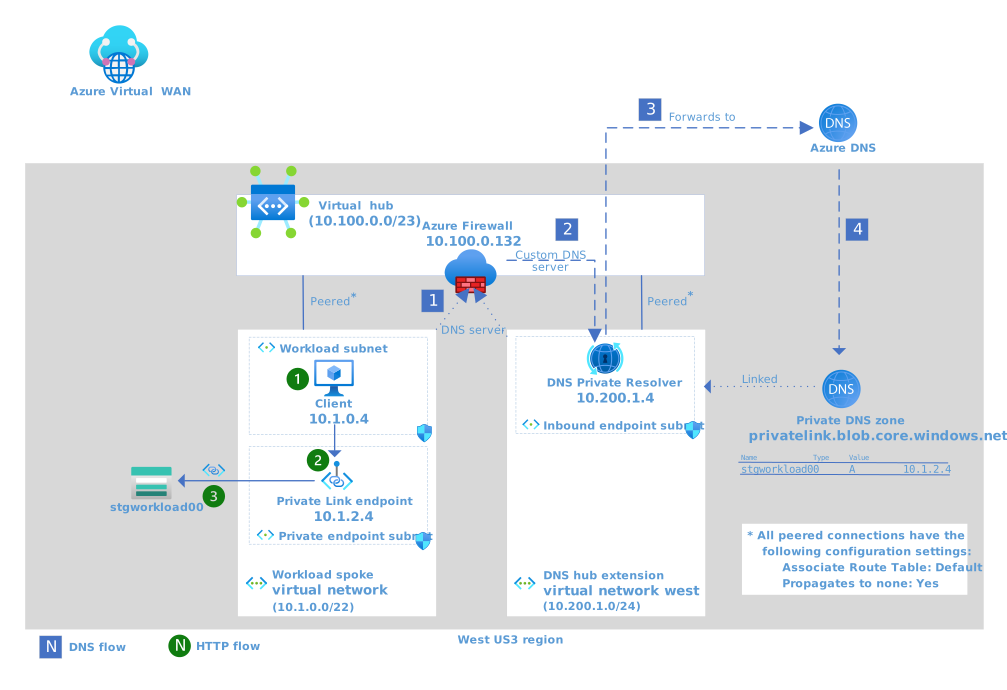
Figure 3: Working solution for single region scenario for Virtual WAN with Private Link and DNS
Download a Visio file of this architecture.
DNS flow for the virtual hub extension
The DNS query for
stgworkload00.blob.core.windows.netfrom the client is sent to the configured DNS server, which is Azure Firewall in the peered regional hub - 10.100.0.132 in this case. Figure 4: DNS servers configuration for workload virtual network
Azure Firewall proxies the request to the regional Azure DNS Private Resolver in the hub extension - 10.200.1.4 in this case, which is the private IP address of the DNS Private Resolver's inbound endpoint.
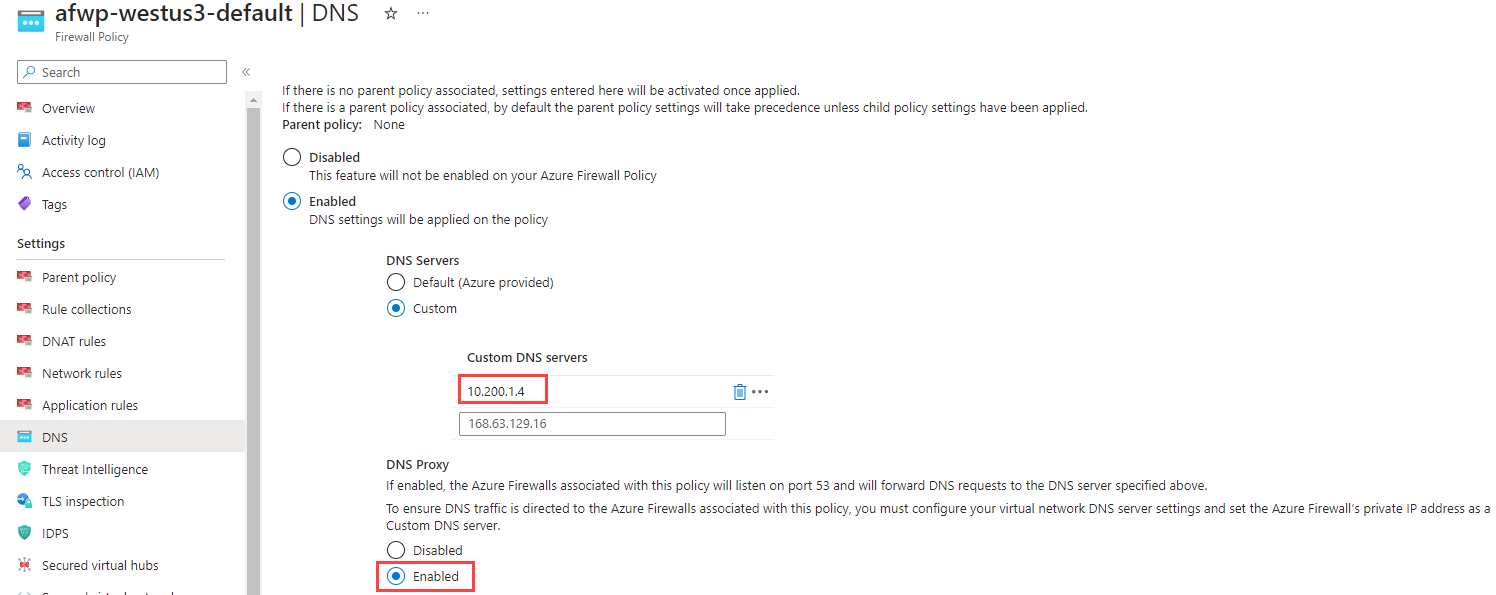
Figure 5: DNS configuration in Azure Firewall policy
DNS Private Resolver proxies the request to Azure DNS. Because a private DNS zone is linked to the virtual network containing the inbound endpoint, Azure DNS can use records in those linked private DNS zones.
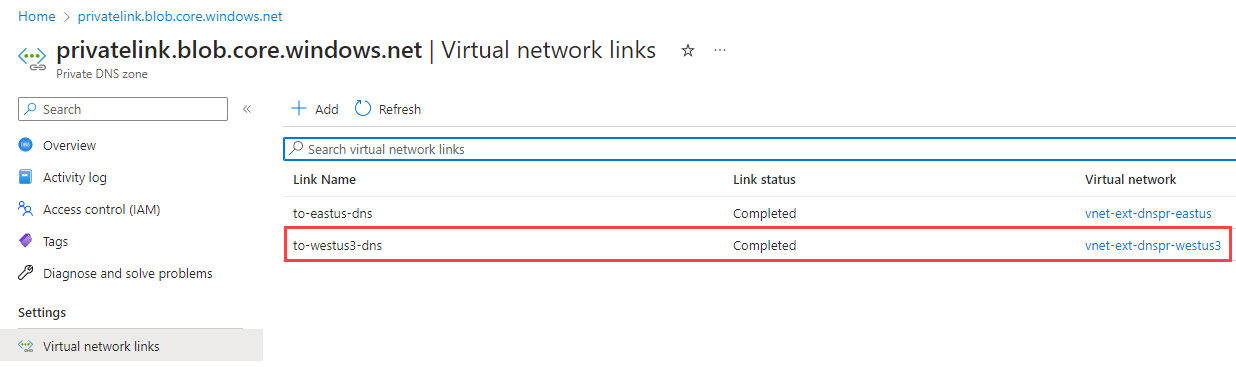 Figure 6: Private DNS zone virtual network links
Azure DNS consults the linked private DNS zone and resolves the FQDN of
stgworkload00.blob.core.windows.netto 10.1.2.4, which is the IP address of the private endpoint for the storage account. This response is provided to Azure Firewall DNS, which then returns the storage account's private IP address to the client.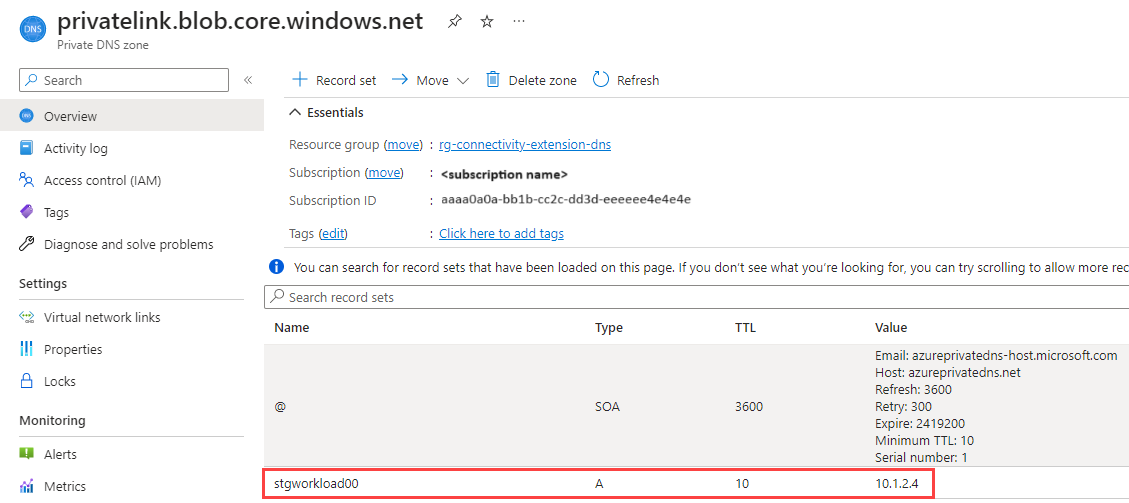 Figure 7: Private DNS zone with the A record for storage account private endpoint

HTTP flow
- With the DNS result (the private IP address of the storage account), the client issues an HTTP request to
stgworkload00.blob.core.windows.net. - The request is sent to the private IP address (10.1.2.4) of the storage account. This request routes successfully, assuming no conflicting restrictions on the local Network Security Groups on the client subnet or the private endpoint subnet. It's important to understand that, even though Azure Firewall is securing private traffic, the request doesn't get routed through Azure Firewall because the private endpoint is in the same virtual network as the client. This default behavior can change if user‑defined routes (UDRs) or Network Virtual Appliances (NVAs) are introduced, but this scenario assumes the standard VNet routing model. No Azure Firewall allowances are needed for this scenario.
- A private connection to the storage account is established through the Private Link service. The storage account allows only private network access, and accepts the HTTP request.
Virtual hub extension for DNS considerations
When implementing the extension for your enterprise, consider the following guidance.
- Deploying the DNS extension isn't a task for the workload team. This task is an enterprise networking function and should be an implementation decision made with those individuals.
- The DNS extension and private DNS zones must exist before you add any PaaS service for which you plan to configure private endpoint DNS records.
- The virtual hub extension is a regional resource, avoid cross-region traffic and establish a hub extension per regional hub where private endpoint DNS resolution is expected.
Spoke virtual network
- Following the single responsibility principle, the virtual network for the DNS extension should only contain the resources required for DNS resolution and shouldn't be shared with other resources.
- The virtual network for the DNS extension should follow the same configuration guidelines under Adding spoke networks.
Azure DNS Private Resolver
Azure DNS Private Resolver is a zone‑redundant service, providing high availability without requiring customer‑managed DNS server hosting. In this single‑region scenario, only an inbound endpoint is needed; however, other architectures, such as hybrid name resolution, conditional forwarding, or cross‑environment resolution, require outbound endpoints.
Each region should have one virtual hub DNS extension with one DNS Private Resolver.
The DNS Private Resolver only requires an inbound endpoint and no outbound endpoints for this scenario. Set the private IP of the inbound endpoint as the custom DNS service in the Azure Firewall policy (see figure 5).
For higher resiliency and increased load handling, deploy two DNS Private Resolver inbound endpoints per region. Each inbound endpoint has a single private IP address. Configure both private IP addresses in Azure Firewall DNS settings for redundant resolution.
 Figure 8: Inbound endpoints for the DNS Private Resolver
Follow the virtual network restrictions for the DNS Private Resolver.
Use a dedicated inbound endpoint subnet sized /28 or larger per resolver requirements; don't share it with other resources.
The Network Security Group in the subnet for the DNS Private Resolver's inbound endpoint should only allow UDP traffic from its regional hub to port 53. Block all other inbound and outbound traffic.

Private DNS zone
Because Azure DNS Private Resolver forwards to Azure DNS, it can use any private DNS zones linked to the virtual network of its inbound subnet.
- Link the private DNS zone to the virtual hub extension virtual network.
- Follow the guidance on managing private DNS zones for private endpoints.
- If you expect PaaS resource owners to manage their own entries, configure Azure RBAC accordingly or implement a solution such as the one from Private Link and DNS integration at scale.
Scenario considerations
With a well-managed virtual hub DNS extension in place, let's turn back to the workload and address some additional points to help achieve the successful outcome objectives within this scenario.
Storage account
- Set Public network access: Disabled under Network connectivity to ensure that the storage account can only be accessed via private endpoints.
- Add a private endpoint to a dedicated private endpoint subnet in the workload's virtual network.
- Send Azure Diagnostics to the workload Log Analytics Workspace. You can use the access logs to help troubleshoot configuration issues.
Private endpoint security
A requirement of this solution is to limit the exposure of this storage account. Once you remove public internet access to your PaaS resource, you should address private networking security.
When Azure Firewall is securing private traffic in a Virtual WAN hub-spoke topology, Azure Firewall defaults to denying spoke-to-spoke connectivity. This default setting prevents workloads in other spoke networks from accessing private endpoints (and other resources) in the workload virtual network. Traffic fully within a virtual network isn't routed through Azure Firewall. To control access within the virtual network and add more granular protection, consider the following network security group (NSG) recommendations.
- Create an application security group (ASG) to group resources that have similar inbound or outbound access needs. In this scenario, use an ASG for the client VMs that need to access storage and one for storage accounts that are accessed. See, Configure an application security group (ASG) with a private endpoint.
- Make sure the subnet containing the workload VM has an NSG.
- Make sure the subnet containing the private endpoints has an NSG.
NSG rules for subnet containing workload VM
Besides any other network rules that your workload requires, configure the following rules.
- Outbound rules:
- Allow compute ASG to access storage account ASG.
- Allow compute ASG to the regional hub Azure Firewall's private IP for UDP on port 53.
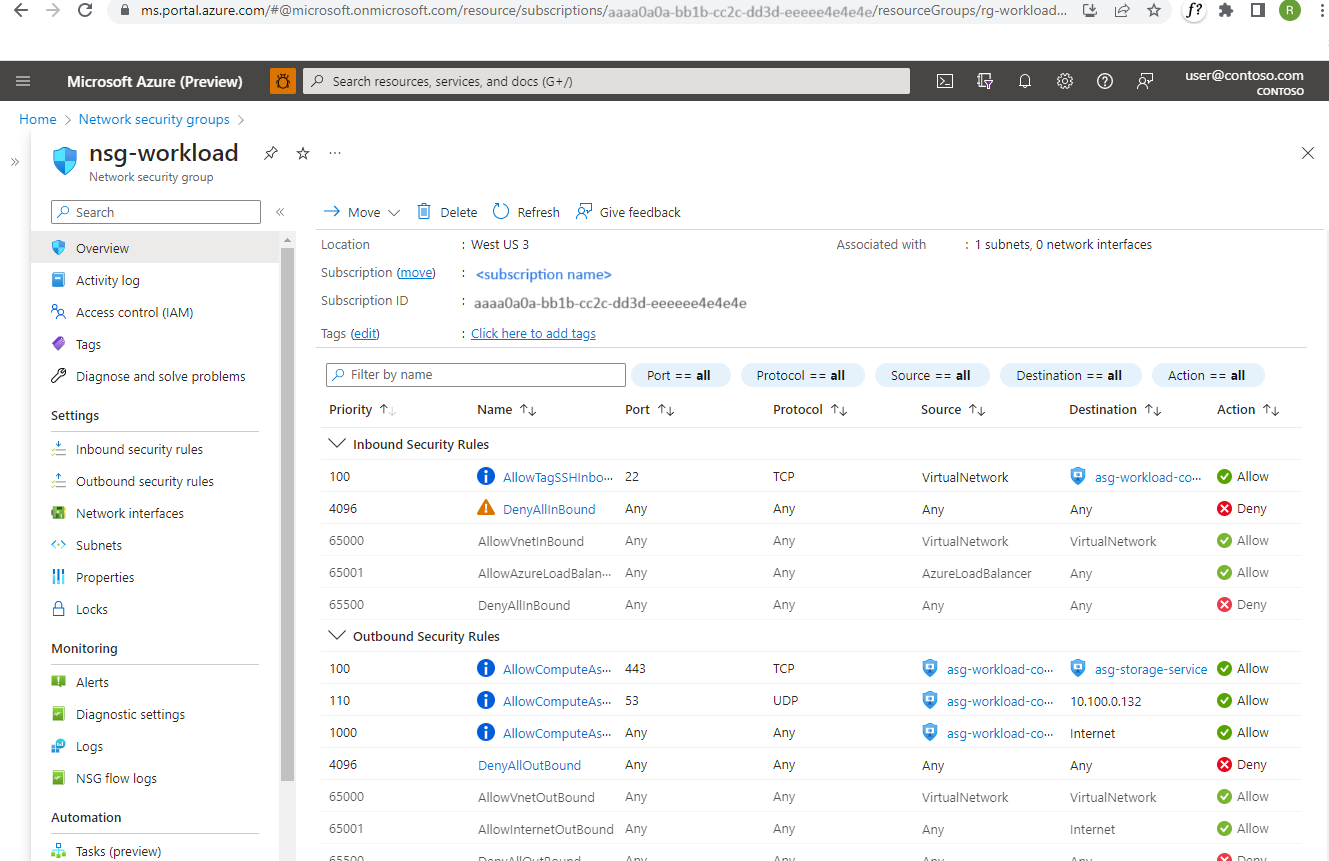 Figure 9: NSG rules for workload subnet
NSG rules for subnet containing private endpoints
It's considered best practice to expose private endpoints on a small, dedicated subnet within the consuming virtual network. One reason is that you can apply user-defined routes and Network Security Group network policies for private endpoints for added traffic control and security.
This scenario allows you to apply a highly restrictive network security group.
- Inbound rules:
- Allow compute ASG to access storage account ASG
- Deny all other traffic
- Outbound rules:
- Deny all traffic
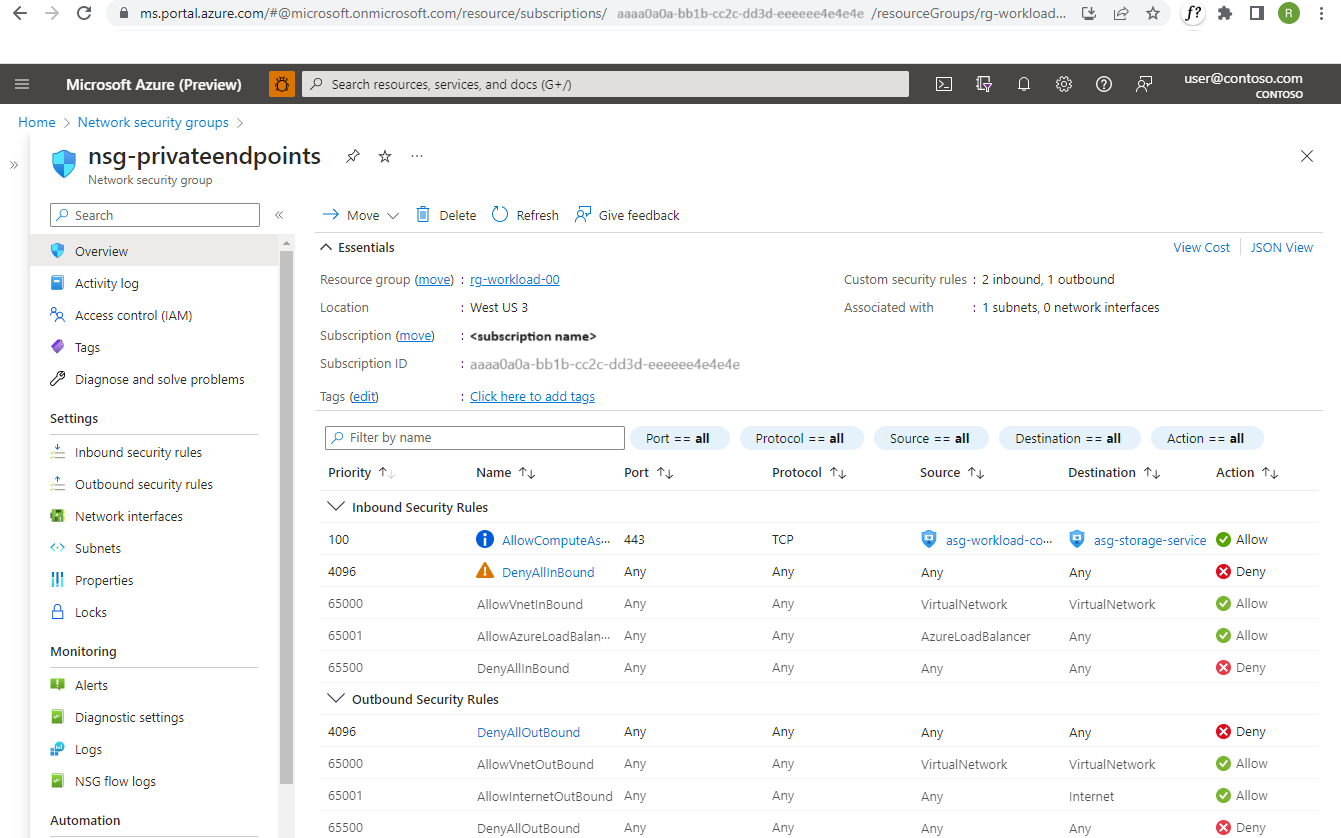 *Figure 10: NSG rules for private endpoint subnet
Private endpoint security in action
The following image illustrates how following the considerations that were outlined can provide defense-in-depth security. The diagram shows a second spoke virtual network with a second VM. That workload isn't able to access the private endpoint.
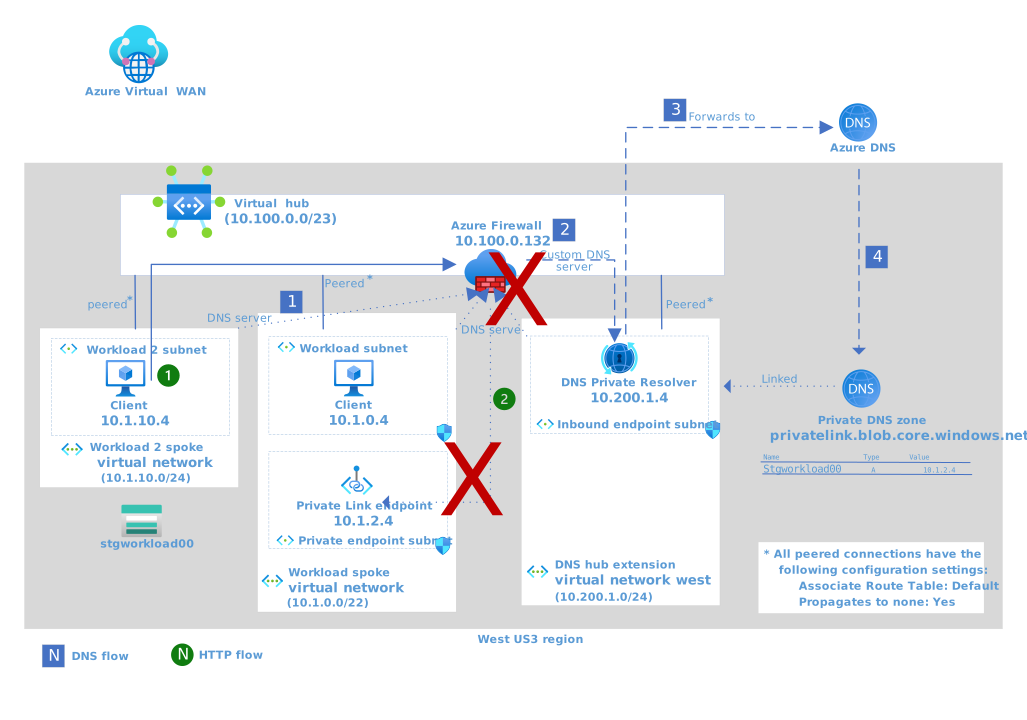
Figure 11: Working solution for single region scenario for Virtual WAN with Private Link and DNS
Download a Visio file of this architecture.
DNS flow
The DNS flow is exactly the same as in the solution flow.
The key point is that the FQDN resolves to the private IP address, not the public IP address. This resolution means that all spokes always receive the private IP address of this service. In this scenario, all spokes will resolve the PaaS service’s private endpoint to its private IP address. While this enables the possibility of sharing the service across multiple workloads, this article does not provide a multi‑workload design pattern. For now, the focus remains on the single‑workload scenario illustrated here.
HTTP flow
- With the DNS result in hand, the private IP address of the storage account, the client issues an HTTP request to
stgworkload00.blob.core.windows.net. - The request is sent to the private IP address of the storage account. This request appropriately fails for many reasons:
- Azure Firewall is configured to secure private traffic, so it handles the request. Unless Azure Firewall has a network or application rule in place to allow the flow, Azure Firewall blocks the request.
- You don't have to use Azure Firewall in the hub to secure private traffic. For example, if your network supports private, cross-region traffic, the NSG on the private endpoint subnet is still configured to block all traffic other than the compute ASG sources within the virtual network that hosts the workload.
Summary
This article introduces a scenario in which a VM client connects to the Azure Storage account via the storage account's private endpoint. The endpoint is in the same virtual network as the client. All other access to the storage account is blocked. This scenario requires a DNS record in the DNS flow that resolves the fully qualified domain name (FQDN) of the storage account back to the private IP address of the private endpoint.
The starting network topology for this scenario introduces two challenges:
- It isn't possible to link a private DNS zone with the required DNS records for the storage account to the virtual hub.
- Linking a private DNS zone to the workload subnet doesn't work. The starting network topology requires that default DNS server and routing rules force the use of Azure Firewall in the regional hub.
The proposed solution is for the enterprise network team to implement a virtual hub extension for DNS. This extension enables shared DNS services to the workload spokes that require them.
Related resources
- What is a private endpoint?
- Azure Private Endpoint DNS configuration
- Private Link and DNS integration at scale
- Azure Private Link in a hub-and-spoke network
- DNS for on-premises and Azure resources
- Use Azure Private Link to connect networks to Azure Monitor
- Azure DNS Private Resolver
- Improved-security access to multitenant web apps from an on-premises network
- Baseline highly available zone-redundant web application
- Tutorial: Create a private endpoint DNS infrastructure with Azure Private Resolver for an on-premises workload