Note
Access to this page requires authorization. You can try signing in or changing directories.
Access to this page requires authorization. You can try changing directories.
Foundry Local enabled by Azure Arc supports two ways to authenticate requests to your inference endpoints: API key authentication and Microsoft Entra ID authentication. You can enable either method independently, or enable both.
This article explains how each offering works, when to use each one, and how the platform processes requests across validation, authorization, and fallback behavior during connectivity interruptions.
Important
- Foundry Local is available in preview. Preview releases provide early access to features that are in active deployment.
- Features, approaches, and processes can change or have limited capabilities before general availability (GA).
Authentication methods
Choose between API key authentication and Microsoft Entra ID authentication based on your security and operational requirements. API keys provide straightforward access for trusted workflows, while Microsoft Entra ID enables identity-based access control with Azure role-based access control enforcement.
API key authentication
Every model deployment is set up with a pair of API keys, a primary key and a secondary key, generated automatically by the operator and stored in a Kubernetes Secret. The system mounts these keys as files into the inference pod and the application-layer middleware validates them on every request. The dual-key model supports zero-downtime key rotation: an administrator patches the primary key in the Secret, the kubelet pushes the updated file into the running pod, and the middleware picks up the new value on its next cache refresh (every five seconds). During the rotation window, the secondary key remains valid, ensuring continuous access while the primary key transitions.
API key authentication is binary. A valid key grants full access to all inference endpoints. The system applies no role-based scoping. The key itself is the sole authorization credential. This simplicity makes API keys well suited for service-to-service communication, automated pipelines, and local development.
Clients present their API key in one of two headers: Authorization: Bearer <key> or api-key: <key>. When a Bearer value carries the fndry-pk- or fndry-sk- prefix, the middleware identifies it as an API key rather than a JWT, enabling both credential types to use the same Authorization header without ambiguity.
Entra ID authentication
When you enable Entra ID authentication, the operator adds two extra sidecars to each inference pod: the Entra Auth SDK sidecar and the msi-adapter. These sidecars enable the platform to validate Microsoft Entra ID JSON Web Tokens (JWTs) and perform Azure RBAC authorization checks, all within the cluster, by using the pod's own managed identity.
A client authenticates by getting a JWT from Microsoft Entra ID, scoped to the Foundry application registration's audience, and sending it as Authorization: Bearer <jwt>. The request flows through three stages:
JWT Validation — The application middleware forwards the JWT to the Entra Auth SDK sidecar running inside the same pod. The sidecar verifies the token's signature against Entra ID's public signing keys (JWKS), validates the issuer, audience, and expiration claims, and returns the validated identity claims - including the caller's object ID (OID).
Azure RBAC authorization — The middleware extracts the caller's OID from the validated claims and calls Azure Resource Manager to check whether this identity holds the required DataAction on the cluster's Azure Resource Manager resource scope. The required action for data-plane inference is
Microsoft.CognitiveServices/accounts/OpenAI/deployments/chat/completions/action, which the Cognitive Services OpenAI User role grants (or any superset role such as Cognitive Services Contributor). RBAC results are cached in memory with a configurable TTL to minimize latency on subsequent requests from the same identity.Response — If both validation and authorization succeed, the request proceeds to the inference backend. If JWT validation fails, the middleware returns HTTP 401. If the identity lacks the required role, the middleware returns HTTP 403.
The msi-adapter sidecar provides the managed identity tokens that the middleware needs to call Azure Resource Manager for Azure RBAC checks. It intercepts instance metadata service (IMDS) calls from within the pod and contacts the Arc Identity Controller to get tokens for the cluster's Arc-managed identity. This design enables Azure RBAC checks to function even in on-premises or edge environments where no Azure VM identity is available.
Authentication modes
The platform supports three authentication configurations, controlled by the apiKey.enabled and entra.enabled settings:
| API Key | Entra ID | Accepted Credentials | Use Case |
|---|---|---|---|
| Enabled | Disabled | API key via Authorization: Bearer or api-key header |
Default: simple credential-based access |
| Disabled | Enabled | Entra ID JWT via Authorization: Bearer only |
Enterprise: identity-based access with RBAC |
| Enabled | Enabled | Either, detected automatically by credential content | Hybrid: both methods coexist on the same endpoint |
When you enable both methods, clients can use either an API key or an Entra ID JWT in the same Authorization: Bearer header. The platform detects the credential type automatically and routes it to the appropriate validation path, so no client-side configuration changes are needed when switching between methods or enabling both.
Inference pod architecture
Each inference pod contains the inference backend alongside up to four sidecar containers, depending on the enabled features:
| Container | Role | Present When |
|---|---|---|
| nginx | TLS termination: terminates external HTTPS traffic and proxies to the inference backend over localhost | Always |
| Entra Auth SDK sidecar | JWT signature verification: validates Entra ID tokens against JWKS keys and returns validated claims | Entra ID enabled |
| msi-adapter | Managed identity provider: intercepts IMDS calls and acquires tokens via the Arc Identity Controller | Entra ID enabled |
| OTel sidecar | Telemetry collection: exports OpenTelemetry metrics and traces | Telemetry enabled |
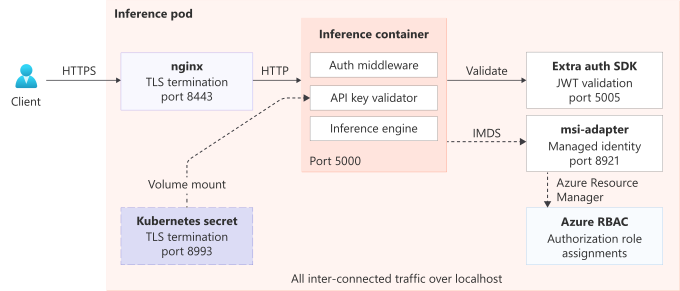
All containers communicate over localhost within the pod's network namespace. External traffic enters exclusively through nginx on port 8443 (HTTPS) and is forwarded to the inference backend on port 5000. The Entra Auth SDK sidecar listens on port 5005 and the msi-adapter provides IMDS on port 8421, both accessible only from within the pod.
The nginx sidecar operates as a pure TLS termination proxy and doesn't perform any authentication. All credential validation happens in the application-layer middleware running inside the inference container, creating a single enforcement point for both API key and JWT authentication.
The following diagram shows how external HTTPS traffic enters through nginx and how the inference backend, Entra Auth SDK sidecar, and msi-adapter communicate over localhost within the pod.
Request flow
When a request arrives at an inference endpoint, it follows this path:
TLS termination — The request arrives at the nginx sidecar over HTTPS (port 8443). nginx terminates TLS and forwards the plain HTTP request to the inference backend on
localhost:5000.Public path check — The auth middleware checks whether the request targets a public path (
/healthz,/readyz,/v1/models). Public paths bypass all authentication and proceed directly to the inference backend.Credential extraction — The middleware extracts credentials from the request headers. If no credentials are present, it returns HTTP 401 (
missing_credentials). If credentials appear in bothAuthorizationandapi-keyheaders, it returns HTTP 400 (ambiguous_auth).Credential routing — Based on the credential content, the middleware routes to the appropriate validation path:
API key path: The middleware validates the key against the primary and secondary keys loaded from mounted Secret files. A valid key grants immediate access (HTTP 200). An invalid key is rejected (HTTP 401,
invalid_api_key).JWT path: The middleware forwards the token to the Entra Auth SDK sidecar for signature and claims validation. On success, it extracts the caller's OID and performs an Azure RBAC check. Sufficient permissions yield HTTP 200; insufficient permissions yield HTTP 403 (
insufficient_permissions).
Inference — Authenticated and authorized requests reach the inference backend, which processes the AI workload and returns the response through the same chain.
The following diagram shows the end-to-end authentication request flow, including public-path bypass, API key validation, and JWT plus Azure RBAC authorization.

Resilience and connectivity loss
API key authentication works entirely within the cluster. Key validation doesn't need any external connectivity. Even during a complete network outage, API key-authenticated requests keep working as long as the pod is running and the key files are accessible.
Entra ID authentication depends on external Azure services for two operations: JWT signature verification (Entra ID JWKS endpoint) and Azure RBAC authorization checks (Azure Resource Manager). The platform includes resilience mechanisms for both operations:
JWKS caching – The Entra Auth SDK sidecar caches Entra ID's public signing keys locally. Short-duration connectivity interruptions don't affect JWT validation as long as cached keys remain valid.
RBAC result caching – The system caches Azure RBAC results in memory per caller identity, with a TTL of up to 300 seconds. Subsequent requests from the same identity during the cache window don't require Azure Resource Manager connectivity.
Extended outage – If Azure Resource Manager becomes unreachable and no cached RBAC result exists for the caller, the middleware returns HTTP 503 (
rbac_check_unavailable). This status code signals the client to retry by using an API key if one is available. The fallback is client-side – each request uses a single authentication method, and the middleware doesn't silently switch between them.
When you enable both authentication methods, this design provides a natural degradation path: Entra ID authentication handles steady-state operations with per-identity authorization, while API key authentication serves as a reliable fallback during temporary connectivity loss.
Authorization model
Authorization behavior differs by authentication method:
API key – Authorization is binary. A valid API key grants full access to all inference endpoints. The system doesn't perform any role-based checks. This model is appropriate for trusted service-to-service communication where the caller's identity is established by possession of the key.
Entra ID – Authorization is role-based through Azure RBAC. After JWT validation, the middleware checks whether the caller's identity holds the required DataAction on the cluster's Azure Resource Manager resource scope. The required action for data-plane inference endpoints is:
Microsoft.CognitiveServices/accounts/OpenAI/deployments/chat/completions/action
This action is included in the Cognitive Services OpenAI User built-in Azure role. The Cognitive Services Contributor role is a superset that additionally covers control-plane operations (deployment management). Assigning Contributor alone is sufficient for both data-plane and control-plane access.
The system also supports custom roles that include the required DataAction. The middleware resolves role assignments by using the Azure Resource Manager role assignment and role definition APIs, with support for wildcard matching in action patterns.
Related content
- Deploy Foundry Local as an Azure Arc extension
- Configure TLS authentication for Foundry Local on Azure Local
- Run inference with Foundry Local on Azure Local
- Inference API endpoints and payload reference for Foundry Local on Azure Local
- Foundry inference API reference for Foundry Local on Azure Local