Note
Access to this page requires authorization. You can try signing in or changing directories.
Access to this page requires authorization. You can try changing directories.
This article explains how the inference operator works, how it manages the model lifecycle through Kubernetes custom resources, and how it reconciles resources to create inference endpoints. It also covers how generative and predictive model workloads differ and how to run inference against each type.
Important
- Foundry Local is available in preview. Preview releases provide early access to features that are in active deployment.
- Features, approaches, and processes can change or have limited capabilities before general availability (GA).
What the inference operator does
The inference operator is a Kubernetes operator that simplifies deploying AI models for inference. It manages the complete lifecycle of model deployments by:
- Creating Kubernetes Deployments, Services, and Ingress resources.
- Configuring CPU and GPU workloads.
- Managing API key authentication and Entra ID token validation.
- Handling TLS certificates for secure communication.
- Caching model artifacts in a local OCI registry via the model store.
The operator runs a reconciliation loop on each custom resource. In addition to handling create, update, and delete events, a 30-second timer continuously monitors deployment health, tracks pod scheduling, and updates replica counts in the resource status.
Custom resource definitions
The operator manages three CRDs. Two are user-facing, and one is internal.
| Resource | Kind | Short name | Purpose |
|---|---|---|---|
| Model | Model |
mdl |
Defines a BYO (custom) model source and metadata. |
| ModelDeployment | ModelDeployment |
mdep |
Creates a running inference endpoint with all child resources. |
| StoreModel | StoreModel |
sm |
Internal. Tracks model caching state in the local OCI registry. |
By separating model definition from deployment, you can:
- Reuse model definitions across multiple deployments.
- Update deployments without changing model definitions.
- Manage models and deployments independently.
For quick deployments, you can skip creating a Model resource. The ModelDeployment can reference catalog models directly, and the operator resolves them from the catalog ConfigMap. For more information about how models are sourced, see Model catalog and sourcing.
How the operator reconciles resources
When you create or update a Model or ModelDeployment resource, the operator:
- Validates the resource specification.
- Resolves the model source (catalog lookup, Model CR reference, or inline custom config).
- Ensures the model is cached locally by creating a StoreModel CR and waiting for the cache job to complete.
- Selects the container image based on workload type, compute type, runtime, and model source.
- Generates API key secrets for authentication.
- Builds and creates child resources: Deployment, Service, nginx ConfigMap, Certificate (when TLS is enabled), and optionally Ingress.
- Sets owner references on all child resources so they're garbage-collected when the ModelDeployment is deleted.
- Updates the resource status with endpoint information.
Child resources created per ModelDeployment
Use this table to see which Kubernetes resources the operator creates for each deployment and what each resource does.
| Resource | Always created | Purpose |
|---|---|---|
| Deployment | Yes | Runs the inference pods. |
| Service | Yes | Provides a ClusterIP endpoint. |
| Secret | Yes | Stores generated API keys. |
| ConfigMap | Yes | nginx sidecar configuration for auth and routing. |
| Certificate | When TLS is enabled | cert-manager Certificate for TLS termination. |
| Ingress | When endpoint.enabled: true |
External path-based routing. |
| StoreModel | Yes | Triggers and tracks model caching in the local OCI registry. |
ModelDeployment lifecycle states
A ModelDeployment moves through a set of lifecycle states that show where it is in provisioning, update, and cleanup.
| State | Description |
|---|---|
Pending |
Resource created, waiting for processing. |
Creating |
Operator is creating child resources and waiting for model cache. |
Running |
All replicas are ready and serving traffic. |
Updating |
Applying configuration changes. |
Error |
Something went wrong - check the status message. |
Terminating |
Resource is being deleted. |
Model catalog
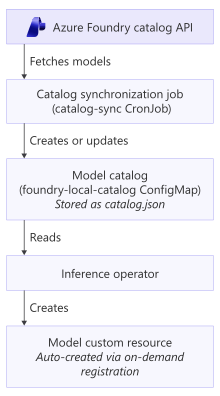
The model catalog is a ConfigMap that stores metadata about available models from the Azure AI Foundry catalog. It serves as a local cache: when you deploy a catalog model, the operator reads from this ConfigMap to get model details like display name, variants, and requirements.
Query the catalog
To see what models are available in your cluster, use the following methods:
kubectl get cm foundry-local-catalog -n foundry-local-operator -o json \
  | jq -r '.data."catalog.json"' \
  | jq -r '["ALIAS", "DEVICE", "SIZE", "MODEL_ID"],
    (.models[] | [.alias, (.variants[0].compute | ascii_upcase),
    ((.variants[0].fileSizeBytes / 1073741824 * 100 | floor) / 100 | tostring + "GB"),
    .variants[0].id]) | @tsv' \
  | column -t
The output looks similar to the following example:
ALIAS                                    DEVICE  SIZE     MODEL_ID
Phi-4-generic-cpu                        CPU     8.13GB   Phi-4-generic-cpu:1
Phi-4-cuda-gpu                           GPU     8.13GB   Phi-4-cuda-gpu:1
qwen2.5-coder-0.5b-instruct-cpu          CPU     0.43GB   qwen2.5-coder-0.5b-instruct-generic-cpu:4
...
Catalog ConfigMap structure
The catalog is stored in a ConfigMap with a single key (catalog.json). Each model entry in the models array contains:
| Field | Type | Description |
|---|---|---|
id |
string | Unique model identifier |
alias |
string | Short name for the model |
displayName |
string | Human-readable name |
description |
string | Model description |
publisher |
string | Model publisher (for example, "Microsoft") |
license |
string | License identifier (for example, "MIT") |
task |
string | Model task (for example, "chat-completion") |
contextLength |
integer | Maximum context window size |
variants |
array | Hardware-specific variants |
supportedCompute |
array | Supported compute types (cpu, gpu) |
Each variant contains:
| Field | Type | Description |
|---|---|---|
id |
string | Variant identifier |
compute |
string | Compute type (cpu or gpu) |
executionProvider |
string | ONNX execution provider |
fileSizeBytes |
integer | Model file size |
How catalog sync works
The catalog-sync component automatically populates the catalog:
- Initial sync: Runs as a Helm post-install hook when you install the operator.
- Scheduled sync: Runs daily through a Kubernetes CronJob.
Each sync cycle:
- Fetches model metadata from the Azure AI Foundry catalog API.
- Transforms the metadata to a concise format.
- Creates or updates the
foundry-local-catalogConfigMap.
Check the last sync time:
kubectl get configmap foundry-local-catalog -n foundry-local-operator \
  -o jsonpath='{.metadata.annotations.foundry\.azure\.com/last-sync}'
Trigger a manual sync:
kubectl create job --from=cronjob/foundry-local-catalog-sync manual-sync \
  -n foundry-local-operator
Lazy model registration
When you create a ModelDeployment that references a catalog model, the operator automatically creates a Model CR if one doesn't exist:
- You create a ModelDeployment with
model.catalog.name: Phi-4-generic-cpu. - The operator checks whether a Model CR named
phi-4-generic-cpuexists. - If not, it reads the catalog ConfigMap and finds the matching model.
- It creates a Model CR with data from the catalog.
- The ModelDeployment proceeds with the newly created Model.
Model CRs persist after creation for reuse. To turn off lazy registration, set catalog.lazyRegistrationEnabled: false in the operator configuration.
Work with Model resources
The Model resource defines a model that's available for deployment. Models can come from two sources:
| Source | Description | Use case |
|---|---|---|
| Catalog | Resolved from the catalog ConfigMap at deployment time | Standard models (Phi, Llama, and others) |
| Custom | Models from your own OCI registry | Fine-tuned or proprietary models |
Model phases
Model CRs track their own lifecycle:
First, create a secret with your registry credentials:
kubectl create secret generic my-registry-credentials \
  --from-literal=username=<your-username> \
  --from-literal=password=<your-password>
Then create the Model resource:
apiVersion: foundrylocal.azure.com/v1
kind: Model
metadata:
  name: my-custom-model
spec:
  displayName: "My Custom Model"
  description: "A fine-tuned model for my use case"
  publisher: "My Organization"
  license: "Proprietary"
  source:
    type: custom
    custom:
      registry: myregistry.azurecr.io
      repository: models/my-custom-model
      tag: v1.0.0
      credentials:
        secretRef:
          name: my-registry-credentials
          usernameKey: username
          passwordKey: password
For the full procedure to package and deploy a custom model, see Package and deploy a bring-your-own model on Foundry Local on Azure Local. For inference requests after deployment, see Run inference on Foundry Local on Azure Local.
Generative models
Generative AI models produce new content like text in response to prompts. Foundry Local on Azure Local supports generative text models for conversations, question answering, and text generation tasks. Both CPU and GPU hardware are supported. Two runtime engines are available: the default ONNX-GenAI engine (CPU or GPU) and the vLLM engine (GPU only) for high-throughput scenarios. Select the runtime by using the spec.runtime field on the ModelDeployment.
Use models from the Azure AI Foundry catalog
Pull and deploy models directly from the Azure AI Foundry catalog through the inference operator as described in Model catalog. Alternatively, deploy them directly from a ModelDeployment.
Load custom models (BYO)
Deploy models you package yourself as Docker or OCI images - for example, custom or third-party models not in the Azure AI Foundry catalog. Deploy any model you can convert to ONNX Runtime format. For the full BYO packaging and deployment procedure, see Package and deploy a bring-your-own model on Foundry Local on Azure Local. For inference requests after deployment, see Run inference on Foundry Local on Azure Local.
Run generative inference
Generative model endpoints follow OpenAI-compatible request patterns. The inference endpoint is /v1/chat/completions.
curl -X POST https://<your-domain>/phi-3.5-gpu/v1/chat/completions \
  -H "Content-Type: application/json" \
  -H "Authorization: Bearer $API_KEY" \
  -d '{
    "model": "Phi-3.5-mini-instruct-cuda-gpu:1",
    "messages": [
      {"role": "system", "content": "You are a helpful assistant."},
      {"role": "user", "content": "What is the capital/major city of France?"}
    ],
    "temperature": 0.7,
    "max_tokens": 100
  }'
Keep these details in mind when you send a generative inference request:
- URL: With an ingress controller, use the ingress IP or DNS. Without ingress, use
kubectl port-forwardand set the URL to 127.0.0.1. - Authorization header: The inference operator generates API keys stored in a Kubernetes Secret. Pass the key as a Bearer token.
- Response: Standard OpenAI Chat Completions JSON response. The generated text is in
choices[0].message.content.
Predictive models
Predictive AI inference runs ONNX-based machine learning models for classification, regression, object detection, and other ML tasks.
Key capabilities:
- ONNX Runtime: Execute models in ONNX format, compatible with PyTorch, TensorFlow, and scikit-learn.
- CPU and GPU execution: Deploy on CPU for cost efficiency or GPU for higher throughput.
- Batch processing: Process multiple requests with configurable batch sizes (default: 32).
- BYO model support: Load custom ONNX models from ORAS-compatible registries.
The preview doesn't include a broad catalog of predictive models. To deploy predictive models, use BYO methods. For the full packaging and deployment procedure, see Package and deploy a bring-your-own model on Foundry Local on Azure Local.
Ideally, have your model in ONNX format. It's framework-agnostic, and the ModelDeployment is built around ONNX Runtime.
Run predictive inference
Predictive models use the /v1/predict endpoint. This example sends a base64-encoded image:
$base64Image = [Convert]::ToBase64String(
    [System.IO.File]::ReadAllBytes("<PATH_TO_IMAGE_FILE>")
)

$body = @{
    items = @(
        @{
            content_type = "image/jpeg"
            encoder      = "base64"
            data         = $base64Image
        }
    )
} | ConvertTo-Json -Depth 3 -Compress

Invoke-RestMethod -Uri https://<URL>/v1/predict -Method Post `
    -Body $body -ContentType "application/json" `
    -Headers @{ "X-API-Key" = $API_KEY } -SkipCertificateCheck
GPU deployment options
When deploying on GPU nodes, the ModelDeployment supports:
resources.limits.gpu: Set the number of GPUs (1-8) for the pod. Required whencompute: gpu.skipGpuResource: When true, the operator doesn't set thenvidia.com/gpuresource limit. Use withnodeSelectorto target GPU nodes where GPU allocation is managed externally.nodeSelector: Target specific nodes by label. Required whenskipGpuResourceis true.tolerations: Tolerate GPU node taints (NoSchedule, PreferNoSchedule, NoExecute).
For full field definitions and YAML examples, see ModelDeployment and operator configuration reference.
Configuration
The operator reads its configuration from a ConfigMap mounted at /etc/inference-operator/config.yaml.
The operator reads configuration from a ConfigMap at /etc/inference-operator/config.yaml, which is automatically generated from your Helm values.yaml.
Key configuration areas:
| Area | What it controls |
|---|---|
| images | Container image references for each workload/compute/source combination. |
| tls | TLS toggle, certificate durations, ports, and sidecar settings. |
| ingress | Default ingress class, path template, and rewrite settings. |
| catalog | Catalog ConfigMap name, namespace, and lazy registration toggle. |
| storeModel | Local registry URL, cache job timeout, and poll interval. |
| authentication | App-level authentication toggle. |
Namespace configuration for model deployments
By default, the inference extension monitors only the foundry-local-operator namespace, along with its own release namespace. To deploy and manage models in additional namespaces, explicitly specify them by using the watch.namespaces configuration during extension installation or update.
Example configuration:
watch:
  namespaces:
    - "foundry-local-operator"
    - "foundry-local-workloads"
If you create a model deployment in a namespace that isn't listed under watch.namespaces, the operator doesn't have the required cluster-scoped Azure role-based access permissions (Azure RBAC) for that namespace. As a result, the model deployment fails during reconciliation due to missing permissions.
Plan your namespace strategy carefully before installation. Changes to this configuration require an extension update to take effect, as Azure RBAC permissions are provisioned at install or update time.
For the full configuration fields and example, see ModelDeployment and operator configuration reference.
Related content
- Model catalog and sourcing in Foundry Local on Azure Local
- StoreModel and model caching in Foundry Local on Azure Local
- Inference runtimes in Foundry Local on Azure Local
- Automatic GPU inference tuning in Foundry Local on Azure Local
- Deploy Foundry Local as an Azure Arc extension
- Run inference on Foundry Local on Azure Local
- ModelDeployment and operator configuration reference
- Inference API endpoints and payload reference