Note
Access to this page requires authorization. You can try signing in or changing directories.
Access to this page requires authorization. You can try changing directories.
This article helps business and technology decision makers determine whether Azure VMware Solution is the right strategy for their organization.
Organizations with significant VMware investments often need to move to the cloud without disrupting business-critical applications. Application modernization efforts can increase cost, risk, and migration timelines, making rapid cloud adoption difficult. Azure VMware Solution provides a path to run VMware workloads in Azure with minimal application change while preserving existing VMware investments and operational practices.
This article begins that decision process by helping decision makers evaluate the benefits, risks, and tradeoffs of Azure VMware Solution and determine whether it is the right strategy for their organization. The remaining guidance in this series helps organizations adopt, govern, operate, and migrate workloads to Azure VMware Solution successfully.
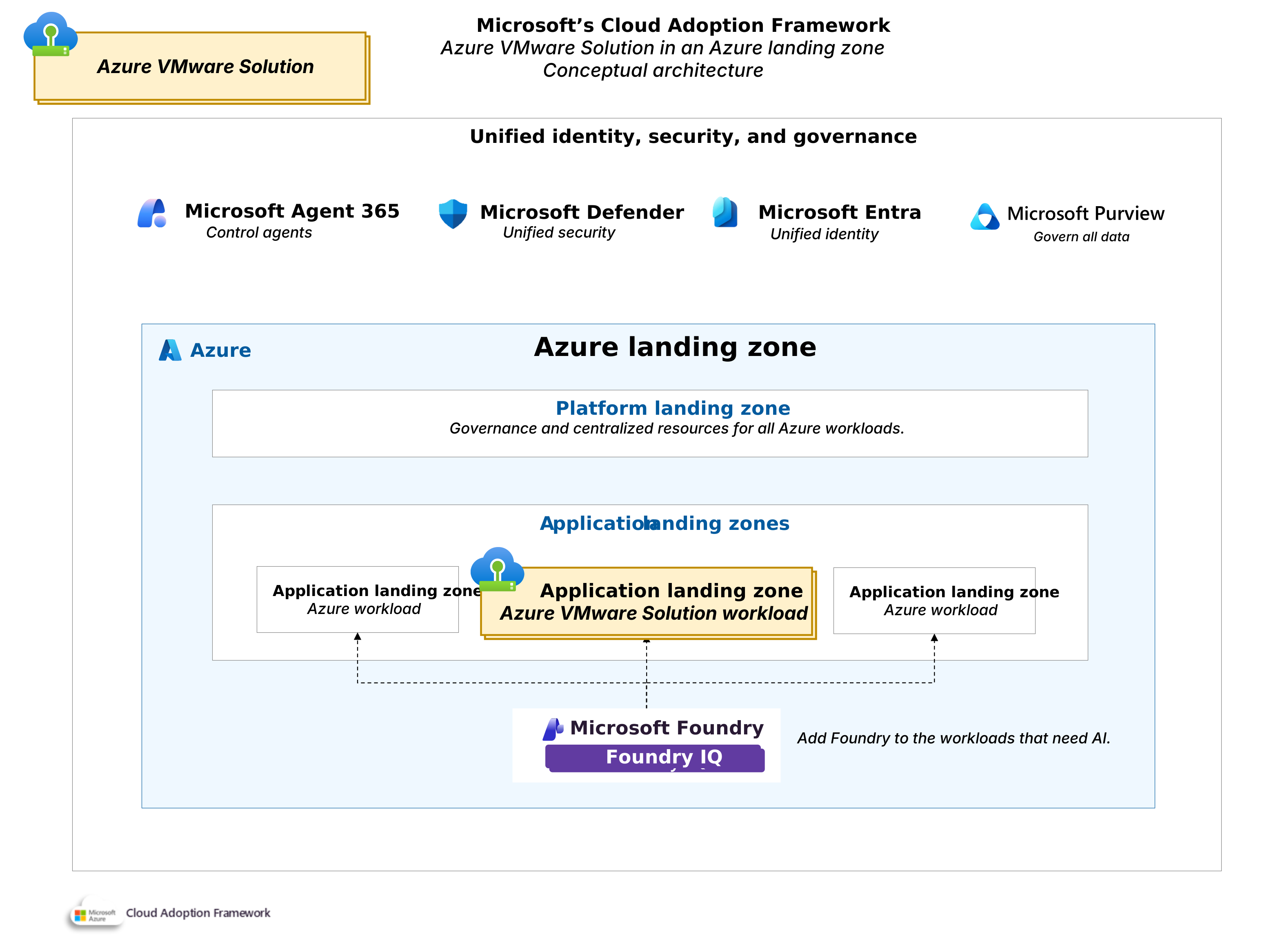
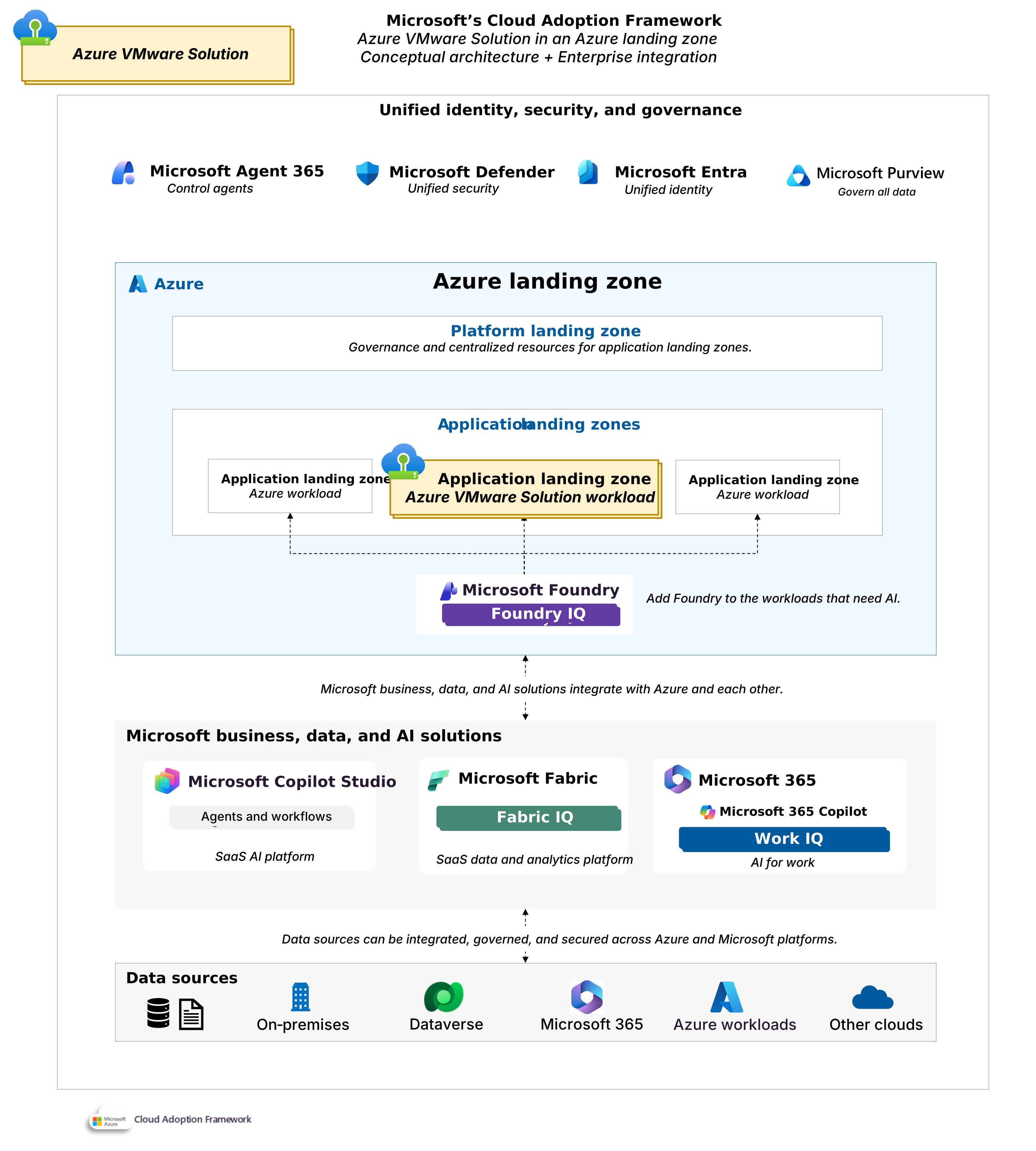
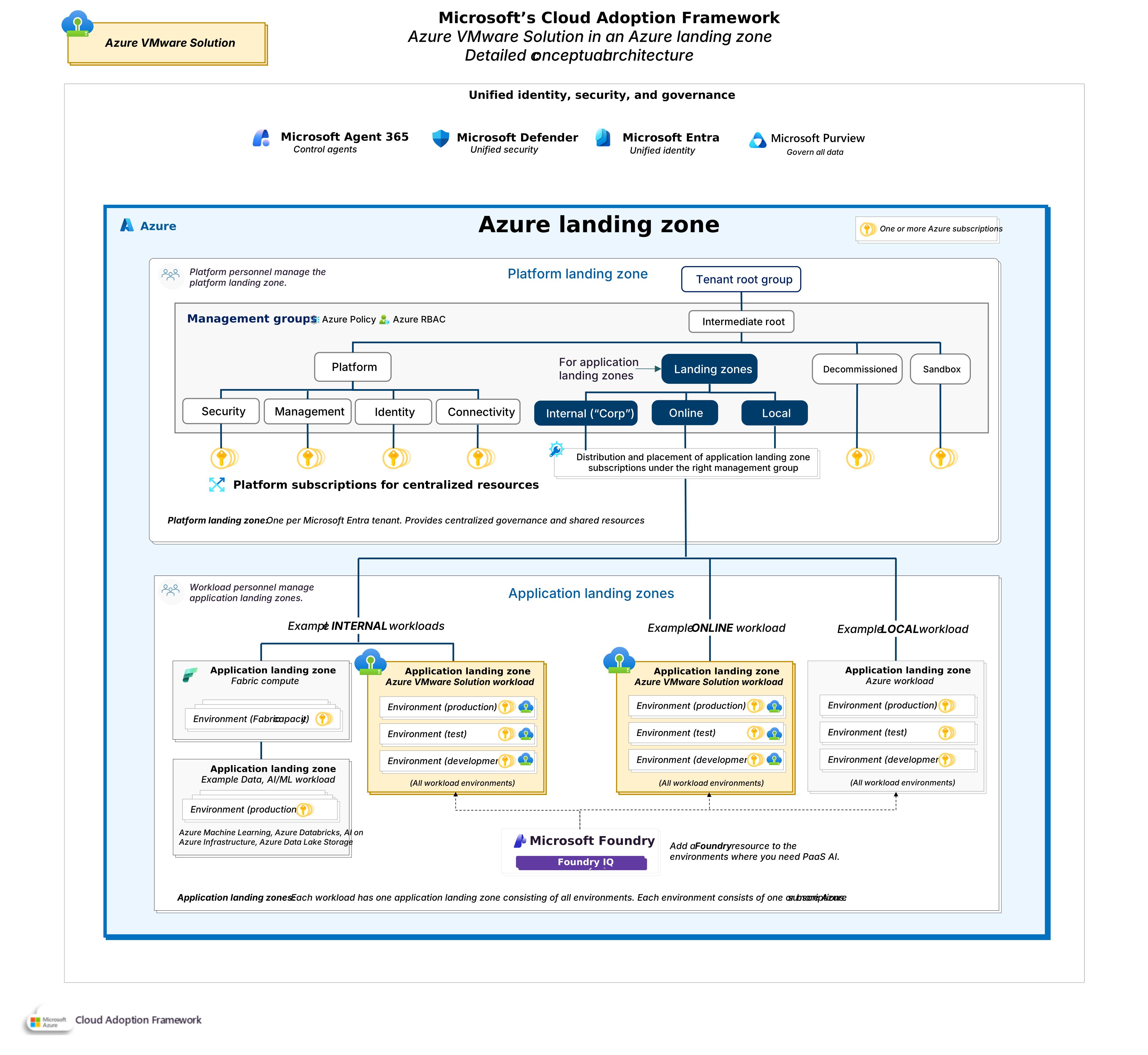
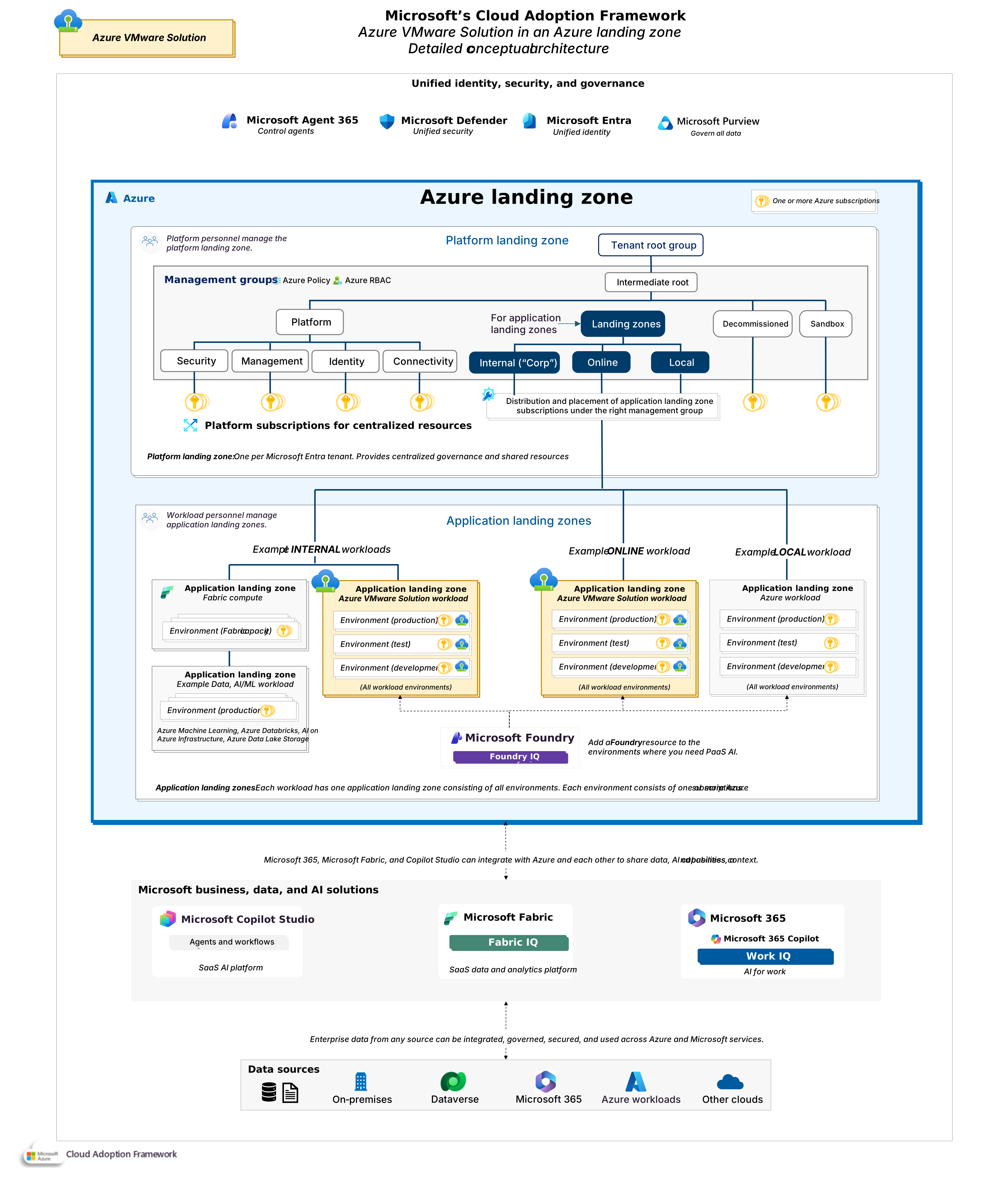
Conceptual view of Azure VMware Solution in an Azure landing zone architecture. Download a PowerPoint file of this architecture.
What is Azure VMware Solution?
Azure VMware Solution runs a VMware environment with vSphere, vSAN, NSX, and HCX, on dedicated Azure infrastructure that Microsoft manages. Your teams continue using familiar VMware tools, processes, and skills but gain native access to Azure services. When you deploy Azure VMware Solution, you create an private cloud. A private cloud is a self-contained VMware environment that Azure provisions for you with vCenter Server to manage virtual machines and NSX for networking, plus vSAN for storage. It runs on physical host servers, or nodes, which are dedicated physical servers reserved for your organization. Each host contributes its compute and storage to your virtual machines, and a private cloud groups hosts into clusters.
When to use Azure VMware Solution?
Azure VMware Solution is often the right choice when the business value of moving to Azure is clear, and the cost, risk, or time required to redesign applications aren't acceptable. Consider Azure VMware Solution in the following situations:
VMware-accelerated migration: If your organization must retire infrastructure, exit a colocation facility, or move out of another cloud provider, Azure VMware Solution provides a migration path with minimal application change. VMware HCX supports workload mobility and network extension capabilities that can simplify migration planning and reduce disruption.
VMware compatibility: Some business-critical applications rely on operating systems, middleware, or vendor-supported configurations that aren't validated for Azure virtual machines. Azure VMware Solution preserves the VMware operating environment, which can help maintain application supportability and reduce migration risk.
VMware investment: Organizations often invest heavily in VMware expertise, operational processes, monitoring platforms, backup solutions, and automation tools. Azure VMware Solution allows teams to continue using familiar VMware technologies while gradually building Azure capabilities at a pace that aligns with business priorities.
VMware integration with Azure: Many organizations want to improve business outcomes without immediately modernizing every application. Azure VMware Solution enables low-latency connectivity between VMware workloads and Azure services, which supports scenarios such as AI, analytics, databases, backup, security, and monitoring. Use Azure Arc to manage VMware virtual machines through the Azure portal, creating a consistent administrator experience across platforms.
VMware disaster recovery: Azure VMware Solution can serve as a recovery target for VMware environments running on-premises or in another cloud. This approach can improve resiliency without maintaining a second physical data center.
Azure VMware Solution isn't the best choice for every cloud strategy. Consider Azure-native infrastructure or platform services instead if:
You plan to modernize or refactor applications in the near term.
Your workloads run well on Azure virtual machines without VMware dependencies.
You have a small VMware footprint and can migrate directly to Azure-native services.
Your primary objective is long-term cloud optimization rather than VMware continuity.
The majority of your workloads are new, and can be designed from the start as cloud-native, rather than being migrated from an on-premises environment.
In these scenarios, moving directly to Azure IaaS or PaaS services often provides greater cloud-native benefits and can reduce long-term platform costs.
What Azure VMware Solution generation to use?
Azure VMware Solution is available in two private cloud generations. The most significant difference between them is the network architecture. The VMware software components, such as vCenter Server, ESXi, and NSX, are identical between Gen1 and Gen2.
Choose Generation 2 (Gen2) for new deployments. Gen2 deploys directly into an Azure Virtual Network. This design simplifies connectivity, supports Azure-native security controls, and aligns with Azure networking standards. Choose Generation 1 (Gen1) only when an existing deployment or technical dependency requires it. Gen1 uses a Microsoft-managed ExpressRoute networking model and can introduce additional design complexity. Make the generation decision early. Moving between generations requires workload migration.
Who is responsible for operating Azure VMware Solution?
Microsoft operates and maintains the Azure infrastructure and VMware platform. This responsibility includes provisioning, hardware maintenance, and updating VMware software such as ESXi and vCenter Server.
Your organization remains responsible for applications, virtual machines, operating systems, data, security policies, compliance, backup, and business. Your responsibilities include monitoring resource consumption and scaling node (host) capacity to meet workload demands while balancing performance, resilience, and cost objectives.
Review the responsibility matrix before adoption. Confirm ownership for security, operations, and compliance. See Azure VMware Solution responsibility matrix - Microsoft vs customer.
What does Azure VMware Solution cost?
Primary cost factors include Azure VMware Solution instance size, number of nodes (hosts), consumption duration, and the VMware VCF portable subscription required from Broadcom. You're billed by the number and size of Azure VMware Solution hosts, not by the number of virtual machines. Compare Azure VMware Solution against the full cost of your existing VMware platform. Include hardware refresh costs, datacenter expenses, and operational support. See Azure VMware Solution pricing and to develop workload estimates, use the Azure pricing calculator.
How do I realize value from Azure VMware Solution?
Azure VMware Solution delivers the most value when you need to move VMware workloads to Azure quickly without major application changes. It helps reduce migration risk and enables teams to continue using existing VMware skills and processes.
Organizations often realize value fastest when retiring infrastructure, exiting a datacenter, improving disaster recovery, or accelerating cloud adoption.
How to adopt Azure VMware Solution?
Adopting Azure VMware Solution requires decisions across planning, architecture, governance, operations, and migration. The following guidance helps you understand what changes are required to support Azure VMware Solution in your existing cloud environment.

Planning and readiness: Understand the readiness requirements for Azure VMware Solution, including operating model considerations, roles and responsibilities, licensing, quotas, skills development, and cost management.
Azure landing zone architecture: Understand the architectural changes to your platform landing zone and application landing zones.
Governance and security baselines: Establish the governance and security baselines required to operate Azure VMware Solution workloads.
Operational standards: Understand the operational processes, monitoring requirements, health management practices, reliability considerations, and cost management activities needed to support Azure VMware Solution.
Migration: Understand the process used to plan, prepare, execute, evaluate, and decommission VMware workload migrations to Azure VMware Solution.