Note
Access to this page requires authorization. You can try signing in or changing directories.
Access to this page requires authorization. You can try changing directories.
This article covers network connectivity design for Oracle Database@Azure workloads. Oracle Database@Azure has a unique architecture compared to most Azure services—it runs within an Azure datacenter while maintaining default connectivity to the Oracle Cloud Infrastructure (OCI) control plane. Understanding this architecture is essential for successful adoption.
The following diagram illustrates the core networking architecture and relationship between Azure virtual networks and OCI virtual cloud networks (VCNs) for Oracle Exadata Database@Azure.
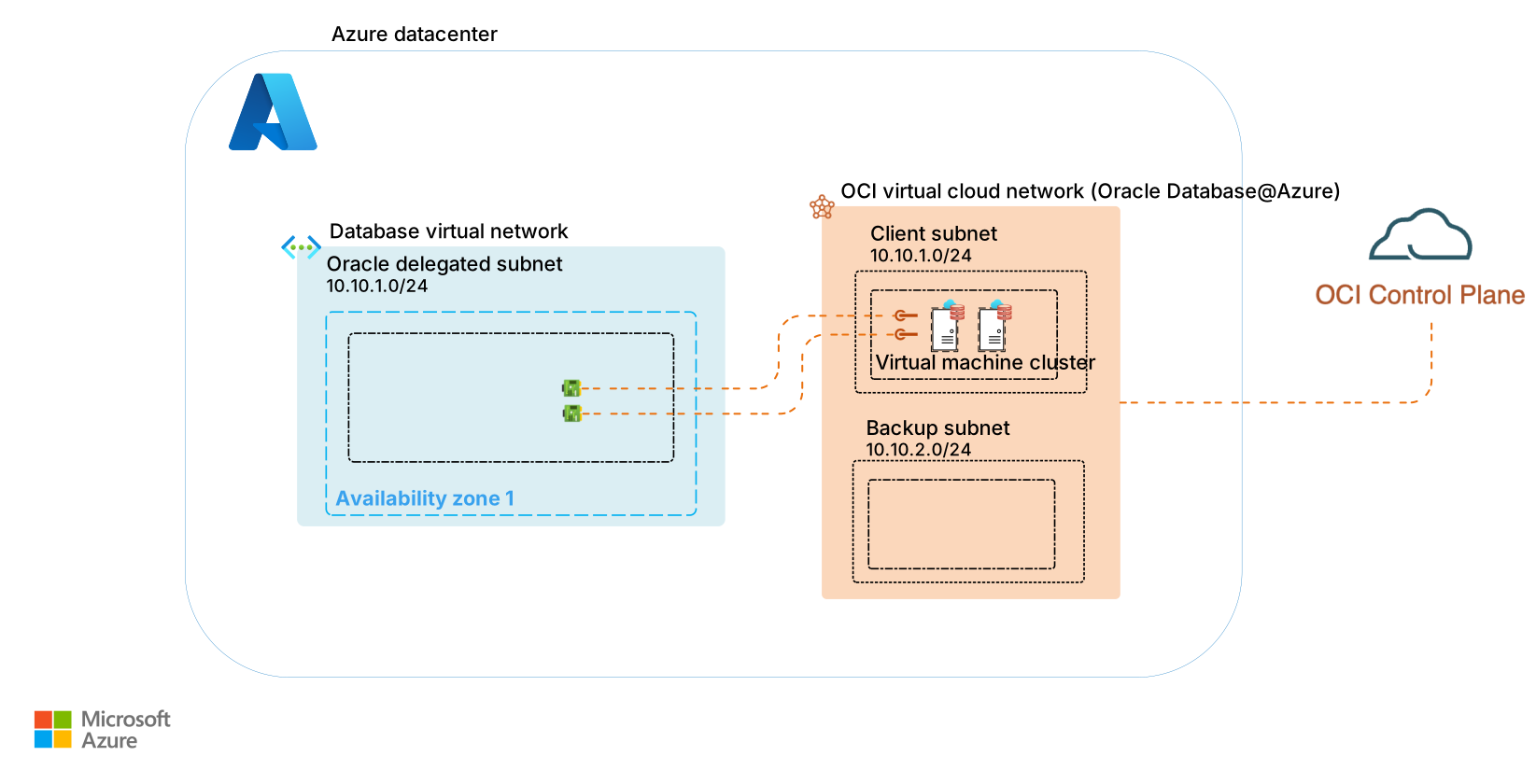
The client subnet in the OCI VCN maps to the Oracle Database delegated subnet in Azure. A backup subnet is also created within the OCI VCN that the service uses solely for OCI-managed backups.
Understand the network architecture
Oracle Exadata Database@Azure requires careful network planning due to its hybrid nature across Azure and OCI. Several architectural constraints and capabilities influence how you design your network topology.
Consider these factors when designing your network topology for Oracle Exadata Database@Azure:
| Factor | Description |
|---|---|
| Inherited region and availability zone settings | When you deploy an Exadata Infrastructure instance, the region and availability zones map to it. Any virtual machine (VM) clusters created within the Exadata Infrastructure instance inherit the same settings. |
| VM cluster limits | Each Oracle Exadata Database@Azure SKU can include up to eight VM clusters. Configure your virtual network before VM cluster creation, and decide whether to connect clusters to the same virtual network or separate virtual networks. |
| Scheduled patching | Scheduled patching for Oracle Exadata Database@Azure is delivered through the OCI control plane and does not require direct internet access. This reduces outbound connectivity needs in typical maintenance scenarios. |
| Internet access requirements | Oracle Exadata Database@Azure has no direct internet access by default. If internet access is required for one-off patching, outbound telemetry, or downloading packages, you must explicitly configure it. |
| Delegated subnet limitation | You can create only one Oracle Database@Azure delegated subnet for each virtual network. You can create up to five Oracle-delegated subnets in a region. If you need more subnets, submit a support ticket with Oracle to increase the limit. For more information, see Network planning for Oracle Database@Azure. |
| Split DNS model | Oracle Database@Azure follows a split DNS model. Configure DNS on both Azure and OCI. For more information, see Oracle Database@Azure DNS setup. |
Plan subnet and IP address sizing
Proper subnet sizing ensures your Oracle Exadata Database@Azure deployment has adequate IP address space for current needs and future growth. Define subnet sizes according to Oracle's SKU specifications, which differ based on the chosen instance type. Here's how to plan subnet and IP address sizing:
Review SKU requirements. Consult the sizing guidelines in Plan for IP address space for Oracle Exadata Database@Azure to determine the required IP address range for your chosen instance type.
Account for private endpoints. If you integrate with Azure Key Vault for TDE key management, plan additional IP addresses in your delegated subnet to accommodate the Key Vault Private Endpoint network interface.
Plan for growth. Allocate extra IP addresses for future VM clusters, additional database nodes, or integration with other Azure services.
Configure network security groups
Network security groups (NSGs) control traffic flow to and from your Oracle Exadata Database@Azure resources. You can apply NSGs from either Azure or OCI, so choose the approach that aligns with your operational model.
If you prefer to manage network security policies in Azure, allow all traffic from OCI-side NSGs and enforce restrictions by using NSGs on the Azure-delegated subnet. Use least-privilege rules to explicitly allow required traffic from approved sources and deny all other inbound access. This approach centralizes security management within Azure and simplifies auditing.
Optimize network performance
Network performance directly affects database response times and application throughput. Minimize latency by reducing unnecessary network hops and placing resources strategically.
Here's how to optimize network performance:
Colocate resources in the same availability zone. Place resources that interact with Oracle Database@Azure Exadata Database Service within the same availability zone to optimize bandwidth and latency.
Minimize network virtual appliances. Reduce the use of network virtual appliances (NVAs) in the network path because each extra hop introduces latency that can degrade database performance. Use NVAs only when required for traffic inspection or compliance purposes, and optimize their placement to reduce unnecessary routing.
Configure DNS for Oracle Database@Azure
A consistent DNS strategy supports reliable name resolution, reduces operational risk, and simplifies connectivity decisions across the organization. DNS choices influence network architecture, hybrid connectivity, compliance controls, and how Azure services integrate with on-premises environments.
Use Azure Private DNS zones unless your organization explicitly requires custom namespaces for internal governance, integration with a third-party DNS solution, or advanced governance controls that exceed Azure DNS capabilities.
Here's how to configure DNS for Oracle Database@Azure:
Use Azure Private DNS zones by default. Link Azure Private DNS zones to your hub virtual network as the default DNS choice. This approach aligns with Azure-native services, accelerates deployment, and reduces operational overhead. See also Oracle Exadata Database@Azure DNS limitations.
Use custom DNS only if required. Custom DNS adds flexibility but also operational complexity and risk. Reserve this option for strict namespace requirements, compliance-driven policies, or mandatory integration with external DNS providers.
Enable hybrid DNS resolution. For on-premises integration, use Azure Private DNS Resolver to bridge DNS resolution between on-premises and Azure-hosted Oracle databases. This approach ensures seamless name resolution without exposing private endpoints publicly and supports compliance and security objectives.
Centralize DNS for scale. When you deploy a large number of Oracle Database@Azure Exadata instances, centralize DNS resolution to your hub network. Define governance policies for DNS to prevent sprawl and maintain security boundaries. Centralization reduces administrative overhead and enforces consistent governance.
Use unique DNS names. When you use the default DNS settings, ensure that the first 10 characters of the virtual network and subnet names for any Exadata environments are unique. The private DNS zone name combines "oci" plus the first 10 alphabetic characters of the virtual network and subnet names. If these characters are not unique, a DNS resolver cannot distinguish between the environments.
Configure Azure Key Vault private endpoint
Oracle Exadata Database@Azure integration with Azure Key Vault for TDE key management requires Private Endpoint configuration and additional DNS setup. The integration requires creating the privatelink.vaultcore.azure.net Private DNS zone in the OCI Private View that matches your database VCN.
For complete Azure Key Vault integration guidance including network prerequisites, see Azure Key Vault integration for Oracle Exadata Database@Azure.
Next step
Beyond the core network design concepts for Oracle Exadata Database@Azure, consider the connectivity requirements for your applications, other Azure services (like Azure Blob Storage or Azure NetApp Files), on-premises environments, and your business continuity and disaster recovery (BCDR) configuration. Proceed to the application connectivity design guidance to learn how to connect your applications to Oracle Exadata Database@Azure efficiently and securely.