Azure DevOps Services | Azure DevOps Server | Azure DevOps Server 2022
Azure Artifacts uses the .npmrc configuration file to authenticate npm clients with feeds. The recommended setup keeps feed configuration and credentials in two separate .npmrc files: a project-level file (checked in alongside your package.json) that stores the feed URL, and a user-level file (never committed) that stores your credentials.
Prerequisites
Connect to a feed
Select the tab that matches your operating system and follow the steps to configure your .npmrc files:
Note
vsts-npm-auth is not supported in Azure DevOps Server.
Sign in to your Azure DevOps organization, and then go to your project.
Select Artifacts, and then select your feed from the dropdown menu.
Select Connect to feed, and then select npm from the left navigation pane.
If you didn't install vsts-npm-auth, run the following command:
npm install -g vsts-npm-auth --registry https://registry.npmjs.com --always-auth false
Add a .npmrc file to your project in the same directory as your package.json, and then paste the snippet from the Project setup section into the file.
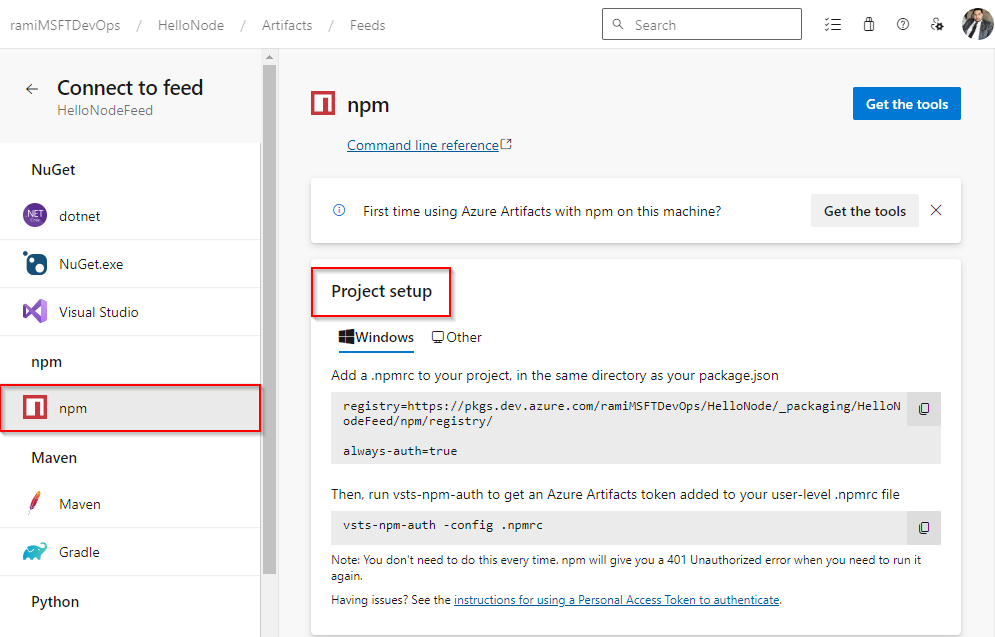
Run the following command to add a token to your user-level .npmrc file. npm returns a 401 Unauthorized error when the token expires—run this command again to refresh it.
vsts-npm-auth -config .npmrc
Sign in to your Azure DevOps organization, and then go to your project.
Select Artifacts, and then select your feed from the dropdown menu.
Select Connect to feed, and then select npm from the left navigation pane.
Add a .npmrc file to your project in the same directory as your package.json, and then paste the snippet from the Project setup section into the file. Your file should look similar to the following:
registry=https://pkgs.dev.azure.com/<ORGANIZATION_NAME>/<PROJECT_NAME>/_packaging/<FEED_NAME>/npm/registry/
Setup credentials
Copy the following snippet and paste it into your user-level npmrc file:
Organization-scoped feed:
; begin auth token
//pkgs.dev.azure.com/<ORGANIZATION_NAME>/_packaging/<FEED_NAME>/npm/registry/:username=[ENTER_ANY_VALUE_BUT_NOT_AN_EMPTY_STRING]
//pkgs.dev.azure.com/<ORGANIZATION_NAME>/_packaging/<FEED_NAME>/npm/registry/:_password=[BASE64_ENCODED_PERSONAL_ACCESS_TOKEN]
//pkgs.dev.azure.com/<ORGANIZATION_NAME>/_packaging/<FEED_NAME>/npm/registry/:email=npm requires email to be set but doesn't use the value
//pkgs.dev.azure.com/<ORGANIZATION_NAME>/_packaging/<FEED_NAME>/npm/:username=[ENTER_ANY_VALUE_BUT_NOT_AN_EMPTY_STRING]
//pkgs.dev.azure.com/<ORGANIZATION_NAME>/_packaging/<FEED_NAME>/npm/:_password=[BASE64_ENCODED_PERSONAL_ACCESS_TOKEN]
//pkgs.dev.azure.com/<ORGANIZATION_NAME>/_packaging/<FEED_NAME>/npm/:email=npm requires email to be set but doesn't use the value
; end auth token
Project-scoped feed:
; begin auth token
//pkgs.dev.azure.com/<ORGANIZATION_NAME>/<PROJECT_NAME>/_packaging/<FEED_NAME>/npm/registry/:username=[ENTER_ANY_VALUE_BUT_NOT_AN_EMPTY_STRING]
//pkgs.dev.azure.com/<ORGANIZATION_NAME>/<PROJECT_NAME>/_packaging/<FEED_NAME>/npm/registry/:_password=[BASE64_ENCODED_PERSONAL_ACCESS_TOKEN]
//pkgs.dev.azure.com/<ORGANIZATION_NAME>/<PROJECT_NAME>/_packaging/<FEED_NAME>/npm/registry/:email=npm requires email to be set but doesn't use the value
//pkgs.dev.azure.com/<ORGANIZATION_NAME>/<PROJECT_NAME>/_packaging/<FEED_NAME>/npm/:username=[ENTER_ANY_VALUE_BUT_NOT_AN_EMPTY_STRING]
//pkgs.dev.azure.com/<ORGANIZATION_NAME>/<PROJECT_NAME>/_packaging/<FEED_NAME>/npm/:_password=[BASE64_ENCODED_PERSONAL_ACCESS_TOKEN]
//pkgs.dev.azure.com/<ORGANIZATION_NAME>/<PROJECT_NAME>/_packaging/<FEED_NAME>/npm/:email=npm requires email to be set but doesn't use the value
; end auth token
Generate a personal access token with Packaging > Read & write scope.
Base64-encode your PAT by using one of the following methods:
Node.js (all platforms): Run the following command, enter your PAT when prompted, and copy the resulting value.
node -e "require('readline') .createInterface({input:process.stdin,output:process.stdout,historySize:0}) .question('PAT> ',p => { b64=Buffer.from(p.trim()).toString('base64');console.log(b64);process.exit(); })"
macOS or Linux: Run the following command and copy the output.
echo -n "YOUR_PERSONAL_ACCESS_TOKEN" | base64
Replace the [BASE64_ENCODED_PERSONAL_ACCESS_TOKEN] placeholders in your user-level .npmrc file with the encoded value.
Sign in to your Azure DevOps collection, and then go to your project.
Select Artifacts, select your feed from the dropdown menu, and then select Connect to feed.

Select npm, and then follow the steps in the Project setup section to configure your .npmrc file and authenticate with your feed.

Sign in to your Azure DevOps collection, and then go to your project.
Select Artifacts, and then select your feed from the dropdown menu.
Select Connect to feed, and then select npm from the left navigation pane.
Add a .npmrc file to your project in the same directory as your package.json, and then paste the snippet from the Project setup section into the file. Your file should look similar to the following:
registry=http://<SERVER_NAME>/<COLLECTION_NAME>/<PROJECT_NAME>/_packaging/<FEED_NAME>/npm/registry/
Setup credentials
Copy the following snippet and paste it into your user-level .npmrc file:
Collection-scoped feed:
; begin auth token
//<SERVER_NAME>/<COLLECTION_NAME>/_packaging/<FEED_NAME>/npm/registry/:username=DefaultCollection
//<SERVER_NAME>/<COLLECTION_NAME>/_packaging/<FEED_NAME>/npm/registry/:_password=[BASE64_ENCODED_PERSONAL_ACCESS_TOKEN]
//<SERVER_NAME>/<COLLECTION_NAME>/_packaging/<FEED_NAME>/npm/registry/:email=npm requires email to be set but doesn't use the value
//<SERVER_NAME>/<COLLECTION_NAME>/_packaging/<FEED_NAME>/npm/:username=DefaultCollection
//<SERVER_NAME>/<COLLECTION_NAME>/_packaging/<FEED_NAME>/npm/:_password=[BASE64_ENCODED_PERSONAL_ACCESS_TOKEN]
//<SERVER_NAME>/<COLLECTION_NAME>/_packaging/<FEED_NAME>/npm/:email=npm requires email to be set but doesn't use the value
; end auth token
Project-scoped feed:
; begin auth token
//<SERVER_NAME>/<COLLECTION_NAME>/<PROJECT_NAME>/_packaging/<FEED_NAME>/npm/registry/:username=[ENTER_ANY_VALUE_BUT_NOT_AN_EMPTY_STRING]
//<SERVER_NAME>/<COLLECTION_NAME>/<PROJECT_NAME>/_packaging/<FEED_NAME>/npm/registry/:_password=[BASE64_ENCODED_PERSONAL_ACCESS_TOKEN]
//<SERVER_NAME>/<COLLECTION_NAME>/<PROJECT_NAME>/_packaging/<FEED_NAME>/npm/registry/:email=npm requires email to be set but doesn't use the value
//<SERVER_NAME>/<COLLECTION_NAME>/<PROJECT_NAME>/_packaging/<FEED_NAME>/npm/:username=[ENTER_ANY_VALUE_BUT_NOT_AN_EMPTY_STRING]
//<SERVER_NAME>/<COLLECTION_NAME>/<PROJECT_NAME>/_packaging/<FEED_NAME>/npm/:_password=[BASE64_ENCODED_PERSONAL_ACCESS_TOKEN]
//<SERVER_NAME>/<COLLECTION_NAME>/<PROJECT_NAME>/_packaging/<FEED_NAME>/npm/:email=npm requires email to be set but doesn't use the value
; end auth token
Generate a personal access token with Packaging > Read & write scope.
Run the following command, enter your PAT when prompted, and then copy the resulting Base64-encoded value.
node -e "require('readline') .createInterface({input:process.stdin,output:process.stdout,historySize:0}) .question('PAT> ',p => { b64=Buffer.from(p.trim()).toString('base64');console.log(b64);process.exit(); })"
Replace the [BASE64_ENCODED_PERSONAL_ACCESS_TOKEN] placeholders in your user-level .npmrc file with the encoded value.
Related content
