Note
Access to this page requires authorization. You can try signing in or changing directories.
Access to this page requires authorization. You can try changing directories.
Use vector search in Azure DocumentDB with the Node.js client library. Store and query vector data efficiently.
This quickstart uses a sample hotel dataset in a JSON file with vectors from the text-embedding-3-small model. The dataset includes hotel names, locations, descriptions, and vector embeddings.
Find the sample code on GitHub.
Prerequisites
An Azure subscription
- If you don't have an Azure subscription, create a free account
An existing Azure DocumentDB cluster
If you don't have a cluster, create a new cluster
Firewall configured to allow access to your client IP address
-
Custom domain configured
text-embedding-3-smallmodel deployed
Use the Bash environment in Azure Cloud Shell. For more information, see Get started with Azure Cloud Shell.

If you prefer to run CLI reference commands locally, install the Azure CLI. If you're running on Windows or macOS, consider running Azure CLI in a Docker container. For more information, see How to run the Azure CLI in a Docker container.
If you're using a local installation, sign in to the Azure CLI by using the az login command. To finish the authentication process, follow the steps displayed in your terminal. For other sign-in options, see Authenticate to Azure using Azure CLI.
When you're prompted, install the Azure CLI extension on first use. For more information about extensions, see Use and manage extensions with the Azure CLI.
Run az version to find the version and dependent libraries that are installed. To upgrade to the latest version, run az upgrade.
Tip
To customize Azure OpenAI model parameters before deployment, see Customize Azure OpenAI deployment below.
TypeScript: Install TypeScript globally:
npm install -g typescript
Create data file with vectors
Create a new data directory for the hotels data file:
mkdir dataCopy the
Hotels_Vector.jsonraw data file with vectors to yourdatadirectory.
Create a Node.js project
Create a new sibling directory for your project, at the same level as the data directory, and open it in Visual Studio Code:
mkdir vector-search-quickstart
code vector-search-quickstart
In the terminal, initialize a Node.js project:
npm init -y
npm pkg set type="module"
Install the required packages:
npm install mongodb @azure/identity openai @types/nodemongodb: MongoDB Node.js driver@azure/identity: Azure Identity library for passwordless authenticationopenai: OpenAI client library to create vectors@types/node: Type definitions for Node.js
Create a
.envfile in your project root for environment variables:# Identity for local developer authentication with Azure CLI AZURE_TOKEN_CREDENTIALS=AzureCliCredential # Azure OpenAI Embedding Settings AZURE_OPENAI_EMBEDDING_MODEL=text-embedding-3-small AZURE_OPENAI_EMBEDDING_API_VERSION=2023-05-15 AZURE_OPENAI_EMBEDDING_ENDPOINT= EMBEDDING_SIZE_BATCH=16 # MongoDB configuration MONGO_CLUSTER_NAME= # Data file DATA_FILE_WITH_VECTORS=../data/Hotels_Vector.json FIELD_TO_EMBED=Description EMBEDDED_FIELD=DescriptionVector EMBEDDING_DIMENSIONS=1536 LOAD_SIZE_BATCH=100Replace the placeholder values in the
.envfile with your own information:AZURE_OPENAI_EMBEDDING_ENDPOINT: Your Azure OpenAI resource endpoint URLMONGO_CLUSTER_NAME: Your resource name
Add a
tsconfig.jsonfile to configure TypeScript:{ "compilerOptions": { "target": "ES2020", "module": "NodeNext", "moduleResolution": "nodenext", "declaration": true, "outDir": "./dist", "strict": true, "esModuleInterop": true, "skipLibCheck": true, "noImplicitAny": false, "forceConsistentCasingInFileNames": true, "sourceMap": true, "resolveJsonModule": true, }, "include": [ "src/**/*" ], "exclude": [ "node_modules", "dist" ] }
Create npm scripts
Edit the package.json file and add these scripts:
Use these scripts to compile TypeScript files and run the DiskANN index implementation.
"scripts": {
    "build": "tsc",
    "start:diskann": "node --env-file .env dist/diskann.js"
}
Create code files for vector search
Create a src directory for your TypeScript files. Add two files: diskann.ts and utils.ts for the DiskANN index implementation:
mkdir src
touch src/diskann.ts
touch src/utils.ts
Tip
Unlike some databases, DocumentDB allows you to create and drop vector indexes at any time after container creation. You don't need to define the vector indexing policy at container creation time.
Create code for vector search
Paste the following code into the diskann.ts file.
import path from 'path';
import { readFileReturnJson, getClientsPasswordless, insertData, printSearchResults } from './utils.js';

// ESM specific features - create __dirname equivalent
import { fileURLToPath } from "node:url";
import { dirname } from "node:path";
const __filename = fileURLToPath(import.meta.url);
const __dirname = dirname(__filename);

const config = {
    query: "quintessential lodging near running trails, eateries, retail",
    dbName: "Hotels",
    collectionName: "hotels_diskann",
    indexName: "vectorIndex_diskann",
    dataFile: process.env.DATA_FILE_WITH_VECTORS!,
    batchSize: parseInt(process.env.LOAD_SIZE_BATCH! || '100', 10),
    embeddedField: process.env.EMBEDDED_FIELD!,
    embeddingDimensions: parseInt(process.env.EMBEDDING_DIMENSIONS!, 10),
    deployment: process.env.AZURE_OPENAI_EMBEDDING_MODEL!,
};

async function main() {

    const { aiClient, dbClient } = getClientsPasswordless();

    try {

        if (!aiClient) {
            throw new Error('AI client is not configured. Please check your environment variables.');
        }
        if (!dbClient) {
            throw new Error('Database client is not configured. Please check your environment variables.');
        }

        await dbClient.connect();
        const db = dbClient.db(config.dbName);
        const collection = await db.createCollection(config.collectionName);
        console.log('Created collection:', config.collectionName);
        const data = await readFileReturnJson(path.join(__dirname, "..", config.dataFile));
        const insertSummary = await insertData(config, collection, data);
        console.log('Created vector index:', config.indexName);

        // Create the vector index
        const indexOptions = {
            createIndexes: config.collectionName,
            indexes: [
                {
                    name: config.indexName,
                    key: {
                        [config.embeddedField]: 'cosmosSearch'
                    },
                    cosmosSearchOptions: {
                        kind: 'vector-diskann',
                        dimensions: config.embeddingDimensions,
                        similarity: 'COS', // 'COS', 'L2', 'IP'
                        maxDegree: 20, // 20 - 2048,  edges per node
                        lBuild: 10 // 10 - 500, candidate neighbors evaluated
                    }
                }
            ]
        };
        const vectorIndexSummary = await db.command(indexOptions);

        // Create embedding for the query
        const createEmbeddedForQueryResponse = await aiClient.embeddings.create({
            model: config.deployment,
            input: [config.query]
        });

        // Perform the vector similarity search
        const searchResults = await collection.aggregate([
            {
                $search: {
                    cosmosSearch: {
                        vector: createEmbeddedForQueryResponse.data[0].embedding,
                        path: config.embeddedField,
                        k: 5
                    }
                }
            },
            {
                $project: {
                    score: {
                        $meta: "searchScore"
                    },
                    document: "$$ROOT"
                }
            }
        ]).toArray();

        // Print the results
        printSearchResults(insertSummary, vectorIndexSummary, searchResults);

    } catch (error) {
        console.error('App failed:', error);
        process.exitCode = 1;
    } finally {
        console.log('Closing database connection...');
        if (dbClient) await dbClient.close();
        console.log('Database connection closed');
    }
}

// Execute the main function
main().catch(error => {
    console.error('Unhandled error:', error);
    process.exitCode = 1;
});
This main module provides these features:
- Includes utility functions
- Creates a configuration object for environment variables
- Creates clients for Azure OpenAI and DocumentDB
- Connects to MongoDB, creates a database and collection, inserts data, and creates standard indexes
- Creates a vector index using IVF, HNSW, or DiskANN
- Creates an embedding for a sample query text using the OpenAI client. You can change the query at the top of the file
- Runs a vector search using the embedding and prints the results
Create utility functions
Paste the following code into utils.ts:
import { MongoClient, OIDCResponse, OIDCCallbackParams } from 'mongodb';
import { AzureOpenAI } from 'openai/index.js';
import { promises as fs } from "fs";
import { AccessToken, DefaultAzureCredential, TokenCredential, getBearerTokenProvider } from '@azure/identity';

// Define a type for JSON data
export type JsonData = Record<string, any>;

export const AzureIdentityTokenCallback = async (params: OIDCCallbackParams, credential: TokenCredential): Promise<OIDCResponse> => {
    const tokenResponse: AccessToken | null = await credential.getToken(['https://ossrdbms-aad.database.windows.net/.default']);
    return {
        accessToken: tokenResponse?.token || '',
        expiresInSeconds: (tokenResponse?.expiresOnTimestamp || 0) - Math.floor(Date.now() / 1000)
    };
};
export function getClients(): { aiClient: AzureOpenAI; dbClient: MongoClient } {
    const apiKey = process.env.AZURE_OPENAI_EMBEDDING_KEY!;
    const apiVersion = process.env.AZURE_OPENAI_EMBEDDING_API_VERSION!;
    const endpoint = process.env.AZURE_OPENAI_EMBEDDING_ENDPOINT!;
    const deployment = process.env.AZURE_OPENAI_EMBEDDING_MODEL!;
    const mongoConnectionString = process.env.MONGO_CONNECTION_STRING!;

    if (!apiKey || !apiVersion || !endpoint || !deployment || !mongoConnectionString) {
        throw new Error('Missing required environment variables: AZURE_OPENAI_EMBEDDING_KEY, AZURE_OPENAI_EMBEDDING_API_VERSION, AZURE_OPENAI_EMBEDDING_ENDPOINT, AZURE_OPENAI_EMBEDDING_MODEL, MONGO_CONNECTION_STRING');
    }

    const aiClient = new AzureOpenAI({
        apiKey,
        apiVersion,
        endpoint,
        deployment
    });
    const dbClient = new MongoClient(mongoConnectionString, {
        // Performance optimizations
        maxPoolSize: 10,         // Limit concurrent connections
        minPoolSize: 1,          // Maintain at least one connection
        maxIdleTimeMS: 30000,    // Close idle connections after 30 seconds
        connectTimeoutMS: 30000, // Connection timeout
        socketTimeoutMS: 360000, // Socket timeout (for long-running operations)
        writeConcern: {          // Optimize write concern for bulk operations
            w: 1,                // Acknowledge writes after primary has written
            j: false             // Don't wait for journal commit
        }
    });

    return { aiClient, dbClient };
}

export function getClientsPasswordless(): { aiClient: AzureOpenAI | null; dbClient: MongoClient | null } {
    let aiClient: AzureOpenAI | null = null;
    let dbClient: MongoClient | null = null;

    // Validate all required environment variables upfront
    const apiVersion = process.env.AZURE_OPENAI_EMBEDDING_API_VERSION!;
    const endpoint = process.env.AZURE_OPENAI_EMBEDDING_ENDPOINT!;
    const deployment = process.env.AZURE_OPENAI_EMBEDDING_MODEL!;
    const clusterName = process.env.MONGO_CLUSTER_NAME!;

    if (!apiVersion || !endpoint || !deployment || !clusterName) {
        throw new Error('Missing required environment variables: AZURE_OPENAI_EMBEDDING_API_VERSION, AZURE_OPENAI_EMBEDDING_ENDPOINT, AZURE_OPENAI_EMBEDDING_MODEL, MONGO_CLUSTER_NAME');
    }

    console.log(`Using Azure OpenAI Embedding API Version: ${apiVersion}`);
    console.log(`Using Azure OpenAI Embedding Deployment/Model: ${deployment}`);

    const credential = new DefaultAzureCredential();

    // For Azure OpenAI with DefaultAzureCredential
    {
        const scope = "https://cognitiveservices.azure.com/.default";
        const azureADTokenProvider = getBearerTokenProvider(credential, scope);
        aiClient = new AzureOpenAI({
            apiVersion,
            endpoint,
            deployment,
            azureADTokenProvider
        });
    }

    // For DocumentDB with DefaultAzureCredential (uses signed-in user)
    {
        dbClient = new MongoClient(
            `mongodb+srv://${clusterName}.mongocluster.cosmos.azure.com/`, {
            connectTimeoutMS: 120000,
            tls: true,
            retryWrites: false,
            maxIdleTimeMS: 120000,
            authMechanism: 'MONGODB-OIDC',
            authMechanismProperties: {
                OIDC_CALLBACK: (params: OIDCCallbackParams) => AzureIdentityTokenCallback(params, credential),
                ALLOWED_HOSTS: ['*.azure.com']
            }
        }
        );
    }

    return { aiClient, dbClient };
}

export async function readFileReturnJson(filePath: string): Promise<JsonData[]> {

    console.log(`Reading JSON file from ${filePath}`);

    const fileAsString = await fs.readFile(filePath, "utf-8");
    return JSON.parse(fileAsString);
}
export async function writeFileJson(filePath: string, jsonData: JsonData): Promise<void> {
    const jsonString = JSON.stringify(jsonData, null, 2);
    await fs.writeFile(filePath, jsonString, "utf-8");

    console.log(`Wrote JSON file to ${filePath}`);
}
export async function insertData(config, collection, data) {
    console.log(`Processing in batches of ${config.batchSize}...`);
    const totalBatches = Math.ceil(data.length / config.batchSize);

    let inserted = 0;
    let updated = 0;
    let skipped = 0;
    let failed = 0;

    for (let i = 0; i < totalBatches; i++) {
        const start = i * config.batchSize;
        const end = Math.min(start + config.batchSize, data.length);
        const batch = data.slice(start, end);

        try {
            const result = await collection.insertMany(batch, { ordered: false });
            inserted += result.insertedCount || 0;
            console.log(`Batch ${i + 1} complete: ${result.insertedCount} inserted`);
        } catch (error: any) {
            if (error?.writeErrors) {
                // Some documents may have been inserted despite errors
                console.error(`Error in batch ${i + 1}: ${error?.writeErrors.length} failures`);
                failed += error?.writeErrors.length;
                inserted += batch.length - error?.writeErrors.length;
            } else {
                console.error(`Error in batch ${i + 1}:`, error);
                failed += batch.length;
            }
        }

        // Small pause between batches to reduce resource contention
        if (i < totalBatches - 1) {
            await new Promise(resolve => setTimeout(resolve, 100));
        }
    }
    const indexColumns = [
        "HotelId",
        "Category",
        "Description",
        "Description_fr"
    ];
    for (const col of indexColumns) {
        const indexSpec = {};
        indexSpec[col] = 1; // Ascending index
        await collection.createIndex(indexSpec);
    }

    return { total: data.length, inserted, updated, skipped, failed };
}

export function printSearchResults(insertSummary, indexSummary, searchResults) {


    if (!searchResults || searchResults.length === 0) {
        console.log('No search results found.');
        return;
    }

    searchResults.map((result, index) => {

        const { document, score } = result as any;

        console.log(`${index + 1}. HotelName: ${document.HotelName}, Score: ${score.toFixed(4)}`);
        //console.log(`   Description: ${document.Description}`);
    });

}
This utility module provides these features:
JsonData: Interface for the data structurescoreProperty: Location of the score in query results based on vector search methodgetClients: Creates and returns clients for Azure OpenAI and Azure DocumentDBgetClientsPasswordless: Creates and returns clients for Azure OpenAI and Azure DocumentDB using passwordless authentication. Enable RBAC on both resources and sign in to Azure CLIreadFileReturnJson: Reads a JSON file and returns its contents as an array ofJsonDataobjectswriteFileJson: Writes an array ofJsonDataobjects to a JSON fileinsertData: Inserts data in batches into a MongoDB collection and creates standard indexes on specified fieldsprintSearchResults: Prints the results of a vector search, including the score and hotel name
Authenticate with Azure CLI
Sign in to Azure CLI before you run the application so the app can access Azure resources securely.
az login
The code uses your local developer authentication to access Azure DocumentDB and Azure OpenAI with the getClientsPasswordless function from utils.ts. When you set AZURE_TOKEN_CREDENTIALS=AzureCliCredential, this setting tells the function to use Azure CLI credentials for authentication deterministically. The function relies on DefaultAzureCredential from @azure/identity to find your Azure credentials in the environment. Learn more about how to Authenticate JavaScript apps to Azure services using the Azure Identity library.
Build and run the application
Build the TypeScript files, then run the application:
The app logging and output show:
- Collection creation and data insertion status
- Vector index creation
- Search results with hotel names and similarity scores
Using Azure OpenAI Embedding API Version: 2023-05-15
Using Azure OpenAI Embedding Deployment/Model: text-embedding-3-small-2
Created collection: hotels_diskann
Reading JSON file from \documentdb-samples\ai\data\Hotels_Vector.json
Processing in batches of 50...
Batch 1 complete: 50 inserted
Created vector index: vectorIndex_diskann
1. HotelName: Royal Cottage Resort, Score: 0.4991
2. HotelName: Country Comfort Inn, Score: 0.4785
3. HotelName: Nordick's Valley Motel, Score: 0.4635
4. HotelName: Economy Universe Motel, Score: 0.4461
5. HotelName: Roach Motel, Score: 0.4388
Closing database connection...
Database connection closed
View and manage data in Visual Studio Code
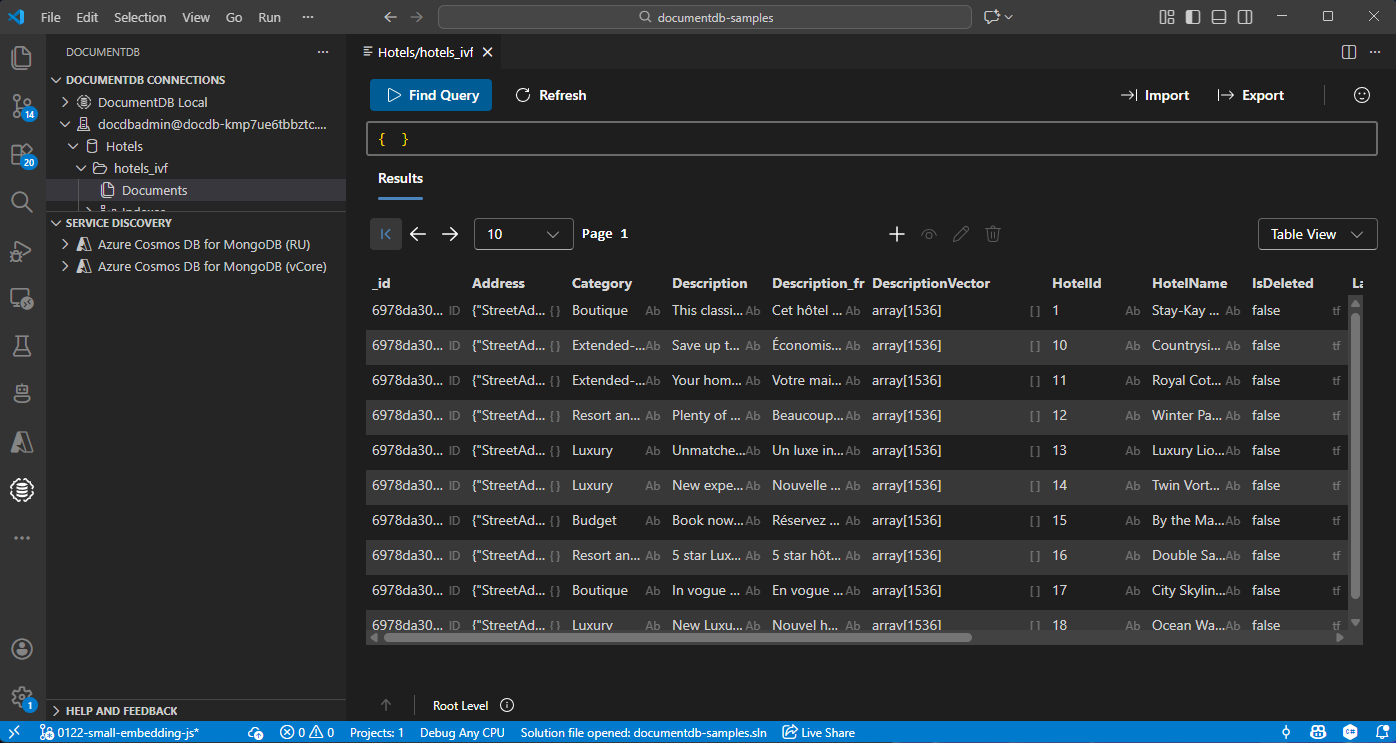
Select the DocumentDB extension in Visual Studio Code to connect to your Azure DocumentDB account.
View the data and indexes in the Hotels database.
Customize Azure OpenAI deployment (optional)
The infrastructure deploys Azure OpenAI with default model and region settings defined in infra/main.bicepparam. Before running azd up, you can customize any of these parameters:
| Parameter | Default | Description |
|---|---|---|
AZURE_OPENAI_LOCATION |
Same as AZURE_LOCATION |
Region for OpenAI resource deployment |
AZURE_OPENAI_EMBEDDING_MODEL |
text-embedding-3-small |
Embedding model name |
AZURE_OPENAI_EMBEDDING_MODEL_VERSION |
1 |
Embedding model version |
AZURE_OPENAI_EMBEDDING_MODEL_TYPE |
Standard |
Deployment type (Standard or GlobalStandard) |
To override a default, use azd env set before running azd up:
# Deploy OpenAI to a different region than your other resources
azd env set AZURE_OPENAI_LOCATION swedencentral

# Switch deployment type from Standard (default) to GlobalStandard
azd env set AZURE_OPENAI_EMBEDDING_MODEL_TYPE GlobalStandard

# Change the embedding model
azd env set AZURE_OPENAI_EMBEDDING_MODEL text-embedding-3-small
azd env set AZURE_OPENAI_EMBEDDING_MODEL_VERSION 1
Note
Not all models are available in all regions or with all deployment types. Check Azure OpenAI model availability by region for supported combinations.
Troubleshoot Azure OpenAI provisioning failures
If azd up fails when creating the Azure OpenAI resource or model deployments, the problem is typically one of:
- Region availability: The model isn't available in your chosen region. Try
azd env set AZURE_OPENAI_LOCATION <different-region>(for example,eastus2orswedencentral). - Deployment type mismatch: The model doesn't support the selected deployment type in your region. Switch between
StandardandGlobalStandardusingazd env set AZURE_OPENAI_EMBEDDING_MODEL_TYPE GlobalStandard. - Quota limits: Your subscription reached its quota for the selected model, region, or deployment type combination. Check your quota in the Azure portal under Azure OpenAI > Quotas. You can request a quota increase or try a different region where you have available capacity.
- Model retired or unavailable: Azure OpenAI periodically retires older model versions. If deployment fails because a model version is no longer available, update to a supported version using
azd env set AZURE_OPENAI_EMBEDDING_MODEL_VERSION <new-version>. Check Azure OpenAI model retirements for current model lifecycle status.
After changing any parameters, run azd up again to retry the deployment.
Clean up resources
Delete the resource group, DocumentDB account, and Azure OpenAI resource when you don't need them to avoid extra costs.