Note
Access to this page requires authorization. You can try signing in or changing directories.
Access to this page requires authorization. You can try changing directories.
Applies to:  Calculated column
Calculated table
Measure
Calculated column
Calculated table
Measure  Visual calculation
Returns the value or evaluates the expression from the visual matrix using absolute navigation. Filters can be provided for any axis on the visual matrix. Any omitted filters are inferred from the context. If no single value can be determined, an error is returned.
Syntax
LOOKUP(<expression>, <colref>, <expression>[, <colref>, <expression>]...[, <AssociatedColumnsBehavior>])
Parameters
| Term | Definition |
|---|---|
expression |
The expression to evaluate. |
colref |
(Optional) The column to be filtered. |
expression |
(Optional) The value to filter. |
AssociatedColumnsBehavior |
(Optional) Specifies how associated columns are handled. Allowed values are EXPLICIT (default) or INFERRED. |
Return value
The value of expression after filters are applied.
If there isn't a match, an error is returned.
If multiple rows match the filters, an error is returned.
Remarks
The AssociatedColumnsBehavior parameter controls how LOOKUP handles axis columns that are functionally determined by the supplied coordinates:
EXPLICIT (default): When the parameter is omitted or set to
EXPLICIT, LOOKUP uses only the filters you explicitly provide. Axis columns not specified are inferred from the current context. This is the original LOOKUP behavior.INFERRED: When set to
INFERRED, the engine identifies which axis columns are functionally determined by the supplied coordinates and fills them in automatically before evaluating the lookup. For example, if you filter by Year, Quarter, and Month, the engine can infer related columns such as the day or week that correspond to those coordinates.
When INFERRED is specified and you supply a value for a column that would have been inferred, the supplied value is validated against the inferred value. If they conflict, the call returns BLANK, similar to how EXPLICIT returns BLANK when you supply conflicting coordinates.
Example 1
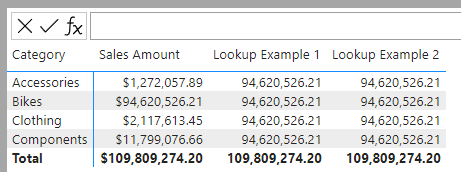
In this example, LOOKUP retrieves the sum of sales for Bikes Category. The first argument could be a column or a scalar expression.
Lookup Example 1 = LOOKUP(SUM([Sales Amount]),  [Category], "Bikes")
Lookup Example 2 = LOOKUP([Sales Amount], [Category], "Bikes")
The screenshot below shows the matrix with two visual calculations.
Example 2
In this example, the LookupExample2 visual calculation retrieves the sum of Sales for Fiscal Year FY2018. Notice that quarter filter from the row will be used since its not specified explicitly, resulting in no results being returned for FY2019 Q1 to FY2019 Q4 since the combination of FY2018 and FY2019 Q1 to FY2019 Q4 does not exist. LookupExample3 explicitly specifies the quarter so does not take into account the current quarter on the row.
LookupExample2 = LOOKUP([Sales Amount], [Fiscal Year], "FY2018")
LookupExample3 = LOOKUP([Sales Amount], [Fiscal Year], "FY2018", [Fiscal Quarter], "FY2018 Q1")

Example 3
This example demonstrates the difference between EXPLICIT and INFERRED behavior. Both visual calculations look up the sum of sales for January 2025 by specifying Year, Quarter, and Month Name coordinates.
Jan 2025 Sales (Explicit) = LOOKUP([Sum of Sales], [Year], 2025, [Quarter], "Q1", [Month Name], "January", EXPLICIT)
Jan 2025 Sales (Inferred) = LOOKUP([Sum of Sales], [Year], 2025, [Quarter], "Q1", [Month Name], "January", INFERRED)
With EXPLICIT, the lookup returns a value only on the row where the current context matches the specified coordinates (the January 2025 row). On all other rows, the lookup returns BLANK because the current row's context conflicts with the specified filters.
With INFERRED, the engine automatically identifies associated columns that are functionally determined by the Year, Quarter, and Month Name coordinates. Because these coordinates uniquely identify a point in time, the lookup returns the value across all rows in the matrix.
