Note
Access to this page requires authorization. You can try signing in or changing directories.
Access to this page requires authorization. You can try changing directories.
Microsoft builds its products on strong security and privacy principles. Customer data belongs to the customer, and Microsoft protects it by design and by default throughout its lifecycle. Customer Insights – Journeys forms treat security and privacy as core features. Microsoft protects all form data with encryption in transit and at rest, strong identity and access controls, and ongoing security validation. Microsoft regularly tests forms and related services through automated security checks, vulnerability scanning, and penetration testing as part of the Secure Development Lifecycle (SDL). Customer Insights – Journeys forms align with global security and privacy standards. Customers stay in control of their data, and Microsoft processes personal data only for its intended purpose in a secure and transparent way. This article applies to both Marketing forms and Event Registration forms, unless differences are explicitly called out.
Customer Insights - Journeys forms security
Security is an important aspect of marketing and event registration forms. Customer Insights - Journeys takes the following precautions to avoid any security risks:
- The Customer Insights - Journeys app accepts form submissions only from domains allowed for external form hosting. This security precaution applies for both forms and form capture.
- Forms can be rendered only on domains allowed for external form hosting.
- The out-of-box domain for forms hosted as a standalone page is enabled for external form hosting by default. Learn more: Publish your form
- To avoid form submissions by bots, you should protect forms with a captcha. The form editor includes reCAPTCHA option, but you can use any other third-party captcha. Learn more: Customize form submission validation
- The Customer Insights - Journeys app infrastructure contains necessary precautions to minimize the consequences of a possible DDoS attack. Learn more:Service protection and request limits.
Protect forms from bots with reCAPTCHA
reCAPTCHA helps protect your forms from automated submissions and abuse by ensuring that responses come from real people, which preserves data quality and system reliability. For this reason, using reCAPTCHA on all publicly accessible forms is strongly recommended.
Important
To improve security, accessibility, and ease of use, the existing HIP captcha used in Customer Insights – Journeys forms is being retired and replaced with a new reCAPTCHA experience.
To add reCAPTCHA to your form, go to the Elements section in the right pane, then drag and drop the reCAPTCHA tile onto the canvas.
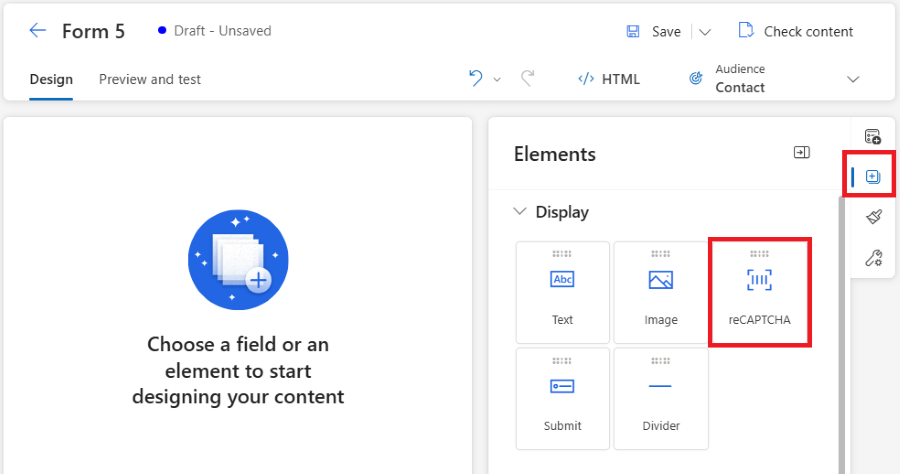
Important
An administrator must enter the Site key and Secret key in the default form configuration to set up reCAPTCHA.
HIP captcha deprecation and the new reCAPTCHA experience
What’s changing
- The HIP captcha currently available in Customer Insights – Journeys forms will be deprecated in March 2026 and fully removed by June 30, 2026.
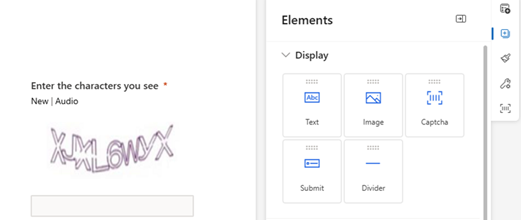
- A new, improved reCAPTCHA experience is being introduced as the replacement.
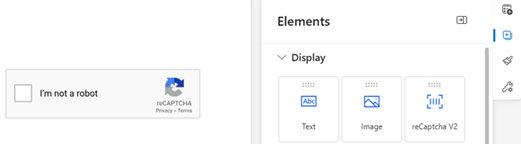
- The new reCAPTCHA can be added to forms using the same drag‑and‑drop experience as the existing captcha—no developer involvement is required.
Why this change is happening
The new reCAPTCHA experience provides:
- Improved security against automated abuse
- Better accessibility and usability
- A simplified setup and authoring experience for form creators
This change ensures Customer Insights - Journeys forms continue to meet modern security and accessibility expectations.
Timeline
February 2026 release
The new reCAPTCHA becomes available in the Form Editor as a drag‑and‑drop element. Administrators must complete a one‑time configuration by providing:
- reCAPTCHA Site key
- reCAPTCHA Secret key
Once configured, form authors can add reCAPTCHA to forms without any extra setup.
Note
If you configured reCAPTCHA before February 2026, you still need to enter the Site key in default form configuration for the reCAPTCHA element in the Form Editor to work correctly.
Warning
In some cases, forms that were created using an earlier reCAPTCHA setup can't fully recognize the new drag‑and‑drop reCAPTCHA element. If this happens, remove the existing reCAPTCHA from the form and add it again using the reCAPTCHA element in the Form Editor.
March 2026 release
- The HIP captcha is removed from the Form Editor.
- Only reCAPTCHA can be added to:
- New forms
- Existing forms that are edited and republished
By June 30, 2026
- The HIP captcha is automatically removed from all forms, including:
- Forms that haven’t been edited since the deprecation
- Forms continue to function without HIP captcha, but no bot protection is applied unless reCAPTCHA is added.
What you need to do
If you create or manage forms
- Starting February 2026, use reCAPTCHA instead of HIP captcha for all new forms.
- Before June 30, 2026, update existing forms to include reCAPTCHA if bot protection is required.
If you administer Customer Insights ‑ Journeys
- Complete the one‑time reCAPTCHA setup in the default form configuration as soon as the February 2026 release is available.
- Share guidance with form authors about switching to reCAPTCHA.
Frequently asked questions
Q: Will my existing forms stop working?
- A: No. Existing forms continue to work. However, once HIP captcha is removed (by June 30, 2026), forms that haven't been updated no longer have captcha protection unless reCAPTCHA is added.
Q: Do I need to change form code or HTML?
- A: No. The new reCAPTCHA is added through the Form Editor UI using drag‑and‑drop. No custom code or developer involvement is required. In some cases, you need to remove the old reCAPTCHA implementation by editing the HTML code.
Q: Can I keep using HIP captcha after March 2026?
- A: No. Starting in March 2026, HIP captcha will no longer be available in the Form Editor, and by June 30, 2026 it will be removed from all forms.
Customer Insights - Journeys forms privacy
- Marketing and event registration forms don't use any cookies by default. Form visit and form submit interactions use a journey link tracking mechanism to get details about known users.
- Cookies for tracking end users are used only when the Web tracking feature is turned on in Form settings. If Web tracking is disabled, no tracking cookies are set.