Note
Access to this page requires authorization. You can try signing in or changing directories.
Access to this page requires authorization. You can try changing directories.
The business process catalog is a standard list of business processes across Dynamics 365 apps and services. Microsoft uses it to organize and prioritize work on the business process documentation.
For the first time, the business process catalog is now available in two formats:
- As an Excel‑based Azure DevOps template, enabling structured import into implementation backlogs.
- As a database package that you can import directly into Mavim.
Microsoft now manages the business process catalog directly within Mavim as the system of record, enabling improved governance, consistency, and alignment between process architecture and delivery execution.
This release introduces several new configuration areas, structural updates, and automation capabilities designed to improve implementation readiness and reduce manual mapping during discovery and design phases.
Download the latest version of the catalog from https://aka.ms/businessprocesscatalog.
Deprecated rows
The March 2026 version of the business process catalog includes rows with a catalog status of Deprecated. These rows are no longer active and are removed in a future release of the catalog. Many of these rows are moved to a new location in the catalog. The Alternate Process Sequence ID column indicates that the deprecated row is available in a new location in the catalog.
Deleted rows
The March 2026 version of the business process catalog includes rows with a catalog status of Deleted. Any row that is marked as Deleted is no longer included in the catalog in future releases. If you actively use a row tagged as Deleted, update your catalog to use the row that is designated in the Alternative process sequence ID field.
Dynamics 365 Contact Center configurations
The catalog now includes configuration-level processes specific to Dynamics 365 Contact Center and Customer Service deployments. By using these new configurations, partners and customers can:
- Align customer service operating models to platform configuration earlier in the implementation lifecycle
- Trace business process requirements directly to Contact Center setup decisions
- Reduce ambiguity between service design and system configuration during solution blueprinting
This approach supports improved collaboration between business architects and technical solution teams by creating a shared reference between operational service flows and implementation backlog items.
Important
Organizations that currently use an earlier version of the catalog should:
- Review newly introduced Dynamics 365 Contact Center configuration processes
- Map existing customer service backlog items to these processes where applicable
- Import the updated catalog into Azure DevOps or Mavim to enable traceability between service design and platform setup
Power Platform environment settings configurations
Microsoft introduced new processes to support Power Platform environment‑level configuration decisions. By using these new configurations, partners and customers can now:
- Capture governance and environment strategy decisions as part of the business process architecture
- Align ALM, security, and environment configuration activities with business capability requirements
- Ensure environment setup tasks are represented in implementation planning alongside functional solution processes
This approach helps prevent environment configuration from becoming an undocumented or late‑stage implementation dependency.
Important
Customers and partners maintaining local catalog copies should:
- Evaluate current environment setup work items or deployment checklists
- Map these activities to the new configuration processes
- Reimport the March 2026 catalog to ensure environment configuration work is captured within implementation scope
Software development company updates
This release introduces two new metadata columns to support improved alignment between business process architecture and solution‑level implementation activities:
- Software development company
- Software solutions
Use these attributes to identify solution‑specific implementation ownership across Microsoft applications and partner‑provided capabilities. By adding these columns, you enable:
- Traceability between standard business processes and solution‑specific implementation scenarios
- Representation of Marketplace solution capabilities within the business process catalog hierarchy
- Structured alignment between partner-provided functionality and implementation backlog items
- Support for mapping partner solution behaviors to:
- Scenarios
- System Processes
- Test Cases
- Deliverables
As part of this release:
- The process team updates existing rows within the business process catalog with values for these new attributes.
- The process team adds two new software development companies to the standard catalog.
These enhancements enable implementation teams to represent both Microsoft‑provided and Marketplace‑provided capabilities within a unified process architecture. Microsoft invites Marketplace solution providers to contribute implementation‑ready process content aligned to their offerings by extending the catalog with:
- Business Scenarios
- System Processes
- Test Cases
- Deliverables
By contributing this content, partner solutions become more discoverable and implementation‑ready for customers and other delivery organizations.
Customers and partners that use the Excel‑based Azure DevOps template must create the following fields in Azure DevOps before importing the March 2026 catalog:
- Software Development Company
- Software Solutions
Terminology and functional area alignments
This release updates both process terminology and functional area classification to better align the business process catalog with current Dynamics 365 application architecture and implementation activities. The following changes are made:
- The Personalization work item type is renamed to User Interface.
- The Sales functional area is renamed to Customer Engagement.
These updates improve:
- Alignment between catalog terminology and Dynamics 365 Customer Engagement application family naming conventions.
- Representation of implementation activities that extend beyond individual user preferences to include:
- Form and view configuration
- Navigation structure
- Role‑based experiences
- Interaction design
Renaming the Sales functional area to Customer Engagement also reflects expanded catalog coverage across Sales, Customer Service, and Contact Center.
This change supports a more complete representation of customer lifecycle processes and reduces ambiguity when mapping implementation backlog items to platform capabilities across Dynamics 365 customer engagement apps workloads.
Important
Partners and customers using a prior version of the catalog should review the following implementation considerations before importing the March 2026 release.
Personalization is now User Interface work item type
Azure DevOps doesn't support renaming existing work item types. If an active implementation project wants to adopt the updated User Interface terminology within Azure DevOps, follow these steps:
- Create a new work item type called User Interface within the existing Azure DevOps project.
- Migrate data from existing Personalization work items to the new User Interface work item type.
Alternatively, organizations that want to retain the previous Personalization work item type can:
Update the March 2026 business process catalog spreadsheet prior to import by:
- Finding all values labeled User Interface.
- Replacing these values with Personalization.
This approach allows the updated catalog content to be imported into an existing Azure DevOps project without requiring work item type creation or data migration.
Sales functional area is now Customer Engagement
Updating the Sales functional area to Customer Engagement doesn't require creation of a new work item type. Organizations can simply update the existing Functional Area value from Sales to Customer Engagement within their Azure DevOps project. Customers and partners should also validate any reporting logic, filters, or queries that reference the Sales functional area following import of the March 2026 catalog.
Public preview of Python scripts for the Azure DevOps template
Automation scripts that support the Excel-based Azure DevOps template are now available in public preview. The updated Azure DevOps template and supporting Python automation scripts enable:
- Automated creation of implementation backlog items based on business process catalog processes
- Structured population of Azure DevOps work items aligned to the business process hierarchy
- Improved traceability between discovery outputs and implementation planning artifacts
- Reduced manual effort during discovery-to-implementation transition
Microsoft recommends that new implementation projects use the March 2026 Azure DevOps template to take advantage of these automation and alignment capabilities. To access the new preview templates, visit https://aka.ms/BPCADOTemplate. To learn more about how to install and use the template, see Configure Azure DevOps process and project.
Important
- For new implementation projects, use the March 2026 Azure DevOps template as the foundation for implementation backlog creation and delivery planning.
- For existing or in-progress implementation projects, carefully evaluate whether transitioning to the new Azure DevOps template is appropriate for the current stage of delivery.
There's no automated migration path from an existing or customized Azure DevOps process template into the March 2026 Azure DevOps template. Adopting the updated template within an active project requires:
- Creation of a new Azure DevOps project based on the March 2026 template
- A full data migration of existing Azure DevOps work items into the new project
Partners and customers should assess the effort required to migrate implementation backlog data before deciding to transition an in-flight project to the updated template.
Mavim database updates
The March 2026 release of the business process catalog is now available in the Mavim database format. You can download the MTDX file from the Microsoft Download Center the same way that you download the Excel-based Azure DevOps version. To dowonload the catalog, visit https://aka.ms/businessprocesscatalog. To learn more, see Import the Microsoft business process catalog into Mavim using the database.
When you use the Mavim to manage your business process catalog, there are additional features and changes to the catalog data that aren't provided in the Excel version.
- New icons provided for all Microsoft products and application families.
- All workshops are updated to include the detailed workshop content in the Word editor.
- Cleaned up the duplicated unused topics in the Dynamics 365 Related Categories node. This cleanup includes the following items:
- Workshops (you can find the workshops in the Success by Design Delivery Plan node).
- Tasks (you can find the tasks in the Success by Design Delivery Plan node).
- New icon for Area paths node.
- Added Area path full path field to all area paths. This new field maps the area path values to the area path values in Azure DevOps. The top node area path named "Project name" should be renamed to match your project and the Area path full path value is set to "Your Project Name Here" which should also be updated to your project's root area path node if you plan to integrate your Azure DevOps environment with Mavim.
- Relationships are created between Application families and Products nodes.
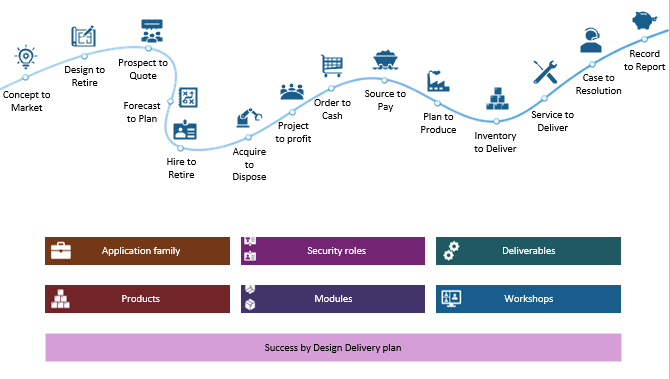
- A new folder of End to end journeys under the Navigation node is now available. This node includes new charts that match the current pitch deck curvy line flow diagrams that are used across all the end to end processes. You can optionally use these new navigation pages in the Mavim collaboration portal as an alternative navigation for drilling down through the various catalog levels. The following image shows the new alternative navigation page. You can optionally set this as the home page or link to your existing home page in Mavim.
Downloadable workshop templates are deprecated
Microsoft no longer maintains the Word document format in the GitHub repository for any workshops. The current version of the Word documents remains available in the GitHub repository for one year. After that year, Microsoft deletes the documents. Use Azure DevOps or Mavim to manage and help you execute the workshops where the data for the workshops is maintained.