Note
Access to this page requires authorization. You can try signing in or changing directories.
Access to this page requires authorization. You can try changing directories.
Important
Some of the functionality described in this release plan has not been released. Delivery timelines may change and projected functionality may not be released (see Microsoft policy). Learn more: What's new and planned
| Enabled for | Public preview | General availability |
|---|---|---|
| Users, automatically |  Apr 1, 2026
 |
Jun 2026 |
Business value
Business Central customers can benefit from features for setting up, calculating, and reporting withholding taxes for vendors in all countries/regions where it’s relevant. You no longer need to source a non-Microsoft application or create a customization because withholding tax functionality is built into the standard version of Business Central.
Feature details
In some countries/regions, companies must pay withholding tax to the government for certain third‑party services or vendor purchases. Business Central calculates withholding tax when you pay a vendor invoice, or when you post it, based on your setup. The tax amount is withheld from the payment and reduces the total amount owed to the vendor.
You can configure withholding tax by setting up Withholding Tax Codes and Vendors.
Get started
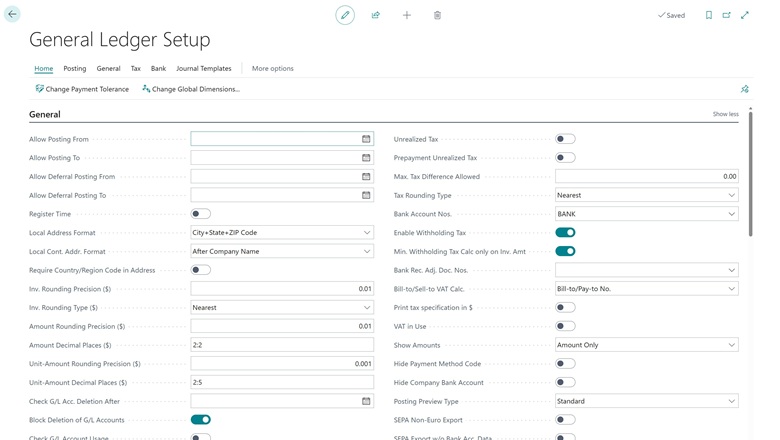
To enable withholding tax calculation, open the General Ledger Setup page and turn it on. Next, configure the Withholding Tax Revenue Types, including their sequences and posting groups. Then, set up the following:
- Withholding Tax Bus. Post. Group and apply it to vendors that are subject to withholding tax.
- Withholding Tax Prod. Post. Group and apply it to items or general ledger accounts.
- Withholding Tax Posting Setup (using the two groups above).
If needed, you can override the product posting group on purchase document lines using the Withholding Tax Prod. Post. Group field.
Using withholding tax
Withholding tax applies automatically when you're working with purchase documents. When you post a document that includes withholding tax, Business Central creates a withholding tax entry. You can also use the Calculate and post withholding tax settlements action to process withholding tax for a specific period based on the withholding tax entries you already posted.

Geographic areas
Visit the Explore Feature Geography report for Microsoft Azure areas where this feature is planned or available.
Language availability
Visit the Explore Feature Language report for information on this feature's availability.
Tell us what you think
Help us improve Dynamics 365 Business Central by discussing ideas, providing suggestions, and giving feedback. Use the forum at https://aka.ms/bcideas.
Thank you for your idea
Thank you for submitting this idea:
We listened to your idea, along with comments and votes, to help us decide what to add to our product roadmap.