Note
Access to this page requires authorization. You can try signing in or changing directories.
Access to this page requires authorization. You can try changing directories.
| Enabled for | Public preview | General availability |
|---|---|---|
| Users, automatically | - |  Apr 1, 2026
 |
Business value
Sales shipments are critical documents for customers, and often need to be delivered promptly and accurately. By sending posted shipments and return receipts by email, you reduce reliance on manual printing and mailing. This streamlined process improves communication with customers, and supports scenarios where you want to share shipment details with different contacts than the ones specified on the invoices.
Feature details
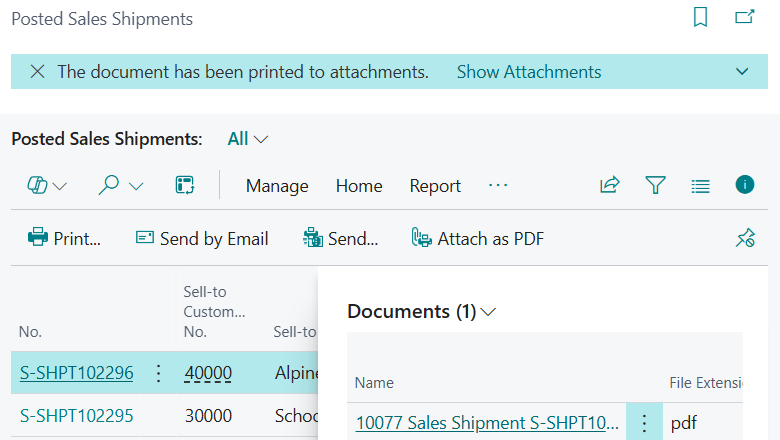
We're introducing the ability to send posted sales shipments and posted return receipts by email, which complements the Print option and aligns the experience of handling these documents with that of posted sales invoices and credit memos. This enhancement gives you several options:
- Send by Email: Send the posted document by email to the customer.
- Send: Use the standard sending options that are available for other posted documents.
- Attach as PDF: Generate and add the generated document in PDF format to the Attachment part.
The Attachment part allows you to store and manage printed document versions for future reference, and is now also available on the following pages:
- Posted Return Receipt (page 6660)
- Posted Return Receipts (page 6662)
- Posted Sales Shipment (page 130)
- Posted Sales Shipments (page 142)
Geographic areas
Visit the Explore Feature Geography report for Microsoft Azure areas where this feature is planned or available.
Language availability
Visit the Explore Feature Language report for information on this feature's availability.
Tell us what you think
Help us improve Dynamics 365 Business Central by discussing ideas, providing suggestions, and giving feedback. Use the forum at https://aka.ms/bcideas.