Note
Access to this page requires authorization. You can try signing in or changing directories.
Access to this page requires authorization. You can try changing directories.
Governing agent identities sponsors is a critical aspect of maintaining lifecycle governance and access control in your organization. Agent identity sponsors are responsible for overseeing the lifecycle and access decisions of agent identities. Keeping sponsor information up to date helps with effective governance and compliance. For an overview of agent identity governance including access packages and sponsor responsibilities, see Governing Agent Identities.
Lifecycle Workflows currently contain the following tasks that involve the governing of sponsors of agent identities:
- Send email to manager about sponsorship changes
- Send email to cosponsors about sponsor changes
- Transfer agent identity sponsorships to manager
These tasks ensure continuity of sponsorship when an agent's sponsor changes roles or leaves the organization. All three tasks are classified as mover and leaver tasks and are available only under mover or leaver workflow templates.
This article explains how to configure Lifecycle Workflows to streamline agent identity sponsor governance.
License Requirements
Microsoft Entra Agent ID is part of Microsoft Agent 365. To use Agent ID features, users need a Microsoft Agent 365 or Microsoft 365 E7 license. All agents acting on behalf of a licensed user are covered under that user's license. Agents don't require their own license. For pricing details, see Microsoft Agent 365 licensing FAQ.
Some Microsoft Entra security features for agents require additional licensing:
- Conditional Access for agents: Microsoft Entra ID P1 or Microsoft 365 E3.
- ID Protection for agents: Microsoft Entra ID P2, Microsoft 365 E5, or Microsoft Entra Suite.
- ID Governance for agents: Microsoft Entra ID P2, Microsoft 365 E5, or Microsoft Entra Suite.
- Network controls for agents: Microsoft Entra Internet Access, included in Microsoft Entra Suite or licensed separately. For more information, see What is Global Secure Access.
Create a sponsor workflow using the Microsoft Entra Admin Center
To create a workflow that notifies the manager or cosponsors of an existing agent identity sponsor's move, follow these steps:
Sign in to the Microsoft Entra admin center as at least a Lifecycle Workflows Administrator.
Browse to ID Governance > Lifecycle workflows > workflows.
On the workflow screen, select the specific mover or leaver workflow template you want to add the sponsorship email tasks to, or create a new workflow based on a template.
Note
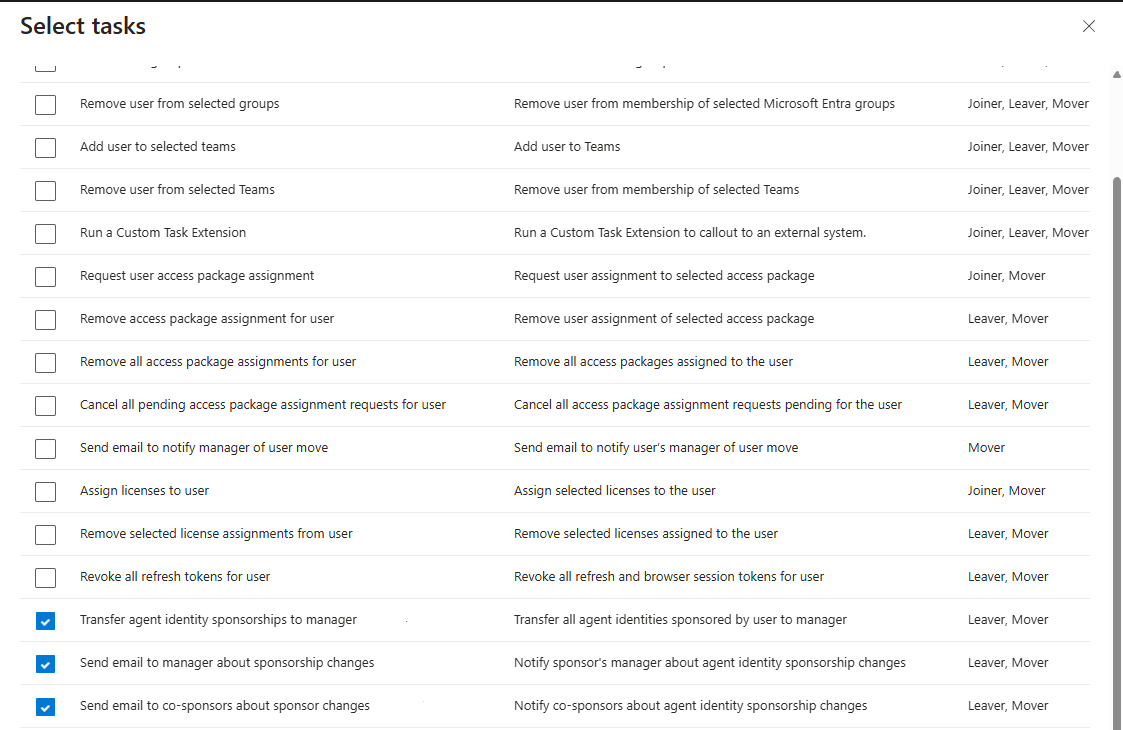
The Send email to manager about sponsorship changes, Send email to co-sponsors about sponsor changes, and Transfer agent identity sponsorships to manager are mover and leaver tasks, and are only available as selectable tasks under workflow templates of the same category.
On the Basics tab, after entering a unique display name and description for the workflow, select your trigger and select Next.
On the Configure scope screen, select the scope of the workflow and select Next.
On the Tasks page, select which sponsor related tasks you want to include and select Next.
Review the created workflow, and then select Create.
Related content
- Manage agent identities in your organization - See how sponsor governance fits into overall agent management.
- Governing Agent Identities - Overview of agent identity governance including access packages and sponsor responsibilities.
- Write concepts
- Manage workflow properties