Note
Access to this page requires authorization. You can try signing in or changing directories.
Access to this page requires authorization. You can try changing directories.
Overview
Cross-tenant synchronization automates creating, updating, and deleting Microsoft Entra B2B collaboration users and groups across tenants in an organization. It enables users to access applications and collaborate across tenants, while still allowing the organization to evolve.
The primary goals of cross-tenant synchronization are:
- Seamless collaboration for a multitenant organization
- Automated life-cycle management of B2B collaboration users in a multitenant organization
- Automatic removal of B2B accounts when a user leaves the organization
Why use cross-tenant synchronization?
Cross-tenant synchronization automates creating, updating, and deleting B2B collaboration users and groups. Users created through cross-tenant synchronization can access both Microsoft applications (such as Teams and SharePoint) and non-Microsoft applications (such as ServiceNow, Adobe, and many more), regardless of which tenant the apps are integrated with.
These users continue to benefit from the security capabilities in Microsoft Entra ID, such as Microsoft Entra Conditional Access and cross-tenant access settings. They can be governed through features such as Microsoft Entra entitlement management.
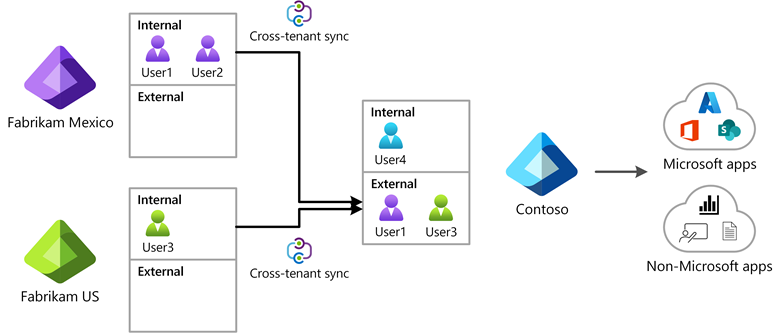
The following diagram shows how you can use cross-tenant synchronization to enable users to access applications across tenants in your organization.
Who should use cross-tenant synchronization?
Organizations that own multiple Microsoft Entra tenants and want to streamline intra-organization cross-tenant application access can benefit from cross-tenant synchronization.
Cross-tenant synchronization can be used across organizations, but doing so might introduce additional compliance responsibilities. Customers are responsible for ensuring that their use complies with applicable privacy, security, and regulatory requirements, including the European Union General Data Protection Regulation (GDPR).
Microsoft does not facilitate user consent collection through cross-tenant synchronization. Customers should assess whether their scenario requires user consent, data minimization, or other safeguards. Customers should also consult their legal or compliance teams before enabling cross-organization synchronization or cross-tenant synchronization across organizations.
Benefits
With cross-tenant synchronization, you can:
- Automatically create B2B collaboration users within your organization and give them access to the applications that they need, without creating and maintaining custom scripts.
- Improve the user experience by ensuring that users can access resources without receiving an invitation email and having to accept a consent prompt in each tenant.
- Automatically update users and remove them when they leave the organization.
Teams and Microsoft 365
Users created through cross-tenant synchronization have the same experience when accessing Microsoft Teams and other Microsoft 365 services as B2B collaboration users created through a manual invitation. If your organization uses shared channels, see Known issues for provisioning in Microsoft Entra ID for more details. Over time, the various Microsoft 365 services will use the member value of the userType property to provide differentiated experiences for users in a multitenant organization.
Properties
When you configure cross-tenant synchronization, you define a trust relationship between a source tenant and a target tenant. Cross-tenant synchronization has the following properties:
- It's based on the Microsoft Entra provisioning engine.
- It's a push process from the source tenant, not a pull process from the target tenant.
- It supports pushing only internal members from the source tenant. It doesn't support syncing external users from the source tenant.
- Users in scope for synchronization are configured in the source tenant.
- Attribute mapping is configured in the source tenant.
- Extension attributes are supported.
- Target tenant administrators can stop a synchronization at any time.
The following table shows the parts of cross-tenant synchronization and which tenant they're configured for.
| Tenant | Cross-tenant access settings |
Automatic redemption | Sync settings configuration |
Users in scope |
|---|---|---|---|---|
 Source tenant |
✔️ | ✔️ | ✔️ | |
 Target tenant |
✔️ | ✔️ |
Cross-tenant synchronization settings
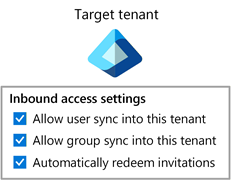
The cross-tenant synchronization settings are inbound-only organizational settings to allow the administrator of a source tenant to synchronize users and groups into a target tenant. These settings are checkboxes with the names Allow user synchronization into this tenant and Allow group synchronization into this tenant that are specified in the target tenant. These settings don't affect B2B invitations created through other processes such as manual invitation or Microsoft Entra entitlement management.

To configure these settings by using Microsoft Graph, see the Update crossTenantIdentitySyncPolicyPartner API. For more information, see Configure cross-tenant synchronization.
Automatic redemption setting
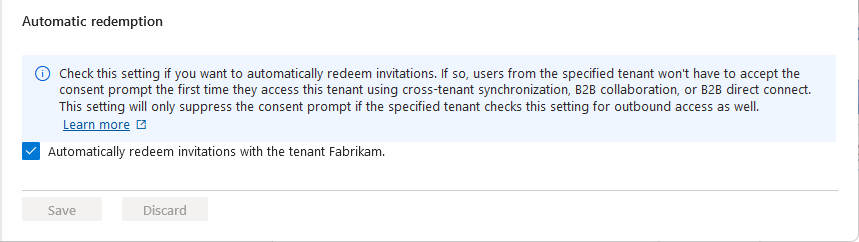
The automatic redemption setting is an inbound and outbound organizational trust setting to automatically redeem invitations. With this setting, users don't have to accept the consent prompt the first time they access the resource or target tenant. This setting is a checkbox with the name Automatically redeem invitations with the tenant tenant name.
How does the setting work in various scenarios?
The automatic redemption setting applies to cross-tenant synchronization, B2B collaboration, and B2B direct connect in the following situations:
- When users are created in a target tenant through cross-tenant synchronization.
- When users are added to a resource tenant through B2B collaboration.
- When users access resources in a resource tenant by using B2B direct connect.
The following table shows how this setting works when you enable it for these scenarios.
| Item | Cross-tenant synchronization | B2B collaboration | B2B direct connect |
|---|---|---|---|
| Automatic redemption setting | Required | Optional | Optional |
| Users receive a B2B collaboration invitation email | No | No | Not applicable |
| Users must accept a consent prompt | No | No | No |
| Users receive a B2B collaboration notification email | No | Yes | Not applicable |
This setting doesn't affect application consent experiences. For more information, see Consent experience for applications in Microsoft Entra ID.
This setting is supported for organizations across different Microsoft cloud environments, such as Azure commercial and Azure Government. For more information, see Configure cross-tenant synchronization.
When is the consent prompt suppressed?
The automatic redemption setting suppresses the consent prompt and invitation email only if you select this setting for both the home/source tenant (outbound) and resource/target tenant (inbound).

The following table shows the consent prompt behavior for source tenant users when the automatic redemption setting is selected for various combinations of cross-tenant access settings.
| Home/source tenant | Resource/target tenant | Consent prompt behavior for source tenant users |
|---|---|---|
| Outbound | Inbound | |
 |
|
Suppressed |
|
 |
Not suppressed |
|
|
Not suppressed |
|
|
Not suppressed |
| Inbound | Outbound | |
|
|
Not suppressed |
|
|
Not suppressed |
|
|
Not suppressed |
|
|
Not suppressed |
To configure this setting by using Microsoft Graph, see the Update crossTenantAccessPolicyConfigurationPartner API. For more information, see Configure cross-tenant synchronization.
How do users know what tenants they belong to?
For cross-tenant synchronization, users don't receive an email or have to accept a consent prompt. If users want to see what tenants they belong to, they can open their My Account page and select Organizations. In the Microsoft Entra admin center, users can open their portal settings, view Directories + subscriptions, and switch directories.
For more information, including privacy information, see Leave an organization as an external user.
Steps for getting started
Here are the basic steps to start using cross-tenant synchronization.
Step 1: Define how to structure the tenants in your organization
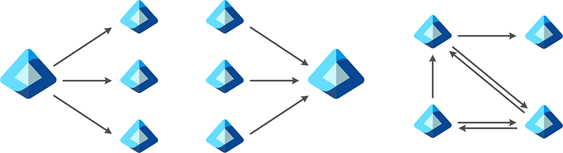
Cross-tenant synchronization provides a flexible solution to enable collaboration, but every organization is different. For example, you might have a central tenant, satellite tenants, or a mesh of tenants. Cross-tenant synchronization supports any of these topologies. For more information, see Topologies for cross-tenant synchronization.
Step 2: Enable cross-tenant synchronization in the target tenant
In the target tenant where users are created, go to the Cross-tenant access settings pane. Here you enable cross-tenant synchronization and the B2B automatic redemption settings by selecting the respective checkboxes. For more information, see Configure cross-tenant synchronization.
Step 3: Enable cross-tenant synchronization in the source tenant
In any source tenant, go to the Cross-tenant access settings pane and enable the B2B automatic redemption feature. Next, use the Cross-tenant synchronization pane to set up a cross-tenant synchronization job and specify:
- Which users you want to synchronize.
- What attributes you want to include.
- Any transformations.
For anyone who has used Microsoft Entra ID to provision identities into a software as service (SaaS) application, this experience is familiar. After you configure synchronization, you can start testing with a few users and make sure they're created with all the attributes that you need. When you finish testing, you can quickly add more users to synchronize and roll out across your organization. For more information, see Configure cross-tenant synchronization.

License requirements
The following table lists the required licenses, depending on your scenario.
| Scenario | Source tenant | Target tenant |
|---|---|---|
| Cross-tenant synchronization for users (same cloud) | Microsoft Entra ID P1 licenses | Not applicable |
| Cross-tenant synchronization for groups (same cloud) | Microsoft Entra ID Governance or Microsoft Entra Suite licenses | Not applicable |
| Cross-cloud synchronization | Microsoft Entra ID Governance or Microsoft Entra Suite licenses | Not applicable |
Source tenant: Each user who's synchronized with cross-tenant synchronization must have a Microsoft Entra ID P1 license in their home/source tenant. Each user who's synchronized with cross-cloud synchronization must have a Microsoft Entra ID Governance or Microsoft Entra Suite license in their home/source tenant. For more information, see Microsoft Entra plans and pricing and Microsoft Entra ID Governance licensing fundamentals.
Target tenant: Licenses aren't required for cross-tenant synchronization or cross-cloud synchronization in the target tenant. However, depending on the features you're using in the target tenant, you might need additional licensing. For example, customers who enabled External ID billing and are provisioning external guests might be charged according to the billing model for Microsoft Entra External ID.
Frequently asked questions
Clouds
Within the same cloud, where can I use cross-tenant synchronization?
Cross-tenant synchronization is supported within the commercial cloud and Azure Government.
Cross-tenant synchronization isn't supported within the Microsoft Azure operated by 21Vianet cloud.
| Source | Target | Azure portal link domains |
|---|---|---|
| Azure commercial | Azure commercial | portal.azure.com --> portal.azure.com |
| Azure Government | Azure Government | portal.azure.us --> portal.azure.us |
| 21Vianet (China) | 21Vianet (China) | portal.azure.cn --> portal.azure.cn |
Is cross-cloud synchronization supported?
Yes, cross-cloud synchronization (such as public cloud to Azure Government) is supported.
For information about the relationship between the Azure cloud environments and Microsoft 365 (GCC, GCC High), see Microsoft 365 integration.
What cloud pairs are supported for cross-cloud synchronization?
Cross-cloud synchronization supports these cloud pairs:
| Source | Target | Azure portal link domains |
|---|---|---|
| Azure commercial | Azure Government | portal.azure.com --> portal.azure.us |
| Azure Government | Azure commercial | portal.azure.us --> portal.azure.com |
| Azure commercial | Azure operated by 21Vianet (Azure in China) |
portal.azure.com --> portal.azure.cn |
What are the differences between cross-tenant synchronization and cross-cloud synchronization?
Cross-tenant synchronization and cross-cloud synchronization are built via the same technologies and are fundamentally the same. The primary difference is that synchronization occurs across clouds instead of within the same cloud.
Does cross-cloud synchronization have limitations?
Synchronization of the manager attribute isn't currently supported in cross-cloud synchronization.
For limitations with multitenant organizations, see Multitenant org FAQ.
For Microsoft 365 limitations with external members, see Collaborate with guests from other Microsoft 365 cloud environments.
Existing B2B users
Can cross-tenant synchronization manage existing B2B users?
Yes. Cross-tenant synchronization uses an internal attribute called alternativeSecurityIdentifier to uniquely match an internal user in the source tenant with an external or B2B user in the target tenant. Cross-tenant synchronization can update existing B2B users to ensure that each user has only one account.
Cross-tenant synchronization can't match an internal user in the source tenant with an internal user in the target tenant (both type member and type guest).
Synchronization frequency
How often does cross-tenant synchronization run?
The sync interval is currently fixed to start at 40-minute intervals. Sync duration varies based on the number of in-scope users. The initial sync cycle is likely to take significantly longer than later incremental sync cycles.
Scope
How do I control what's synchronized into the target tenant?
In the source tenant, you can control which users are provisioned by using the configuration-based or attribute-based filters. You can also control which attributes on the user object are synchronized. For more information, see Scoping users or groups to be provisioned with scoping filters.
If a user is removed from the scope of sync in a source tenant, will cross-tenant synchronization soft delete them in the target tenant?
Yes.
Object types
What object types can I synchronize?
You can synchronize Microsoft Entra users and security groups between tenants. Devices and contacts aren't currently supported.
What user types can I synchronize?
You can synchronize internal members from source tenants. You can't synchronize internal guests from source tenants.
You can synchronize users to target tenants as external members (default) or external guests.
For more information about the userType definitions, see Understand and manage the properties of B2B guest users.
I have existing B2B collaboration users. What will happen to them?
Cross-tenant synchronization matches the user and makes any necessary updates to the user, such as updating the display name. By default, userType isn't updated from guest to member. You can configure this property in the attribute mappings.
Attributes
What user attributes can I synchronize?
Cross-tenant synchronization can sync commonly used attributes on the user object in Microsoft Entra ID, including (but not limited to) displayName, userPrincipalName, and directory extension attributes.
Cross-tenant synchronization supports provisioning the manager attribute in the Azure commercial cloud. Manager synchronization isn't currently supported in the US Government cloud. For you to provision the manager attribute, both the user and their manager must be in scope for cross-tenant synchronization.
For cross-tenant synchronization configurations created after January 2024 with the default schema/attribute mappings:
- The
managerattribute is automatically added to the attribute mappings. - Manager updates apply on the incremental cycle for users who are undergoing changes (for example, a manager change). The sync engine doesn't automatically update all existing users who were provisioned previously.
- To update the manager for existing users who are in scope for provisioning, you can use on-demand provisioning for specific users or do a restart to provision the manager for all users.
For cross-tenant synchronization configurations created before January 2024 with custom schema/attribute mappings (for example, you added an attribute to the mappings or changed the default mappings):
- You need to add the
managerattribute to your attribute mappings. This action triggers a restart and updates all users who are in scope for provisioning. This process should be a direct mapping of themanagerattribute in the source tenant to themanagerattribute in the target tenant.
If the manager of a user is removed in the source tenant and no new manager is assigned in the source tenant, the manager attribute isn't updated in the target tenant.
What attributes can't I synchronize?
You can't use cross-tenant synchronization to synchronize attributes such as photos, custom security attributes, and user attributes outside the directory.
Can I control where user attributes are sourced or managed?
Cross-tenant synchronization doesn't offer direct control over the source of authority. The user and its attributes are deemed authoritative at the source tenant.
There are parallel sources-of-authority workstreams that will evolve source-of-authority controls for users down to the attribute level. A user object at the source might ultimately reflect multiple underlying sources. For the tenant-to-tenant process, this situation is still treated as the source tenant's values being authoritative for the sync process (even if pieces originate elsewhere) into the target tenant. Currently, there's no support for reversing the sync process's source of authority.
Cross-tenant synchronization supports the source of authority only at the object level. All attributes of a user must come from the same source, including credentials. It isn't possible to reverse the source of authority or federation direction of a synchronized object.
What happens if I change attributes for a synced user in the target tenant?
Cross-tenant synchronization doesn't query for changes in the target. If you don't make any changes to the synced user in the source tenant, then user attribute changes that you made in the target tenant persist. If you make changes to the user in the source tenant, then during the next synchronization cycle, the user in the target tenant is updated to match the user in the source tenant.
Can the target tenant manually block sign-in for a specific home/source tenant user who's synced?
If you don't make any changes to the synced user in the source tenant, the setting to block sign-in in the target tenant persists. If a change is detected for the user in the source tenant, cross-tenant synchronization reenables that user who's blocked from sign-in in the target tenant.
Group synchronization
Important
Group synchronization is currently in preview. This information relates to a prerelease product that might be substantially modified before it's released. Microsoft makes no warranties, expressed or implied, with respect to the information provided here.
Is synchronization of groups supported?
Yes, cross-tenant synchronization can create security groups in the target tenant. This capability is currently in preview.
When a group is synchronized, all members of the group who are in scope for synchronization are synchronized. For more information, see Configure cross-tenant synchronization.
What happens if a group already exists in the target tenant?
If a group exists in the target tenant (created outside cross-tenant synchronization), cross-tenant synchronization doesn't update it.
What group types are supported?
| Support | Source | Target |
|---|---|---|
| Supported | Security group (static and dynamic) Microsoft 365 group |
Security group (static) |
| Not supported | All other group types, such as: - Mail-enabled security groups - Shared mailbox - Dynamic distribution groups - Distribution groups |
All other group types, such as: - Microsoft 365 groups - Mail-enabled security groups - Shared mailbox - Dynamic distribution groups - Distribution groups |
What are the restrictions for synchronizing groups?
Creating groups as role assignable isn't currently supported.
Nested groups aren't supported.
Cross-tenant synchronization doesn't create Microsoft 365 groups, distribution groups, mail-enabled security groups, or distribution lists.
The synchronization scope must be set to Sync only assigned users and groups. The Sync all users option isn't supported when group synchronization is enabled.
Synchronizing groups across cloud environments such as Azure commercial, Azure Government, and Azure in China isn't supported.
Changes to the group in the target tenant aren't overridden automatically. They're overridden only if there's a change to the group in the source tenant.
For example, if a group is synchronized from tenant A to tenant B and an administrator makes a change to the group in tenant B, that change persists in tenant B. The synchronization engine doesn't detect the change made to the group in the target tenant, so it doesn't override the change.
If a group is created outside cross-tenant synchronization, it isn't included in cross-tenant synchronization.
Structure
Can I sync a mesh between multiple tenants?
Cross-tenant synchronization is configured as a single-direction peer-to-peer sync. That is, synchronization is configured between one source and one target tenant. You can configure multiple instances of cross-tenant synchronization to sync from a single source to multiple targets and from multiple sources into a single target. But only one sync instance can exist between a source and a target.
Cross-tenant synchronization syncs only users who are internal to the home/source tenant. This limitation ensures that you can't have a loop where a user is written back to the same tenant.
Multiple topologies are supported. For more information, see Topologies for cross-tenant synchronization.
Can I use cross-tenant synchronization across organizations (outside my multitenant organization)?
For privacy reasons, cross-tenant synchronization is intended for use within an organization. Consider using entitlement management for inviting B2B collaboration users across organizations.
Can I use cross-tenant synchronization to migrate users from one tenant to another tenant?
No. Cross-tenant synchronization isn't a migration tool because the source tenant is required for synchronized users to authenticate. In addition, tenant migrations would require migrating user data such as SharePoint and OneDrive data.
B2B collaboration
Does cross-tenant synchronization resolve any present B2B collaboration limitations?
Because cross-tenant synchronization is built on existing B2B collaboration technology, existing limitations apply. Examples include (but aren't limited to):
| App or service | Limitations |
|---|---|
| Power BI | Support for a UserType value of Member in Power BI is currently in preview. For more information, see Distribute Power BI content to external guest users with Microsoft Entra B2B. |
| Azure Virtual Desktop | For limitations, see Prerequisites for Azure Virtual Desktop. |
| Microsoft Teams | For limitations, see Collaborate with guests from other Microsoft 365 cloud environments. |
B2B direct connect
How does cross-tenant synchronization relate to B2B direct connect?
B2B direct connect is the underlying identity technology required for Teams Connect shared channels.
B2B direct connect and cross-tenant synchronization are designed to coexist. You can enable them both for broad coverage of cross-tenant scenarios.
We recommend B2B collaboration for all other cross-tenant application access scenarios, including both Microsoft and non-Microsoft applications.
I'm trying to determine the extent to which I'll need to use cross-tenant synchronization in my multitenant organization. Do you plan to extend support for B2B direct connect beyond Teams Connect?
There's no plan to extend support for B2B direct connect beyond Teams Connect shared channels.
Microsoft 365
Does cross-tenant synchronization enhance any cross-tenant Microsoft 365 user experiences for app access?
Cross-tenant synchronization uses a feature that improves the user experience by suppressing the first-time B2B consent prompt and redemption process in each tenant.
Synchronized users have the same cross-tenant Microsoft 365 experiences available to any other B2B collaboration user.
Can cross-tenant synchronization enable people-search scenarios in Microsoft 365?
Yes, cross-tenant synchronization can enable people search in Microsoft 365. Ensure that the showInAddressList attribute is set to True on users in the target tenant. The showInAddressList attribute is set to True by default in the attribute mappings for cross-tenant synchronization.
Cross-tenant synchronization creates B2B collaboration users and doesn't create contacts.
Teams
Does cross-tenant synchronization enhance any current Teams experiences?
Synchronized users have the same cross-tenant Microsoft 365 experiences that are available to any other B2B collaboration user.
Integration
What federation options are supported for users in the target tenant back to the source tenant?
For each internal user in the source tenant, cross-tenant synchronization creates a federated external user (commonly used in B2B) in the target.
Cross-tenant synchronization supports syncing internal users. This support includes internal users federated to other identity systems through domain federation (such as Active Directory Federation Services). Cross-tenant synchronization doesn't support syncing external users.
Does cross-tenant synchronization use SCIM?
No. Currently, Microsoft Entra ID supports a System for Cross-domain Identity Management (SCIM) client, but not a SCIM server. For more information, see SCIM synchronization with Microsoft Entra ID.
Deprovisioning
Does cross-tenant synchronization support deprovisioning users?
Yes. When the following actions occur in the source tenant, the user is soft deleted in the target tenant:
- You delete the user in the source tenant.
- You unassign the user from the cross-tenant synchronization configuration.
- You remove the user from a group that's assigned to the cross-tenant synchronization configuration.
- An attribute on the user changes such that they don't meet the scoping filter conditions defined on the cross-tenant synchronization configuration anymore.
If the user is blocked from sign-in in the source tenant (accountEnabled = false), they're blocked from sign-in in the target. This action isn't a deletion but an update to the accountEnabled property.
Users aren't soft deleted from the target tenant in this scenario:
- Add a user to a group and assign it to the cross-tenant synchronization configuration in the source tenant.
- Provision the user on demand or through the incremental cycle.
- Update the
accountEnabledstatus tofalseon the user in the source tenant. - Provision the user on demand or through the incremental cycle. The
accountEnabledstatus changes tofalsein the target tenant. - Remove the user from the group in the source tenant.
Does cross-tenant synchronization support restoring users?
Yes. If the user in the source tenant is restored, reassigned to the app, and meets the scoping condition again within 30 days of soft deletion, the user is restored in the target tenant.
IT admins can also manually restore the user directly in the target tenant.
How can I deprovision all the users who are currently in the scope of cross-tenant synchronization?
Unassign all users and groups from the cross-tenant synchronization configuration. This action triggers all the users who were unassigned, either directly or through group membership, to be deprovisioned in subsequent sync cycles. The target tenant needs to keep the inbound policy for sync enabled until deprovisioning is complete.
If the scope is set to Sync all users, you need to change it to Sync only assigned users and groups. Cross-tenant synchronization automatically soft deletes the users. The users are automatically hard deleted after 30 days, or you can choose to hard delete the users directly from the target tenant.
If the sync relationship is severed, are external users who were previously managed by cross-tenant synchronization deleted in the target tenant?
No. No changes are made to the external users previously managed by cross-tenant synchronization if the relationship is severed (for example, if the cross-tenant synchronization policy is deleted).