Note
Access to this page requires authorization. You can try signing in or changing directories.
Access to this page requires authorization. You can try changing directories.
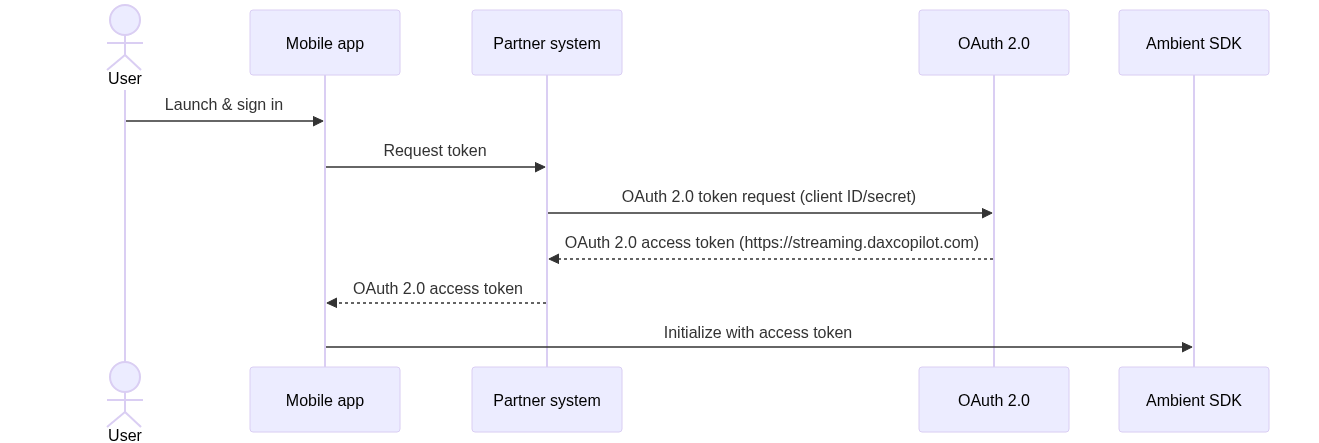
When integrating Dragon Copilot Ambient SDK into your Android app, you need to provide an access token through the AccessTokenProvider interface.
To do this, implement a simple callback that supplies the following two pieces of information:
- The OAuth 2.0 access token string.
- When the token expires.
Example:
val tokenProvider = AccessTokenProvider { onSuccess, onError ->
    // Use your authentication library to get a token
    // For example, if using MSAL:
    val token = "your-oauth-token"
    val expiryTime = Date(System.currentTimeMillis() + 3600000) // 1 hour from now

    onSuccess(token, expiryTime)
}
Initialize the SDK
Pass your token provider callback when you initialize the SDK:
val client = AmbientClient(
    context = applicationContext,
    accessTokenProvider = tokenProvider,
    // ... other configuration
)
For information on the authentication token requirements, see: App authentication.
The following diagram illustrates the authentication process using access tokens.