Describe Communication Compliance
Insider risk management
Organizations face challenges in managing potential risks from within—from employees accidentally sharing sensitive information to inappropriate communications that could expose the organization to legal liability. Microsoft Purview provides a suite of insider risk solutions to help detect, investigate, and address these internal risks.
Microsoft Purview Insider Risk Management is a solution that uses signals from across your Microsoft 365 environment, combined with machine learning, to identify potentially risky behavior patterns. When a situation requires additional investigation, cases from Insider Risk Management can be escalated to eDiscovery for legal review.
Microsoft Purview Communication Compliance is one of the insider risk solutions in Microsoft Purview. It focuses specifically on detecting, capturing, and acting on inappropriate messages that can lead to data security or compliance incidents.
What is Communication Compliance?
Microsoft Purview Communication Compliance is an insider risk solution that helps you detect, capture, and act on inappropriate messages that can lead to potential data security or compliance incidents within your organization. Communication Compliance evaluates text and image-based messages in Microsoft and non-Microsoft apps—including Teams, Viva Engage, Outlook, and WhatsApp—for potential business policy violations such as inappropriate sharing of sensitive information, threatening or harassing language, and potential regulatory violations.
Communication Compliance has predefined and custom policies that allow you to check internal and external communications for policy matches so that designated reviewers can examine them. Reviewers can investigate email, Microsoft Teams, Microsoft 365 Copilot, Viva Engage, or non-Microsoft communications in your organization and take appropriate actions to make sure they comply with your organization's message standards.
With role-based access controls, Communication Compliance supports the separation of duties between your IT admins and your compliance management team. For example, the IT group for your organization might be responsible for setting up Communication Compliance role permissions, groups, and policies, while investigators and reviewers are responsible for message triage, review, and mitigation actions.
Identifying and resolving compliance issues with Communication Compliance uses the following workflow:
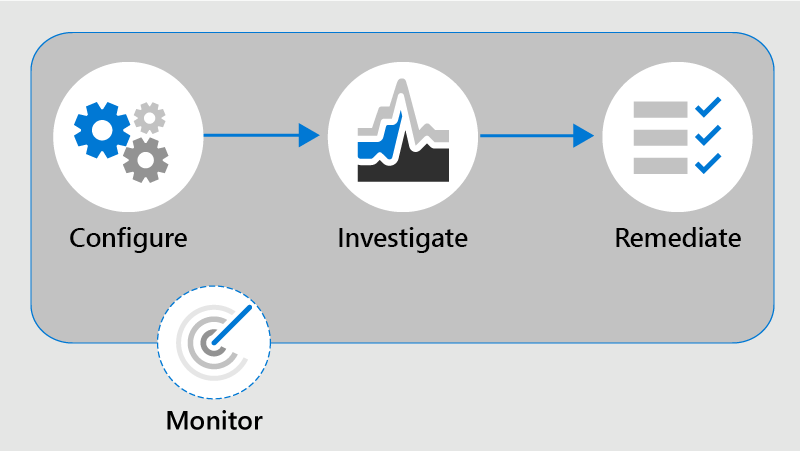
- Configure: In this step, admins identify compliance requirements and configure applicable Communication Compliance policies.
- Investigate: Admins look deeper into issues detected as matching your Communication Compliance policies. Tools that help include alerts, issue management to support remediation, document reviews, reviewing user history, and filters.
- Remediate: Remediate Communication Compliance issues. Options include resolving an alert, tagging a message, notifying the user, escalating to another reviewer, marking an alert as a false positive, removing a message in Teams, and escalating for investigation.
- Maintain: Keeping track and managing compliance issues identified by Communication Compliance policies spans the entire workflow process. Communication Compliance dashboard widgets, export logs, and events recorded in the unified audit logs support ongoing evaluation and improvement of your compliance posture.
Some important compliance areas where communication compliance policies can assist with reviewing messages include:
- Corporate policies: Users must comply with corporate policies such as acceptable use and ethical standards in their day-to-day business communications. With Communication Compliance, admins can scan user communications across the organization for potential concerns of offensive language or harassment.
- Risk management: Communication Compliance can help admins scan for unauthorized communication about confidential projects such as upcoming acquisitions or earnings disclosures.
- Regulatory compliance: Most organizations must follow some regulatory compliance standards during their normal operations. For example, a regulation might require organizations to review communications of their brokers to safeguard against potential insider trading, money laundering, or bribery. Communication Compliance helps the organization scan and report on these types of communications in a way that meets regulatory requirements.
Generative AI coverage
Communication Compliance policies can analyze interactions—such as prompts and responses—entered into generative artificial intelligence (AI) applications to help detect inappropriate or risky interactions. Coverage is supported for Microsoft 365 Copilot, apps built using Microsoft Copilot Studio, and AI applications connected through Microsoft Entra or Microsoft Purview Data Map connectors. This extends communication compliance monitoring to AI-powered conversations across your organization.
Integration with Microsoft Purview Insider Risk Management
Communication Compliance integrates with Microsoft Purview Insider Risk Management. When users face significant workplace pressures, they might engage in risky activities that surface as potentially inappropriate behavior in communications. By integrating these two solutions, organizations can detect warning signs and take action before more serious incidents occur.
Integration with Microsoft Security Copilot
Microsoft Purview Communication Compliance supports integration with Microsoft Security Copilot, through the embedded experience. Users whose organization is onboarded to Copilot, enable Copilot to access data from Microsoft 365 services, and have the appropriate role permissions can experience Copilot integration through the following supported capabilities:
- Get a contextual summary of a message and its attachments in the context of classifier conditions that flagged the message.
- Ask follow-up contextual questions about the message and its attachments.
To use this feature, navigate to the Policies page in Communication Compliance in the Microsoft Purview portal, select a policy that uses trainable classifiers, and view a policy match. Select the Summarize action button to generate a contextual summary of the message and its attachments.
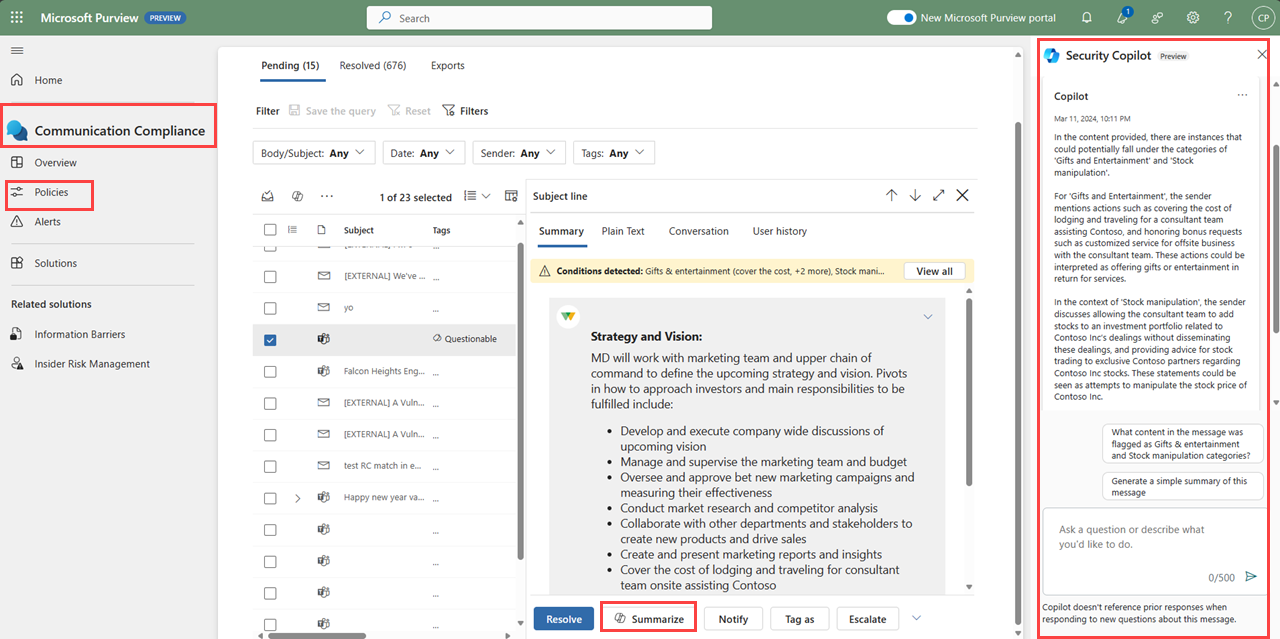
Reviewers can also ask follow-up questions in the Security Copilot side panel to learn more about the message.