Describe Microsoft Purview Records Management
Organizations of all types require a solution to manage regulatory, legal, and business-critical records. Microsoft Purview Records Management helps organizations fulfill legal obligations, demonstrate compliance with regulations, and reduce risk by disposing of items that no longer have business value.
Records management builds on the retention capabilities of Microsoft Purview Data Lifecycle Management. While data lifecycle management focuses broadly on retaining the content you need and deleting what you don't, records management adds more control for high-value items—those with legal, regulatory, or critical business significance. Items declared as records have specific restrictions on allowed actions and are tracked throughout their full lifecycle.
Microsoft Purview Records Management includes many features, including:
- Labeling content as a record.
- Establishing retention and deletion policies within the record label.
- Triggering event-based retention.
- Reviewing and validating disposition.
- Proof of records deletion.
- Exporting information about disposed items.
When content is labeled as a record, by using a retention label, the following happens:
- Restrictions are put in place to block certain activities.
- Activities are logged.
- Proof of disposition is kept at the end of the retention period.
To enable items to be marked as records, an administrator sets up retention labels.
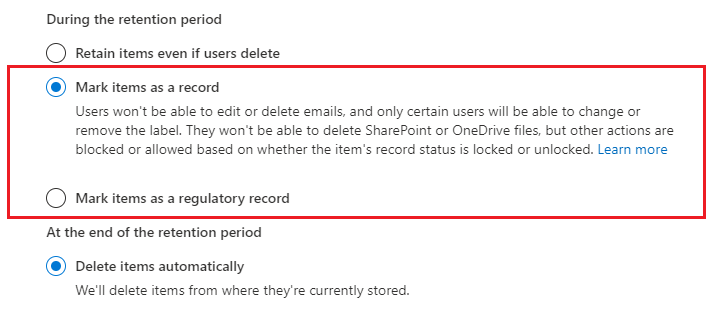
Items such as documents and emails can then be marked as records based on those retention labels. Items might be marked as records, but they can also be shown as regulatory records. Regulatory records provide other controls and restrictions such as:
- A regulatory label can’t be removed when an item is as a regulatory record.
- The retention periods can’t be made shorter after the label has been applied.
For more information on comparing restrictions between records and regulatory records, see the section, "Compare restrictions for what actions are allowed or blocked section" in the article "Learn about records management," linked in the summary and resources unit of this module.
The most important difference is that if content has been marked as a regulatory record, nobody, not even a global administrator, can remove the label. Marking an item as a regulatory record can have irreversible consequences and should only be used when necessary. As a result, this option isn't available by default and must be enabled by the administrator using PowerShell.
Event-based retention
Standard retention policies start counting the retention period from a fixed point—for example, when an item was created or last modified. Event-based retention is different: the retention period starts when a specific event occurs rather than from a fixed date.
For example, an organization might need to retain employee records for seven years after the employee leaves the organization. With event-based retention, the retention countdown starts when the triggering event (the employee's departure) is recorded, not when the document was originally created. This makes it possible to manage retention accurately for items whose lifecycle is tied to business events.
Event-based retention is useful for records tied to:
- Employee lifecycles (start retention when employment ends)
- Product records (start retention when a product is discontinued)
- Contract records (start retention when a contract expires)
Disposition reviews
Before an item is permanently deleted at the end of its retention period, organizations can require a disposition review. A disposition review is a process in which designated reviewers examine the item and either approve its deletion or extend its retention period.
Disposition reviews provide assurance that no important records are accidentally deleted. Microsoft Purview Records Management provides proof of disposition—a record confirming how and when an item was permanently deleted—which can be critical for demonstrating regulatory compliance to auditors.
File plan
A file plan is a tool in Microsoft Purview Records Management that helps organizations manage their retention requirements in a structured way. With a file plan, you can:
- Import an existing retention schedule from another system into Microsoft 365.
- View and manage all retention labels in one location, with details about their retention periods and associated actions.
- Add descriptive information to retention labels, such as regulatory authority and business function.
File plans are useful for organizations with existing retention schedules that need to be aligned with Microsoft Purview.
Common use cases for Microsoft Purview Records Management
There are different ways in which Microsoft Purview Records Management can be used across an organization, including:
- Enabling administrators and users to manually apply retention and deletion actions for documents and emails.
- Automatically applying retention and deletion actions to documents and emails.
- Enabling site admins to set default retain and delete actions for all content in a SharePoint library, folder, or document set.
- Enabling users to automatically apply retain and delete actions to emails by using Outlook rules.
To ensure Microsoft Purview Records Management is used correctly across the organization, administrators can work with content creators to put together training materials. Documentation should explain how to apply labels to drive usage, and ensure a consistent understanding.