Note
Access to this page requires authorization. You can try signing in or changing directories.
Access to this page requires authorization. You can try changing directories.
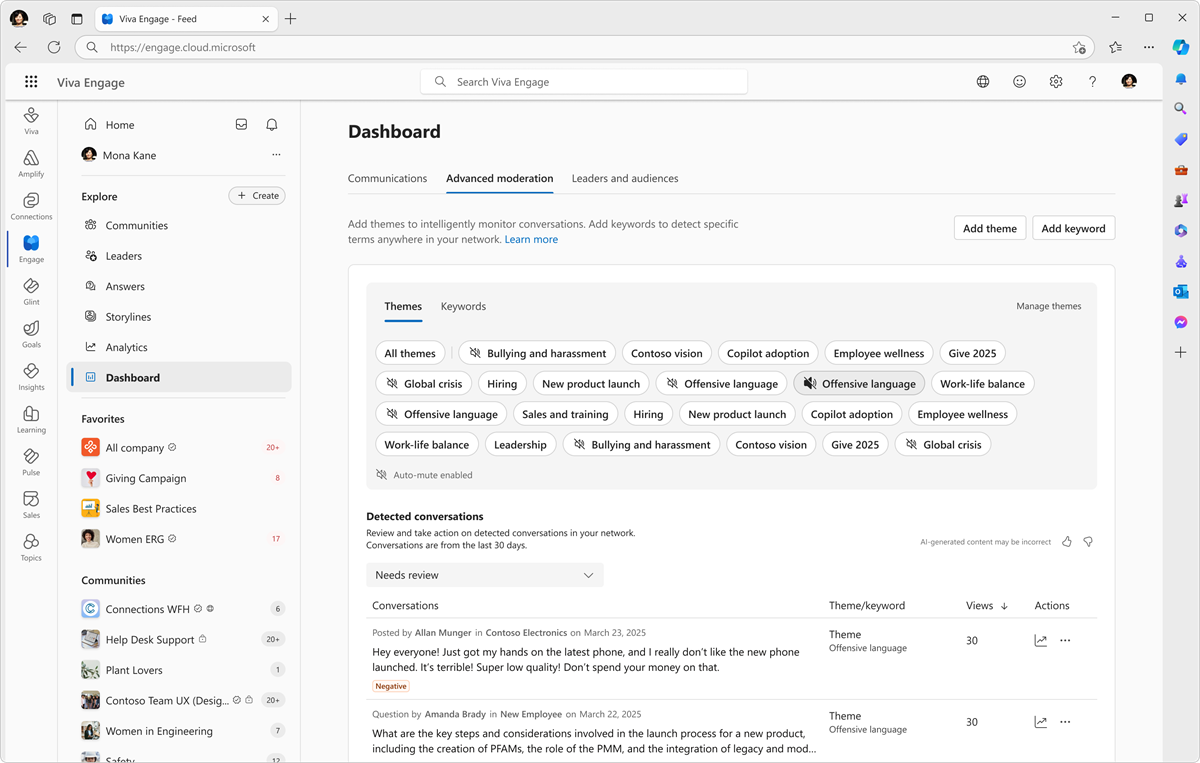
Verified admins, network admins, and corporate communicators with Advanced Moderation permissions can set custom themes to moderate and monitor conversations across the Viva Engage network. You can use theme moderation to automatically mute and report conversations. Auto-mute is an optional admin feature. Admins and corporate communicators can quickly review conversations that match any given theme within the advanced moderation dashboard.
Theme moderation is built on the Viva Engage AI Summarization service. This feature gives Viva Engage users and admins access to Large Language Model (LLM) technology with Microsoft Responsible AI protections.
Note
Theme moderation requires at least 50% of users in your organization to have the Viva Suite license, or the Viva Employee Communications and Communities license. The Microsoft 365 enterprise plan includes keyword monitoring, detected conversations, and the advanced moderation feature set.
Set up theme moderation
Check your Viva Engage Admin Center settings to ensure that the AI Summarization setting reflects your network preferences. It controls all AI data processing for your network. By default, AI summarization is enabled and processes data across all users in your network unless you specify otherwise.

Network admins and corporate communicators can use theme moderation to track conversations related to their themes. Viva Engage supports concurrent use of up to 30 themes at a time. The feature is available in the Advanced Moderation page of the Communications dashboard.
When you add new themes, ongoing conversations that match themes start to populate the Advanced moderation > Detected conversations table.
Note
Retroactive detection doesn't occur for existing conversations that match newly added themes.
See also
For a more detailed walkthrough of advanced moderation and its use of themes, see Communications dashboard: Advanced moderation.
AI Summarization and theme extraction FAQ
Admin roles for Advanced moderation and Keyword monitoring
Advanced moderation: keyword monitoring for Viva Engage admins
For more information about how AI works in Viva Engage, see Data, Privacy, and Security for Microsoft 365 Copilot in Viva Engage.