Muistiinpano
Tämän sivun käyttö edellyttää valtuutusta. Voit yrittää kirjautua sisään tai vaihtaa hakemistoa.
Tämän sivun käyttö edellyttää valtuutusta. Voit yrittää vaihtaa hakemistoa.
Inline completions are the ghost text suggestions that appear as you type in a .sql file. They come from the GitHub Copilot model and are useful for finishing common SQL patterns while you type. This article explains what inline completions offer, their key limitation (they don't see your database schema), and when to use the @mssql chat participant for schema-aware suggestions instead.
Inline completions don't see your connected database schema. They're generated by the GitHub Copilot model directly, without access to the MSSQL extension's schema context. For schema-aware suggestions while writing SQL, use the @mssql chat participant. For the architectural reason, see How GitHub Copilot works with the MSSQL extension.
Key takeaways
- Inline completions generate ghost text while you type in the editor.
- They're useful for generic Transact-SQL (T-SQL) patterns (joins,
SELECTclauses, common functions). - They don't reference your connected database schema.
- For schema-aware completions, use the
@mssqlchat participant instead of inline completions. - The smart action icon and Ctrl+I keyboard shortcut invoke GitHub Copilot on selected code. They complement inline completions.
Prerequisites
Make sure you're connected to a database and have an active editor window open with the MSSQL extension. When you connect, the @mssql chat participant understands the context of your database environment and can give accurate, context-aware suggestions. If you don't connect to a database, the chat participant doesn't have the schema or data context to provide meaningful responses.
The following examples use the AdventureWorksLT2022 sample database, which you can download from the Microsoft SQL Server Samples and Community Projects home page.
For best results, adjust table and schema names to match your own environment.
Make sure the chat includes the @mssql prefix. For example, type @mssql followed by your question or prompt. This prefix ensures that the chat participant understands you're asking for SQL-related assistance.
What inline completions offer
When you type in a .sql file with GitHub Copilot enabled, ghost text appears inline. Accept with Tab or Enter; ignore by continuing to type.
Inline completions are good at:
- Finishing common patterns (
SELECT * FROM,INNER JOIN ... ON,WHERE x = ?). - Completing partial identifiers you've already typed in the file.
- Generating boilerplate for well-known SQL constructs.
Inline completions are not good at:
- Using real table or column names from your database (they guess based on context).
- Respecting your database actual schema or relationships.
- Using the
@mssqlchat participant's schema context.
Why inline completions aren't schema-aware
Visual Studio Code's inline completion application programming interface (API) is effectively single-provider for any given document. When GitHub Copilot is enabled, third-party extensions (including the MSSQL extension) can't contribute schema-aware ghost text for SQL files. Ghost text comes from the GitHub Copilot model directly.
This is platform behavior, not an MSSQL extension limitation. For the full explanation, see How GitHub Copilot works with the MSSQL extension.
Get schema-aware suggestions while writing SQL
For suggestions that reference your actual tables, columns, and relationships, use the @mssql chat participant. Address @mssql in chat:
@mssql Write a T-SQL query that lists customers from SalesLT.Customer
who placed an order in the last 30 days.
The chat participant includes schema metadata in the request, so suggestions reference real objects in your database.
Use the smart action icon
When you select SQL in the editor, the ✨ smart action icon appears next to the selection. Select it to open a short menu:
- Modify using Copilot: Rewrite the selection with an inline recommendation.
- Explain: Get a natural-language explanation of the selected SQL.
- /doc: Generate documentation comments for the selection.
- /fix: Suggest fixes for issues in the selection.
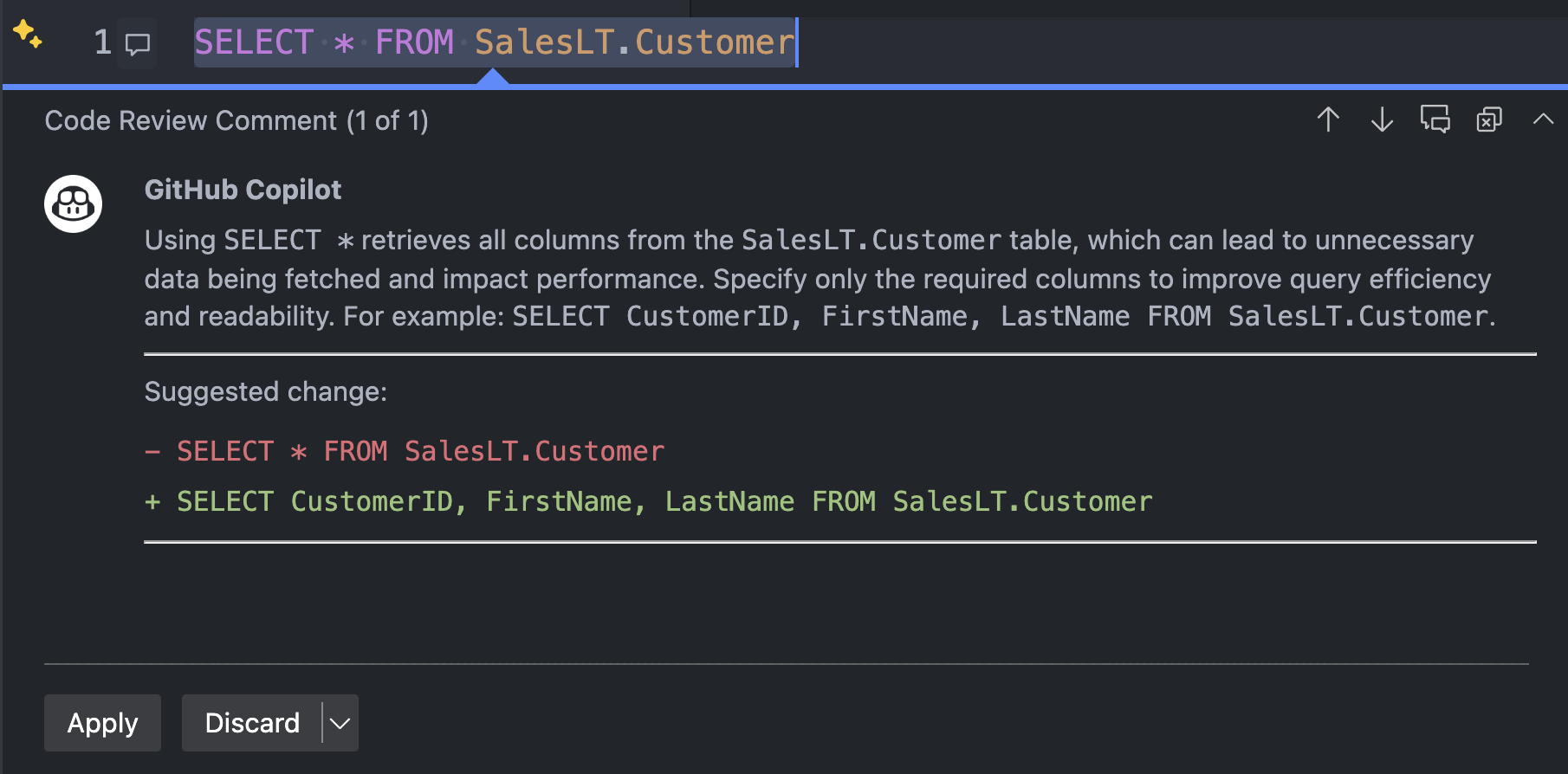
When you select Review using GitHub Copilot, an inline recommendation appears:
Use keyboard shortcuts
Invoke GitHub Copilot inline with:
- Ctrl+I on Windows and Linux
- Cmd+I on macOS
An inline prompt box appears where you can ask questions or request modifications to your query.

Inline completions vs. chat: decision guide
| If you want to... | Use |
|---|---|
| Finish a common SQL pattern while typing | Inline completions |
| Get a schema-aware query | @mssql chat |
| Modify a highlighted query | Smart action icon |
| Have a multi-turn conversation about your schema | @mssql chat |
| Invoke GitHub Copilot on a fresh prompt inline | Ctrl+I / Cmd+I |
Share your experience
To help us refine and improve GitHub Copilot for the MSSQL extension, use the following GitHub issue template to submit your feedback: GitHub Copilot Feedback
When submitting feedback, consider including:
Scenarios tested: Let us know which areas you focused on, for example, schema creation, query generation, security, localization.
What worked well: Describe any experiences that felt smooth, helpful, or exceeded your expectations.
Issues or bugs: Include any problems, inconsistencies, or confusing behaviors. Screenshots or screen recordings are especially helpful.
Suggestions for improvement: Share ideas for improving usability, expanding coverage, or enhancing GitHub Copilot's responses.
Related content
- How GitHub Copilot works with the MSSQL extension
- Quickstart: Chat with the
@mssqlparticipant (ask mode) - Quickstart: Use GitHub Copilot agent mode
- Quickstart: Use custom instructions to align GitHub Copilot with your T-SQL conventions
- Limitations and known issues
- Visual Studio Code: Customize AI responses