使用 Upsert 消息可以减少数据集成方案的复杂性。 将数据从外部系统(例如在大容量数据集成方案中)加载到 Microsoft Dataverse 时,你可能不知道 Dataverse 中是否存在记录。 在这些情况下,无法决定是否使用 Update 或 Create 消息。 必须先检索记录,以检查记录是否存在,然后再执行相应的操作。 通过使用Upsert消息,可以降低复杂性并更高效地将数据加载到 Dataverse 中。
使用Upsert会导致性能损失,而不是Create。 如果确定记录不存在,请使用 Create。
注释
虽然可以使用主键值Upsert,但通常首选使用备用键,因为常见的用例是数据集成情境。 有关详细信息,请参阅 使用备用键引用记录。
弹性表 upsert
弹性表的行为与Upsert标准表不同。 通过使用弹性表,该 Upsert 作不会调用 Create 或 Update 消息,具体取决于记录是否已存在。
Upsert 将更改直接应用到实体中。
-
如果记录存在:该操作将用实体中的数据覆盖记录中的所有数据。 没有
Update事件。 -
如果记录不存在:该作将创建新记录。 没有
Create事件。
此行为会影响对事件应用业务逻辑的位置。 可以通过使用Create或Upsert创建新的记录。 可以使用 Update 或 Upsert 更新记录。 如果你需要为Create或Update的弹性表应用一致的逻辑,也必须在Upsert中包含该逻辑。 有关详细信息,请参阅 弹性表中的记录向上插入。
了解标准表的插入更新(upsert)过程
服务器处理 upsert 消息。 用于 .NET 类的 SDK 使用与服务器相同的对象。 因此,以下说明使用适用于 .NET 类的 SDK 来描述服务器如何处理 UpsertRequest 类 实例并返回 UpsertResponse 类 实例。
以下步骤描述在收到标准表 UpsertRequest 时服务器上的处理逻辑:
-
UpsertRequest 实例到达时,Target 属性被设置为包含用于或
Create操作数据的Update实例。- 实体实例通常具有 Entity.KeyAttributes 属性集,其中包含使用备用键标识记录的值。
- 如果存在,Dataverse 会尝试使用设置为 Target 属性的 Entity 实例的 Entity.Id 属性来查找记录。 否则,它使用 Entity.KeyAttributes 属性中的备用键值。
-
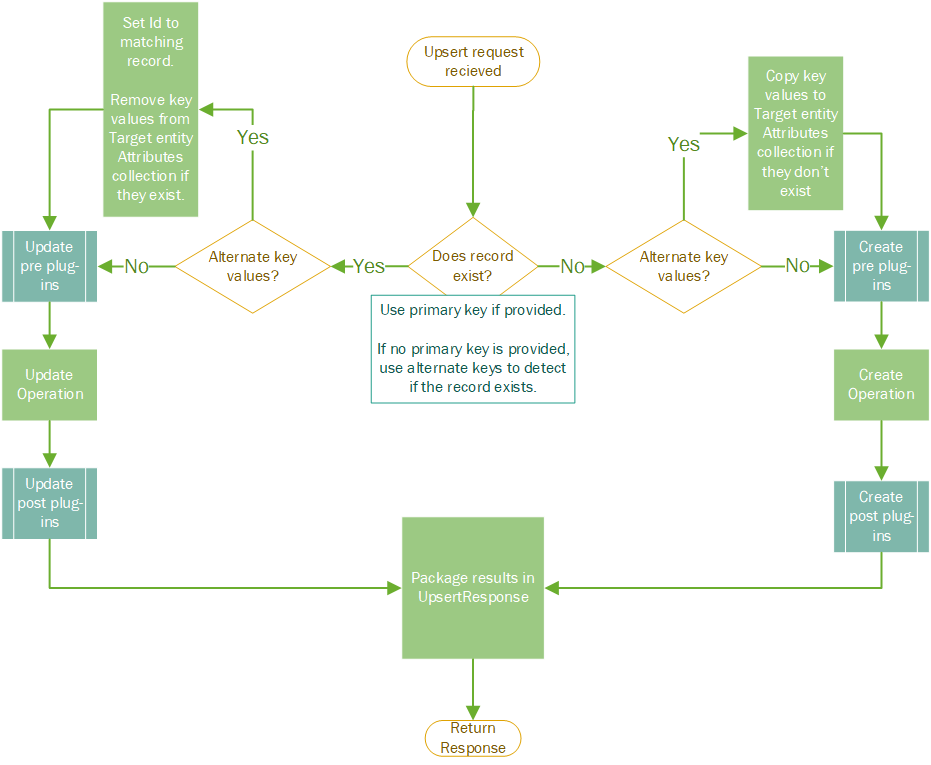
如果记录存在:
- 将
TargetEntity.Id 设置为找到记录的主键值。 - 从
TargetEntity.Attributes 集合中删除使用Target集合相同的键的任何数据。 - 调用
Update。 - 将 UpsertResponse.RecordCreated 属性设置为
false. - 从实体创建
Target作为 UpsertResponse.Target 的值。 - 返回 UpsertResponse。
- 将
-
如果记录不存在:
- 将
Entity.KeyAttributes 中尚未存在于 Entity.Attributes 集合的任何数据复制到 Entity.Attributes 中。 - 调用
Create。 - 将 UpsertResponse.RecordCreated 设置为
true. - 从实体和
Target操作的id结果创建Create,作为UpsertResponse.Target的值。 - 返回 UpsertResponse。
- 将
下图显示了收到 UpsertRequest 时服务器上的进程。
撰写请求指南
使用备用键标识记录时,请不要在表示要保存的数据的请求部分中包括备用键数据。
如果使用的是 Web API,并且不熟悉适用于 .NET 的 SDK,则前面所述的服务器端过程可能很难遵循。 Web API 与前面说明和关系图中使用的 SDK 对象没有相同的对象模型,但可以映射数据,如下表所示。
| 网络应用程序接口 | SDK | 说明 |
|---|---|---|
| URL 中的键值 | Entity.KeyAttributes 属性 | 包含用于标识记录的备用键数据。 |
| 请求正文 | 实体 设置为UpsertRequest.Target 属性 | 包含要用于 Create 或 Update. |
尽管服务器按前面所述处理这些请求,但可以这样思考:
- 如果记录存在: 服务器会删除请求正文中的数据集,因为这些数据集对 URL 中的备用键值无关紧要,因此没有必要包含它。 这种做法可确保在使用这些备用键值来标识记录时无法更新记录的备用键值。 可以使用主键或另一组备用键来更改备用键值。
- 如果记录不存在: 服务器使用请求正文中设置的任何备用键值来创建新记录, 即使数据与 URL 中的备用键指定的值不同。 如果请求正文中没有备用密钥数据,服务器会将备用密钥数据从 URL 复制到请求的正文中。 若要避免 URL 中的键值和正文中相应的键值不匹配的情况,请不要将它们包含在正文中。
使用 Web API
通过使用 Web API,可以通过向指定Upsert资源发送 HTTP Update 请求来启动PATCH和EntitySet消息。 URL 中的密钥标识资源。
两者之间的差异UpsertUpdate取决于是否包含If-Match: *请求标头。 如果包含 If-Match: * 请求标头,并且没有资源与 URL 中的键值匹配,则请求会返回 404 Not Found 状态代码。 请求 If-Match: * 标头可确保 PATCH 请求是一个 Update 操作。
如果未包含 If-Match: * 请求标头,则 PATCH 请求将被视为一个 Upsert。 如果请求找不到与 URL 中的密钥匹配的任何记录,则会创建一个新记录。 但是,与 SDK 不同,响应不会告诉你它是否创建了记录。 在任一情况下,状态响应为 204 No Content。
如果包含Prefer: return=representation请求标头,系统将返回201 Created状态Create,同时为200 OK返回Update状态。 添加此标头会添加额外的 Retrieve 作,因此会影响性能。 如果使用此选项,请确保添加的 $select 查询选项仅包括主键值。 有关详细信息,请参阅:
通过使用 PATCH 请求,如果您只想创建记录,您还可以包含 If-None-Match: * 请求标头以阻止 Update。 有关更多信息,请参阅限制插入或更新操作。
Web API 示例代码
以下示例通过使用具有两个备用键列的表来演示 Upsert 操作:
使用 upsert 进行创建
此请求创建记录。
请求:
PATCH [Organization Uri]/api/data/v9.2/example_records(example_key1=2,example_key2=2) HTTP/1.1
OData-MaxVersion: 4.0
OData-Version: 4.0
If-None-Match: null
Accept: application/json
Content-Type: application/json

{ "example_name": "2:2" }
响应:
HTTP/1.1 204 No Content
OData-Version: 4.0
OData-EntityId: [Organization Uri]/api/data/v9.2/example_records(example_key1=2,example_key2=2)
使用 upsert 进行更新
此请求将更新上述请求创建的记录。
请求:
PATCH [Organization Uri]/api/data/v9.2/example_records(example_key1=2,example_key2=2) HTTP/1.1
OData-MaxVersion: 4.0
OData-Version: 4.0
If-None-Match: null
Accept: application/json
Content-Type: application/json

{ "example_name": "2:2 Updated" }
响应:
HTTP/1.1 204 No Content
OData-Version: 4.0
OData-EntityId: [Organization Uri]/api/data/v9.2/example_records(example_key1=2,example_key2=2)
注释
创建或更新操作的响应相同。
使用 upsert 和 return=representation 首选项创建
使用 Prefer: return=representation 标头时,可以在响应中获取不同的状态代码,以指示记录是已创建还是更新。
以下请求将创建新记录并返回状态 201 Created。
请求:
PATCH [Organization Uri]/api/data/v9.2/example_records(example_key1=3,example_key2=3)?$select=example_recordid HTTP/1.1
OData-MaxVersion: 4.0
OData-Version: 4.0
If-None-Match: null
Accept: application/json
Prefer: return=representation
Content-Type: application/json

{ "example_name": "3:3" }
响应:
HTTP/1.1 201 Created
Content-Type: application/json; odata.metadata=minimal
ETag: W/"71004878"
Preference-Applied: return=representation
OData-Version: 4.0

{
  "@odata.context": "[Organization Uri]/api/data/v9.2/$metadata#example_records(example_recordid)/$entity",
  "@odata.etag": "W/\"71004878\"",
  "example_recordid": "ef0d112e-d70e-ed11-82e5-00224822577b"
}
使用 Upsert 和 return=representation 首选项进行更新
此请求将更新上述请求创建的记录,并返回状态 200 OK 以显示这是更新作。
请求:
PATCH [Organization Uri]/api/data/v9.2/example_records(example_key1=3,example_key2=3)?$select=example_recordid HTTP/1.1
OData-MaxVersion: 4.0
OData-Version: 4.0
If-None-Match: null
Accept: application/json
Prefer: return=representation
Content-Type: application/json

{ "example_name": "3:3 Updated" }
响应:
HTTP/1.1 200 OK
Content-Type: application/json; odata.metadata=minimal
ETag: W/"71004880"
OData-Version: 4.0

{
  "@odata.context": "[Organization Uri]/api/data/v9.2/$metadata#example_records(example_recordid)/$entity",
  "@odata.etag": "W/\"71004880\"",
  "example_recordid": "ef0d112e-d70e-ed11-82e5-00224822577b"
}
使用适用于 .NET 的 SDK
客户端应用程序使用
UpsertResponse.RecordCreated 属性指示记录是否已创建,UpsertResponse.Target 包含对已创建或更新的记录的引用。
SDK for .NET 示例代码
“插入记录使用 Upsert”示例中的SampleMethod.cs文件包含以下ProcessUpsert方法。 此方法对 XML 文件的内容应用 UpsertRequest 消息以创建新记录或更新现有记录。
public static void ProcessUpsert(CrmServiceClient service, String Filename)
{
    Console.WriteLine("Executing upsert operation.....");
    XmlTextReader tr = new XmlTextReader(Filename);
    XmlDocument xdoc = new XmlDocument();
    xdoc.Load(tr);
    XmlNodeList xnlNodes = xdoc.DocumentElement.SelectNodes("/products/product");

    foreach (XmlNode xndNode in xnlNodes)
    {
        String productCode = xndNode.SelectSingleNode("Code").InnerText;
        String productName = xndNode.SelectSingleNode("Name").InnerText;
        String productCategory = xndNode.SelectSingleNode("Category").InnerText;
        String productMake = xndNode.SelectSingleNode("Make").InnerText;

        //use alternate key for product
        Entity productToCreate = new Entity("sample_product", "sample_productcode", productCode);

        productToCreate["sample_name"] = productName;
        productToCreate["sample_category"] = productCategory;
        productToCreate["sample_make"] = productMake;
        var request = new UpsertRequest()
        {
            Target = productToCreate
        };

        try
        {
            // Execute UpsertRequest and obtain UpsertResponse.
            var response = (UpsertResponse)service.Execute(request);
            if (response.RecordCreated)
                Console.WriteLine("New record {0} is created!", productName);
            else
                Console.WriteLine("Existing record {0} is updated!", productName);
        }

        // Catch any service fault exceptions that Dataverse throws.
        catch (FaultException<Microsoft.Xrm.Sdk.OrganizationServiceFault>)
        {
            throw;
        }
    }
}