This is very strange; all newer Visual Studio 2022 fails .. but from .NET SDK perspective, it is "only" version newer than 7.0.307 that fails with an infinite hang and 100% CPU usage.
I am very curious to what Microsoft have done to break this.
Tested versions (dotnet build):
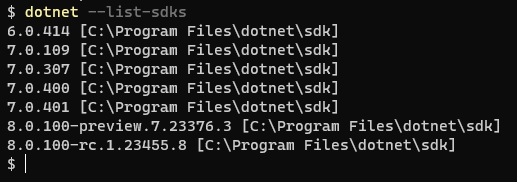
global.json is not honored from Visual Studio - so unfortunately I cannot build my project from here.
If anybody wants to test it out, feel free to do a:
git clone https://github.com/gimlichael/Cuemon.git
It is enough to try and build the Cuemon.Core project. Again, using dotnet build, it works flawlessly with any version prior or equal to 7.0.307. From 7.0.400 and forward it fails.
Said mentioned project, Cuemon, will fail to build in any newer versions of Visual Studio (after June 30 this year).
I am empty for ideas on how to fix this - so any help would be much appreciated.
Thanks.
UPDATE 1:
If I use Resharper Build & Run, I can manually set the MSBuild to the one from .NET SDK within Visual Studio 2022. Just like dotnet build, this works with any version prior or equal to 7.0.307.
UPDATE 2:
Eureka! I have found the root cause; in Cuemon I have a class named Template (https://github.com/gimlichael/Cuemon/blob/development/src/Cuemon.Core/Template.cs).
This class supports up to 20 generic parameters (yeah, I know - who would really want to use that many - but that is beside the point).
After .NET SDK 7.0.307, Microsoft has made a change to MSBuild/dotnet that triggers the infinite build.
I will see if I can make a GitHub issue - though I am in doubt where.
My best guess would be .NET SDK if such exists - otherwise somewhere in the dotnet organization.
For those of you experiencing same issue; it MIGHT be because of extensive generic use - but who knows - there could be other compilation bugs introduced after said mentioned .NET SDK version.
Happy coding!
UPDATE 3:
Created an issue on GitHub: https://github.com/dotnet/sdk/issues/35365
' cx='32' cy='32' r='32' /%3E%3Ctext x='50%25' y='55%25' dominant-baseline='middle' text-anchor='middle' fill='%23FFF' %3ESA%3C/text%3E%3C/svg%3E)
' cx='32' cy='32' r='32' /%3E%3Ctext x='50%25' y='55%25' dominant-baseline='middle' text-anchor='middle' fill='%23FFF' %3EPM%3C/text%3E%3C/svg%3E)
' cx='32' cy='32' r='32' /%3E%3Ctext x='50%25' y='55%25' dominant-baseline='middle' text-anchor='middle' fill='%23FFF' %3EW%3C/text%3E%3C/svg%3E)
' cx='32' cy='32' r='32' /%3E%3Ctext x='50%25' y='55%25' dominant-baseline='middle' text-anchor='middle' fill='%23FFF' %3ERC%3C/text%3E%3C/svg%3E)
' cx='32' cy='32' r='32' /%3E%3Ctext x='50%25' y='55%25' dominant-baseline='middle' text-anchor='middle' fill='%23FFF' %3EBR%3C/text%3E%3C/svg%3E)
' cx='32' cy='32' r='32' /%3E%3Ctext x='50%25' y='55%25' dominant-baseline='middle' text-anchor='middle' fill='%23FFF' %3EWK%3C/text%3E%3C/svg%3E)
' cx='32' cy='32' r='32' /%3E%3Ctext x='50%25' y='55%25' dominant-baseline='middle' text-anchor='middle' fill='%23FFF' %3EAC%3C/text%3E%3C/svg%3E)
' cx='32' cy='32' r='32' /%3E%3Ctext x='50%25' y='55%25' dominant-baseline='middle' text-anchor='middle' fill='%23FFF' %3EAM%3C/text%3E%3C/svg%3E)
' cx='32' cy='32' r='32' /%3E%3Ctext x='50%25' y='55%25' dominant-baseline='middle' text-anchor='middle' fill='%23FFF' %3EH%3C/text%3E%3C/svg%3E)
' cx='32' cy='32' r='32' /%3E%3Ctext x='50%25' y='55%25' dominant-baseline='middle' text-anchor='middle' fill='%23FFF' %3EMA%3C/text%3E%3C/svg%3E)
' cx='32' cy='32' r='32' /%3E%3Ctext x='50%25' y='55%25' dominant-baseline='middle' text-anchor='middle' fill='%23FFF' %3ECJ%3C/text%3E%3C/svg%3E)
' cx='32' cy='32' r='32' /%3E%3Ctext x='50%25' y='55%25' dominant-baseline='middle' text-anchor='middle' fill='%23FFF' %3EMM%3C/text%3E%3C/svg%3E)