Hi @Nova,
Thank you for reaching out and explaining the behavior you’re seeing in Outlook on the web.
When the reading pane no longer returns to the inbox after opening a message, especially when this change happens unexpectedly, it can interrupt your workflow.
Based on current behavior in Outlook on the web, the closest available workaround is to adjust the Reading Pane settings.
If the goal is to avoid staying on the same email after clicking Inbox, you can change how the Reading Pane behaves:
- Open Outlook on the web
- Go to View > Reading Pane
- Select Fill Screen or Pop‑out only, depending on your preference.
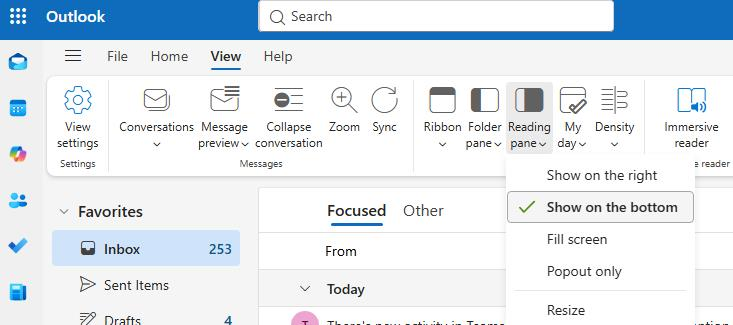
If this change started suddenly:
You may also want to try the following browser‑side steps, as they can sometimes help resolve unexpected UI behavior:
- Clear your browser’s cache and cookies.
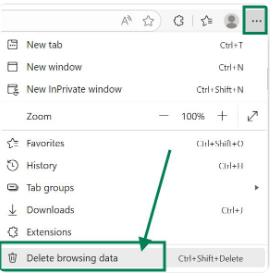
- Sign out completely, then sign back in
- Try a different browser or open an InPrivate/Incognito window.
I hope this information helps. Please try the steps above and let me know whether they resolve the issue. If the behavior continues, we can continue working together to explore other options.
As other users will also search for information in this community, your vote can significantly help those with similar inquiries quickly locate the most relevant resources.
Thank you for your kindness and for contributing to the forum.
If the answer is helpful, please click "Accept Answer" and kindly upvote it. If you have extra questions about this answer, please click "Comment".
Note: Please follow the steps in our documentation to enable e-mail notifications if you want to receive the related email notification for this thread.
' cx='32' cy='32' r='32' /%3E%3Ctext x='50%25' y='55%25' dominant-baseline='middle' text-anchor='middle' fill='%23FFF' %3EN%3C/text%3E%3C/svg%3E)


' cx='32' cy='32' r='32' /%3E%3Ctext x='50%25' y='55%25' dominant-baseline='middle' text-anchor='middle' fill='%23FFF' %3EKL%3C/text%3E%3C/svg%3E)