Microsoft 365 and Office | Subscription, account, billing | For business | Other
Microsoft 365 features that help users manage their subscriptions, account settings, and billing information.

This browser is no longer supported.
Upgrade to Microsoft Edge to take advantage of the latest features, security updates, and technical support.
' cx='32' cy='32' r='32' /%3E%3Ctext x='50%25' y='55%25' dominant-baseline='middle' text-anchor='middle' fill='%23FFF' %3EPB%3C/text%3E%3C/svg%3E)
How do I contact the Microsoft Data Protection Team? I cannot get past a bot and to a live person (via phone or chat).
Microsoft 365 features that help users manage their subscriptions, account settings, and billing information.
' cx='32' cy='32' r='32' /%3E%3Ctext x='50%25' y='55%25' dominant-baseline='middle' text-anchor='middle' fill='%23FFF' %3EVH%3C/text%3E%3C/svg%3E)
Dear @Perry Borchard,
I understand how frustrating it can be when you are unable to get through to a live support agent. Regarding the Microsoft Data Protection Team, all requests must be routed through Microsoft Support system's verification and escalation.
Before advising on the exact steps to reach the Microsoft Data Protection Team, could you please help clarify a few details?
1/ If your request is related to privacy or personal data rights (e.g., GDPR):
You may submit your request directly via Microsoft’s Privacy Support page: Privacy support and requests
Please note that this channel is intended only for data protection and privacy-related inquiries and cannot assist with account or tenant access issues.
2/ If your issue involves account access, please note that contacting the Microsoft Data Protection Team depends on the type of account you are using.
If you can access to the M365 Admin Center, you can create a support ticket directly in there. Here's the Microsoft Official Guide: Get support | Microsoft Docs
If you are using business account and you are the global admin but cannot access to the M365 Admin Center. Here's some example way to reach out to the Data Protection Team I recommend you look through the answer in this link: Microsoft 365 tenant admin lockout – lost MFA for only Global Administrator. Many users have successfully reach out to the Data Protection Team.
Moreover, you can also refer and follow the steps have been suggested by the Q&A Assist's answer.
Note: Please understand that as a forum moderator, my role is to provide general guidance and troubleshooting support. I don’t have access to internal systems or backend tools, and I appreciate your understanding of these limits.
I hope the information shared helps point you in the right direction. If you're facing any problems, please feel free to share more details about the current error or steps you're stuck on. I’ll be happy to assist further.
The first response may not always resolve the issue right away, but with your help and more details, we can work toward a solution.
Thank you for your patience and understanding. I'm looking forward for your reply.
If the answer is helpful, please click "Accept Answer" and kindly upvote it. If you have extra questions about this answer, please click "Comment".
Note: Please follow the steps in our documentation to enable e-mail notifications if you want to receive the related email notification for this thread.
Do I just wait for someone from your "Data Protection Team" to contact me? I can't get a live body chat or phone (4/30/2026 4:05pm CST).
Dear @Perry Borchard,
Thank you for your reply, and I completely understand your concern.
Currently, the Data Protection Team does not operate as a customer-facing support channel, and they do not typically reach out unless a case has already been created and properly escalated through Microsoft Support.
However, it is depending on which type of account you are using (for example, personal account (@outlook.com/@hotmail.com) or business account (@company.com/@onmicrosoft.com).
In this case, to provide you the best way reach the Microsoft Data Protection Team, could you please help clarify a few details:
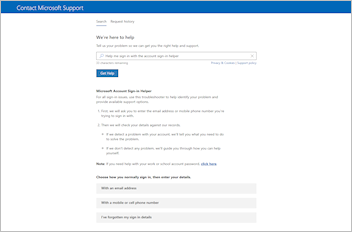
In the meantime, if you cannot sign-in, you can use the Microsoft sign-in helper to identify the problem.
The tool will ask you to enter the email address or mobile phone number you're trying to sign in with and check the details you provide. If it detects a problem with your account, it will tell you what you need to do to solve the problem. If the tool doesn't detect any problem, it will tell you how you can help yourself.
Click the button below to begin or go to aka.ms/sign-in-helper.
For more information and instruction, please refer to this Microsoft article: Microsoft account sign-in helper
I hope the information shared helps point you in the right direction. Thank you for your patience and understanding. I'm looking forward for your reply.
Dear @Perry Borchard,
Good day and I hope you're doing well. I just wanted to check in and see if there is any update from you
If you're still facing any problems, please feel free to share more details about the current error or steps you're stuck on. I’ll be happy to assist further.
Looking forward to your update.
I need a live chat or call to unlock my locked account. How do I get a live person upon my request?
I am a personal/home 365 account. The sign on account helper does not work. And the MAF does not work. I am locked out with no way to get my data/calendar. I need a live person, PLEASE
Dear @Perry Borchard,
Thank you for your additional information.
In this case, since you are using personal account and you want to reach out the support agent, I recommend you try going to this link: aka.ms/sign-in-helper > Sign in with any other accounts > Type: "Customer Support" or "Microsoft Support"
In "Products and services": choose Microsoft 365 and Office" > In Category: choose "Technical Support" or "Manage My Subscription", ect.
Then, choose "Chat with a support agent in your web browser"
Thank you for your patience and understanding. Please try the steps above and let me know if they work. I'm looking forward for your reply.
Thank you. I can't use sign in helper because I can't get passed the multi factor authentication. I would like to have a live chat or call.
Or please cancel and refund my subscription. This is now going on a week with NO access to my data incl calendar. Fortunately, Google has my contacts. Can you see how frustrated with your support I am?!
Dear @Perry Borchard,
I completely understand how frustrating this situation must be, especially when you’re unable to sign in due to the Microsoft Authenticator.
I’m really sorry to say that I’m not able to create a support ticket on your behalf or access your account directly.
You should create or use another Microsoft account to contact Microsoft Support on behalf of your primary (affected) account > Once you have an alternate account, please follow the steps shared earlier to reach support.
Please understand that as a forum moderator, my primary role is to provide general guidance and troubleshooting steps. I don’t have access to internal systems or the ability to make changes to accounts, subscriptions, or backend authentication settings. I truly appreciate your understanding of these limitations.
That said, I genuinely hope these steps help point you in the right direction, and I’m here to continue assisting you as much as I can within my scope.

To reach Microsoft’s Data Protection team (for example, when locked out as the only admin or for account/MFA recovery tied to data protection), use one of these supported paths:
These are the supported ways to get routed past automated flows and into a case that can be handled by Microsoft’s Data Protection or privacy teams.
References: