Note
Access to this page requires authorization. You can try signing in or changing directories.
Access to this page requires authorization. You can try changing directories.
Azure Private Link
Azure DNS
Azure Firewall
Azure Virtual WAN
Azure Private Link enables clients to access Azure PaaS services directly from private virtual networks without using public IP addressing. For each service, you configure a private endpoint that uses a private IP address from your network. Clients can then use the private endpoint to connect privately to the service.
Clients use the fully qualified domain name (FQDN) of a service to connect to the service. You configure DNS in your network to resolve the FQDN of the service to the private IP address of the private endpoint.
Your network design and, in particular, your DNS configuration, are key factors in supporting private endpoint connectivity to services. This article is one of a series of articles that provide guidance on understanding Private Link behavior in Virtual WAN environments. Several scenarios are presented, including intentionally constrained examples used to illustrate common DNS and routing challenges. Even if none of the scenarios match your situation exactly, you should be able to adapt the designs to meet your needs.
Starting network topology
The starting network topology is the base architecture for all scenarios in this series. It's a typical hub-spoke network that uses Azure Virtual WAN.
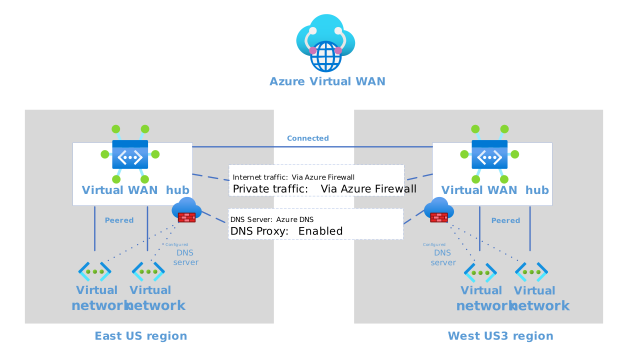
Figure 1: Starting network topology for all private endpoint and DNS scenarios
Download a Visio file of this architecture. This topology has the following characteristics:
- It's a hub-spoke network that's implemented with Azure Virtual WAN.
- There are two regions, each with a secured virtual hub that includes Azure Firewall.
- Each secured regional virtual hub has the following security settings for Azure Virtual Network connections:
- Internet traffic: Secured by Azure Firewall - All traffic to the internet flows through the regional hub firewall.
- Private traffic: Secured by Azure Firewall - All inter-spoke traffic flows through the regional hub firewall.
- Each regional virtual hub is secured with Azure Firewall. The regional hub firewalls have the following settings:
- DNS Servers: Default (Azure provided) - The regional hub firewall explicitly uses Azure DNS for FQDN resolution in rule collections.
- DNS Proxy: Enabled - The regional hub firewall responds to DNS queries on port 53. It forwards queries to Azure DNS for uncached values.
- The firewall logs rule evaluations and DNS proxy requests to a Log Analytics workspace that's in the same region. This logging is a standard network security requirement.
- Each spoke uses its regional firewall's private IP as its DNS server. Otherwise the FQDN rule evaluation can be out of sync.
Multi-region routing
Virtual WAN hub routing intent and routing policies let you control how traffic flows between hubs and whether that traffic is inspected by Azure Firewall or another security solution.
By default, in a multi-hub Virtual WAN deployment, inter-hub private traffic does not pass through Azure Firewall. Instead, Azure uses its built‑in Virtual WAN–managed hub‑to‑hub connectivity, which runs in parallel to the secured traffic paths inside each hub. This means that private traffic moving between hubs is not automatically inspected.
If you need Azure Firewall to inspect inter‑hub private traffic, you can enable this behavior by configuring a Private Traffic routing policy and turning on inter-hub inspection. This forces private traffic between hubs to be forwarded through Azure Firewall for inspection.
This configuration is more advanced and is outside the scope of this series.
Adding spoke networks
When you add spoke networks, apply the constraints defined in the starting network topology. Each spoke associates with its regional hub's default route table, and Azure Firewall secures both internet and private traffic. The following screenshot shows a configuration example:
 Figure 2: Security configuration for virtual network connections in the virtual hub
Key challenges
The starting network topology creates challenges for configuring DNS for private endpoints.
While Virtual WAN provides a managed hub experience, the tradeoff is limited ability to influence the virtual hub configuration or add components to it. A traditional hub-spoke topology allows you to isolate workloads in spokes while sharing common network services, such as DNS records, in the self-managed hub. You typically link the private DNS zone to the hub network so that Azure DNS can resolve private endpoint IP addresses for clients.
However, it isn't possible to link private DNS zones to Virtual WAN hubs, so any DNS resolution within the hub isn't aware of private zones. Specifically, this creates a problem for Azure Firewall, which serves as the DNS provider for workload spokes and uses DNS for FQDN resolution.
When you use Virtual WAN hubs, it might seem intuitive to link private DNS zones to the spoke virtual networks where workloads expect DNS resolution. However, as noted in the architecture, DNS proxy is enabled on the regional firewalls and all spokes must use their regional firewall as their DNS source. The Azure DNS query originates from the firewall in the hub, not from the workload virtual network, so private DNS zone links on the spoke network aren't used in the resolution.
Because Virtual WAN hubs cannot link to Private DNS zones, the recommended approach for DNS resolution in Private Link scenarios is Azure DNS Private Resolver deployed in a hub-extension virtual network. This enables scalable, zone-aware private DNS resolution for workloads connected to Virtual WAN hubs. Follow-up articles in this series demonstrate how DNS Private Resolver completes the architecture.
Note
To configure the regional firewall to be the spoke's DNS provider, set the custom DNS server on the spoke virtual network to point to the private IP of the firewall instead of to the normal Azure DNS value.
Given the complexity of enabling DNS proxy on the regional firewalls, let's review the reasons for enabling it.
- Azure Firewall network rules support FQDN-based limits to more precisely control egress traffic that application rules don't handle. DNS proxy must be enabled for this feature. A common use is limiting Network Time Protocol (NTP) traffic to known endpoints, such as
time.windows.com. - DNS request logging benefits security teams. Azure Firewall has built-in support for DNS request logging, so requiring that all spoke resources use Azure Firewall as their DNS provider ensures broad logging coverage.
To illustrate the challenges, the following sections describe two configurations. There's a simple example that works, and a more complex one that doesn't, but its failure is instructive.
Working scenario
The following example is a basic private endpoint configuration. A virtual network contains a client that requires a PaaS service through a private endpoint. A private DNS zone that's linked to the virtual network has an A record that resolves the FQDN of the service to the private IP address of the private endpoint. The following diagram illustrates the flow.
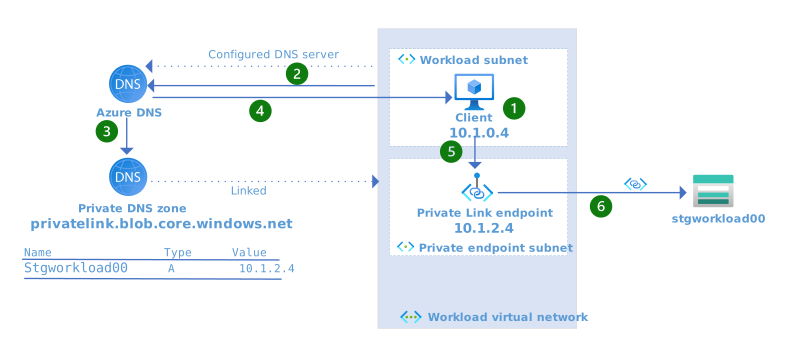
Figure 3: A basic DNS configuration for private endpoints
Download a Visio file of this architecture.
The client issues a request to stgworkload00.blob.core.windows.net.
Azure DNS, the configured DNS server for the virtual network, is queried for the IP address for stgworkload00.blob.core.windows.net.
Running the following command from the virtual machine (VM) illustrates that the VM is configured to use Azure DNS (168.63.129.16) as the DNS provider.
resolvectl status eth0

Link 2 (eth0)
      Current Scopes: DNS
  Current DNS Server: 168.63.129.16
         DNS Servers: 168.63.129.16
The private DNS zone
privatelink.blob.core.windows.netis linked to Workload VNet, so Azure DNS incorporates records from Workload VNet in its response.Because an A record exists in the private DNS zone that maps the FQDN,
stgworkload00.privatelink.blob.core.windows.net, to the private IP of the private endpoint, the private IP address 10.1.2.4 is returned.Running the following command from the VM resolves the FQDN of the storage account to the private IP address of the private endpoint.
resolvectl query stgworkload00.blob.core.windows.net

stgworkload00.blob.core.windows.net: 10.1.2.4   -- link: eth0
                                    (stgworkload00.privatelink.blob.core.windows.net)
The request is issued to the private IP address of the private endpoint which is 10.1.2.4.
The request is routed through Private Link to the storage account.
This design works because Azure DNS:
- Is the configured DNS server for the virtual network.
- Is aware of the linked private DNS zone.
- Resolves DNS queries by using the values of the zone.
Nonworking scenario
The following example is a naive attempt to use private endpoints in the starting network topology. It isn't possible to link a private DNS zone to a Virtual WAN hub. Therefore, when clients are configured to use the firewall as their DNS server, the DNS requests are forwarded to Azure DNS from within the virtual hub, which doesn't have a linked private DNS zone. Azure DNS doesn't know how to resolve the query other than by providing the default, which is the public IP address.
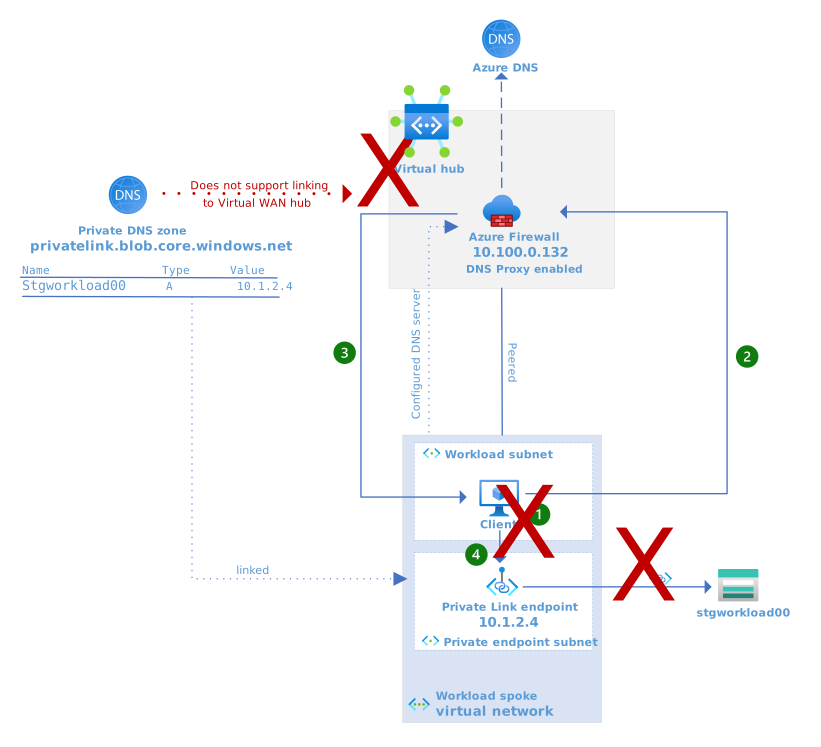
Figure 4: A naive attempt to use private endpoints in the starting network topology
Download a Visio file of this architecture.
The client issues a request to stgworkload00.blob.core.windows.net.
Running the following command from the VM illustrates that the VM is configured to use the virtual hub firewall as the DNS provider.
resolvectl status eth0

Link 2 (eth0)
      Current Scopes: DNS
  Current DNS Server: 10.100.0.132
         DNS Servers: 10.100.0.132
The firewall has DNS Proxy enabled with the default setting to forward requests to Azure DNS. The request is forwarded to Azure DNS.
Azure DNS can't resolve
stgworkload00.blob.core.windows.netto the private IP address of the private endpoint because:- A private DNS zone can't be linked to a Virtual WAN hub.
- Azure DNS isn't aware of a private DNS zone that's linked to the workload virtual network, because the configured DNS server for the workload virtual network is Azure Firewall.
Azure DNS responds with the public IP address of the storage account.
Running the following command from the VM resolves the FQDN of the storage account to the public IP of the storage account.
resolvectl query stgworkload00.blob.core.windows.net

stgworkload00.blob.core.windows.net: 52.239.174.228 -- link: eth0
                                    (blob.bn9prdstr08a.store.core.windows.net)
Because Azure Firewall is proxying DNS queries, we're able to log them. The following are sample Azure Firewall DNS Proxy logs.
DNS Request: 10.1.0.4:60137 - 46023 A IN stgworkload00.blob.core.windows.net. udp 63 false 512 NOERROR qr,rd,ra 313 0.009424664s
DNS Request: 10.1.0.4:53145 - 34586 AAAA IN blob.bn9prdstr08a.store.core.windows.net. udp 69 false 512 NOERROR qr,aa,rd,ra 169 0.000113s
The client doesn't receive the private IP address for the Private Link endpoint and can't establish a private connection to the storage account.
This behavior is expected. It's the problem that the scenarios address.
Scenarios
Solutions to this problem are similar, but examining common workload scenarios shows how each solution meets different requirements. Most scenarios consist of a client that accesses one or more PaaS services over a private endpoint. They adhere to the starting network topology but differ in their workload requirements. The scenarios start with a client that accesses a single regional PaaS service. They become incrementally more complex and add more network visibility, regions, and PaaS services.
In most scenarios, the client is implemented as a VM, and the PaaS service that the client accesses is a storage account. You should consider VMs as a stand-in for any Azure resource that has a NIC that's exposed on a virtual network, such as Virtual Machine Scale Sets, Azure Kubernetes Service nodes, or any other service that routes in a similar way.
Important
The Private Link implementation for the Azure Storage account might differ from other PaaS services in subtle ways, but it aligns well with many other services. For example, some services remove FQDN records while exposed through Private Link, which might result in different behaviors, but such differences are usually not a factor in solutions for these scenarios.
Each scenario starts with the desired end state and details the required configuration to get from the starting network topology to the desired end state. The solution uses the virtual hub extensions pattern, which exposes shared services as a secure extension of a regional hub, together with Azure DNS Private Resolver for DNS resolution for private endpoints in Virtual WAN environments. The following table contains links to the virtual hub extension pattern and the scenarios.
| Guide | Description |
|---|---|
| Single region, dedicated PaaS | A workload in a single region accesses one dedicated PaaS resource. |
Next steps
Related resources
- What is a private endpoint?
- Azure Private Endpoint DNS configuration
- Private Link and DNS integration at scale
- Azure Private Link in a hub-and-spoke network
- DNS for on-premises and Azure resources
- Use Azure Private Link to connect networks to Azure Monitor
- Azure DNS Private Resolver
- Improved-security access to multitenant web apps from an on-premises network
- Baseline highly available zone-redundant web application
- Tutorial: Create a private endpoint DNS infrastructure with Azure Private Resolver for an on-premises workload