Note
Access to this page requires authorization. You can try signing in or changing directories.
Access to this page requires authorization. You can try changing directories.
Azure Monitor can already collect telemetry from on-premises, edge, and multicloud environments. In many enterprise environments, sending large volumes of telemetry directly to the cloud can increase ingestion costs, introduce reliability risks during connectivity loss, and limit your control over what data is collected. Azure Monitor pipeline builds on existing Azure Monitor collection capabilities for these scenarios.
Azure Monitor pipeline provides centralized governance and a single point of control that runs close to your data sources, so you can filter, transform, aggregate, and route telemetry before it's sent to Azure Monitor. This approach helps you reduce ingestion volume, improve reliability in disconnected environments, and apply consistent data processing across hybrid and multicloud deployments. Built on OpenTelemetry technology, the pipeline supports standard ingestion protocols including Syslog and OTLP, enabling it to receive telemetry from a wide range of clients and environments.
Why use Azure Monitor pipeline?
Use Azure Monitor pipeline when direct-to-cloud collection doesn't meet your security, scale, cost, or resiliency requirements.
| Need | How the pipeline helps |
|---|---|
| Bandwidth or ingestion cost constraints | Filters and aggregates data before cloud ingestion to reduce your network bandwidth requirements. |
| High telemetry volume | Processes data locally at scale to handle sustained high-throughput scenarios before sending to Azure Monitor. |
| Intermittent or restricted connectivity | When persistent storage is enabled, stores data locally so it survives process restarts or connectivity loss and backfills automatically when connectivity returns. |
| Formatting of telemetry | Auto-schematizes Syslog and CEF data to standard tables. |
Supported data sources
Azure Monitor pipeline currently receives and processes the following data source types:
| Data source | Details | Status |
|---|---|---|
| Syslog | Supports RFC 3164 and RFC 5424 over TCP and UDP. CEF is supported as Syslog data through the same receiver. | Generally available |
| OpenTelemetry logs (OTLP) | Supports ingestion of OpenTelemetry logs from clients to Azure Monitor. | Preview |
Key capabilities
Azure Monitor pipeline includes a set of capabilities that help address common ingestion challenges in hybrid and multicloud environments.
- Secure ingestion endpoints support TLS and optional mutual TLS (mTLS), so you can encrypt telemetry in transit and restrict ingestion to trusted clients.
- Local processing can filter, aggregate, and reshape telemetry before it reaches Azure Monitor, which helps reduce ingestion cost and keep cloud analytics focused on higher-value data.
- Supported Syslog and CEF data can be auto-schematized for Azure Monitor tables such as
SyslogandCommonSecurityLog, which helps reduce downstream parsing effort. - Optional persistent storage writes telemetry to durable local storage so it survives process restarts and connectivity interruptions. The pipeline automatically backfills data when connectivity returns.
- Built-in monitoring exposes health and performance signals for the pipeline itself, so you can see whether it is receiving, processing, and forwarding telemetry.
- Sizing guidance helps you plan the Kubernetes infrastructure for your expected telemetry volume and workload characteristics.
How Azure Monitor pipeline works
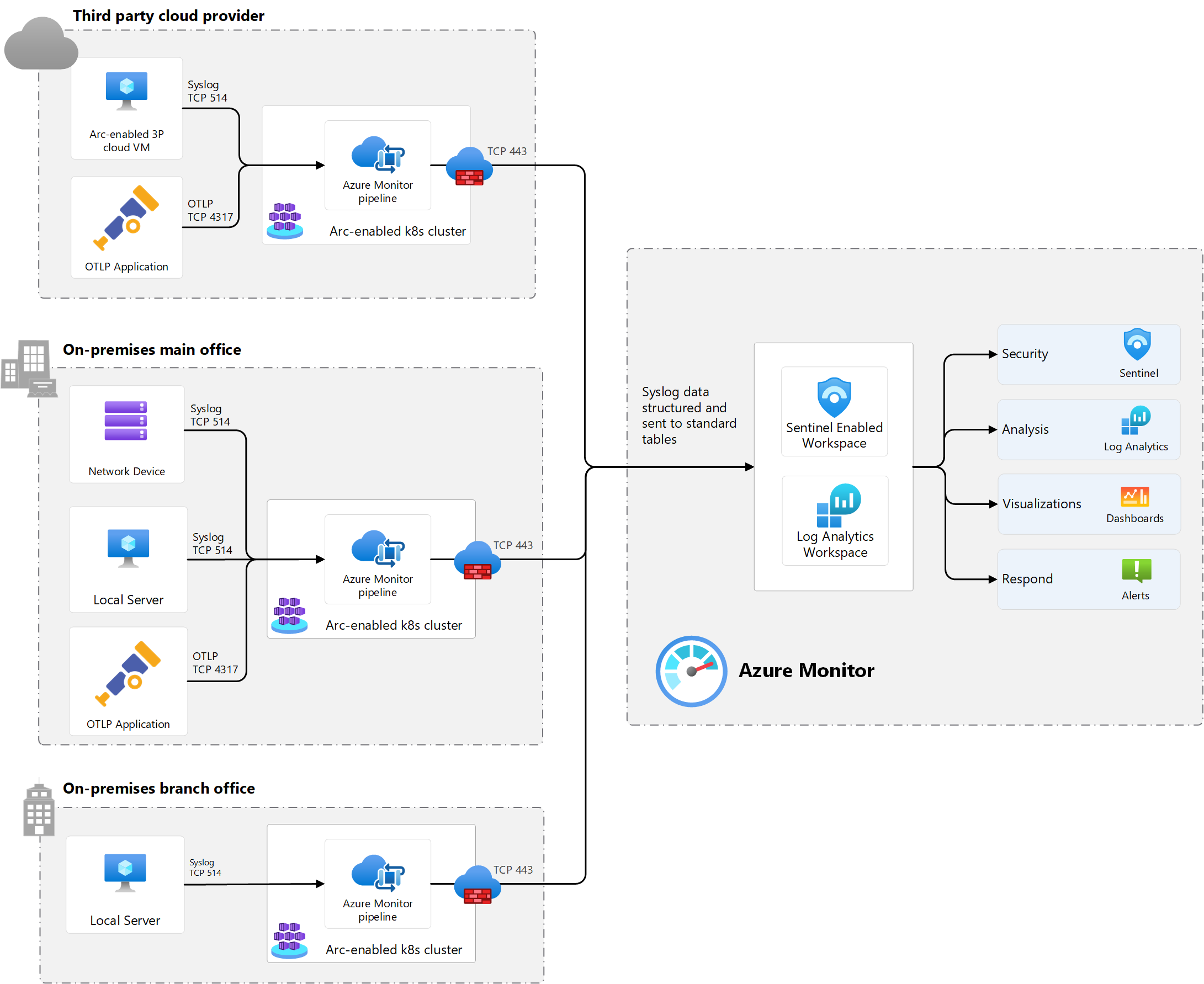
The pipeline is a containerized solution that runs on an Arc-enabled Kubernetes cluster in your datacenter, edge location, or another cloud provider. It receives telemetry from clients over standard protocols such as Syslog and OpenTelemetry (OTLP), processes that telemetry, and sends it to Azure Monitor. The pipeline is configured through the Azure portal, ARM templates, Bicep, or Azure CLI.
Note
Azure provides Azure Monitor pipeline with management and integration to Azure Monitor, but you're responsible for operating and maintaining the Kubernetes environment where the pipeline runs. This shared responsibility model allows you to retain control over your local infrastructure.
A typical deployment is shown in the preceding image and includes the following components:
- The pipeline runs on an Arc-enabled Kubernetes cluster at each on-premises, edge, or multicloud location.
- Clients send Syslog data, including CEF, to the pipeline over TCP or UDP on port 514 by default.
- Clients send OpenTelemetry logs (OTLP) data to the pipeline on TCP port 4317 by default (this feature is in Preview).
- An optional gateway exposes pipeline receivers to clients outside the cluster.
- Optional TLS or mutual TLS (mTLS) secures ingestion traffic.
- Optional transformations filter or reshape data before it's sent to a Log Analytics workspace.
- The pipeline forwards data across local firewalls to a Log Analytics workspace in Azure Monitor.
- Once data is collected, it's available to any Azure Monitor feature that accesses that workspace.
Azure Monitor pipeline compared to Azure Monitor agent
Azure Monitor pipeline and Azure Monitor agent (AMA) use different collection models and often work well together. AMA is installed on individual resources and collects telemetry from those resources for Azure Monitor. Azure Monitor pipeline is deployed centrally and receives, processes, and forwards telemetry from multiple local sources before cloud ingestion.
| Aspect | Azure Monitor agent | Azure Monitor pipeline |
|---|---|---|
| Ingestion model | Agent-based | Forwarder + Gateway -based |
| Deployment model | Installed on individual virtual machines or Kubernetes clusters | Deployed centrally on an Arc-enabled Kubernetes cluster |
| Primary role | Collect telemetry from the resource where the agent runs | Receive, process, and route telemetry from multiple sources before sending it to Azure Monitor |
| Typical fit | Resources where you can install and manage an agent and send data directly to Azure | Scenarios that need centralized ingestion, preprocessing, or persistent storage before sending data to Azure |
| Scale model | Per-resource collection with local caching | Aggregated ingestion with centralized persistent storage and processing |
Many architectures use both together. AMA handles per-resource collection for supported Azure and Arc-enabled resources, while Azure Monitor pipeline provides a central ingestion point for scenarios where customers need to receive telemetry from remote sources or apply control before the data reaches Azure.
Supported configurations
Azure Monitor pipeline runs on Arc-enabled Kubernetes. Support depends on both the region and the Kubernetes distribution versions supported for the required cert-manager extension.
| Supported Kubernetes distributions | Supported regions |
|---|---|
| - VMware Tanzu Kubernetes Grid multicloud (TKGm) v1.28.11 - SUSE Rancher K3s v1.33.3+k3s1 - AKS Arc v1.32.7 |
- Australia East - Brazil South - Canada Central - Central India - Central US - Central US EUAP - East Asia - East US - East US 2 - East US 2 EUAP - France Central - Germany West Central - Italy North - Japan East - Korea Central - North Central US - North Europe - Norway East - South Africa North - South India - Sweden Central - Switzerland North - UK South - UK West - West Central US - West Europe - West US - West US 2 - West US 3 |
Supported regions, see Product availability by region.
Related articles
- Complete the cluster setup in Configure Azure Monitor pipeline.
- Review gateway guidance in Azure Monitor pipeline - Gateway for Kubernetes deployment.
- Review encryption options in Azure Monitor pipeline TLS configuration.
- Review data shaping options in Transform data with Azure Monitor pipeline.
- Plan deployment capacity in Size Azure Monitor pipeline.