Note
Access to this page requires authorization. You can try signing in or changing directories.
Access to this page requires authorization. You can try changing directories.
Applies to:  External tenants (learn more)
Decide which migration approach is right for your Azure AD B2C tenant before you begin implementation. This article helps you choose between the standard migration and High Scale Compatibility (HSC) mode, understand the key decision points, and find the right next step. This article is for existing customers of Azure AD B2C who are planning to migrate. New customers evaluating Microsoft Entra External ID should refer to Planning your solution.
Important
Before you choose an approach, review the feature and service limitations that apply to Microsoft Entra External ID, and the additional limitations that apply in HSC mode. Some Azure AD B2C capabilities (for example, social identity providers, passkeys, age gating, and certain Conditional Access scenarios) aren't available in HSC mode today. See HSC mode limitations and Capability support by scale and deployment mode.
In this article, you’ll learn how to:
- Compare the available migration approaches (standard and High Scale Compatibility)
- Understand the key decision points and eligibility criteria
- Review HSC mode limitations and feature availability
- Review a stage-by-stage view of how coexistence works
- Find links to configuration instructions for your chosen approach
Choose a migration approach
Your first decision is which migration approach to use. Most customers should use the standard approach. High Scale Compatibility (HSC) mode is only relevant if your tenant exceeds specific scale thresholds and you can accept its functional limitations.
- Standard migration. Recommended for most customers. You migrate users and credentials to a new External ID tenant and cut over applications.
- High Scale Compatibility (HSC) mode. For very large Azure AD B2C tenants with over 5 million directory objects. You keep existing users and credentials in place and migrate applications in phases.
Determine whether High Scale Compatibility (HSC) mode migration applies
Use the following decision tree to check whether your tenant is eligible for HSC mode.
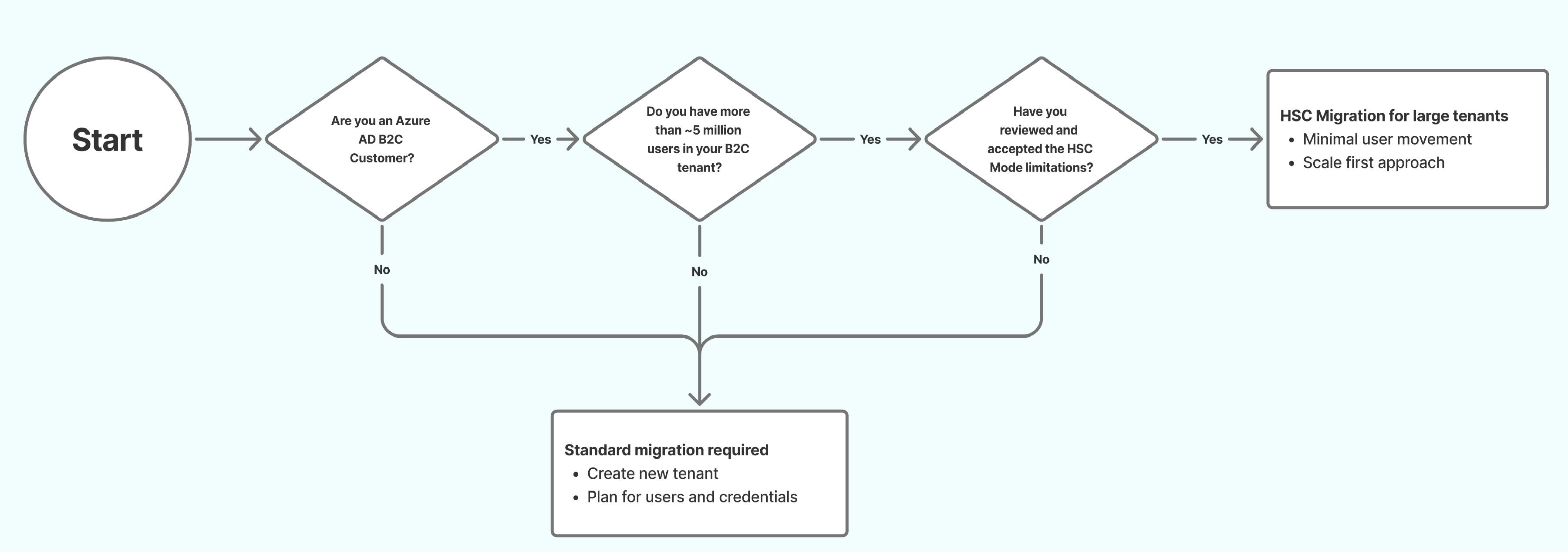
HSC mode migration might be a good choice if all the following are true:
- You are an existing Azure AD B2C customer.
- Your tenant contains approximately 5 million or more directory objects (users, groups, and applications).
- You have reviewed and accepted the functional limitations of HSC mode.
Decision summary
| Standard migration | High Scale Compatibility (HSC) mode migration |
|---|---|
| Best for: Most tenants Typical trigger: Below high-scale thresholds Identity approach: Plan to migrate users (and, where required, credentials) as part of moving to External ID Coexistence: Not designed for long-running side-by-side operation at very large scale Feature coverage: Broadest compatibility |
Best for: Very large Azure AD B2C tenants Typical trigger: ~5 million+ directory objects and scale-driven constraints Identity approach: Keep existing users and credentials in place while migrating applications in phases Coexistence: Azure AD B2C and External ID run side by side in the same tenant and might require schema updates Feature coverage: Significant feature gaps today — no social identity providers, no passkeys, no age gating, no admin portal experience, and limited Conditional Access. See HSC mode limitations |
If your tenant meets the HSC mode eligibility criteria, review both approaches below before deciding. The standard approach might still be the better fit depending on your feature requirements.
If your tenant doesn't meet the HSC mode eligibility criteria, use the standard migration approach. HSC mode provides no added benefit below the high-scale thresholds.
Standard migration approach
The standard migration approach is recommended for most Azure AD B2C customers. It’s intended for tenants that can migrate users (and, where required, credentials) and move applications to Microsoft Entra External ID without needing high-scale coexistence behavior.
What you migrate in the standard approach
In the standard approach, you migrate identities and applications to a new Microsoft Entra External ID tenant. This typically includes:
- Creating the destination tenant and configuring security, compliance, and monitoring
- Registering applications and configuring user flows
- Migrating user data from your existing tenant
- Preserving passwords (if needed)
- Cutting over applications to External ID
Common migration patterns
- Bulk user migration, then app cutover: Users are migrated to External ID in advance, and applications are updated to authenticate against External ID.
- Bulk user migration with just-in-time (JIT) password migration: Users are migrated to External ID first, then password validation/migration happens during sign-in or password reset over a time-boxed coexistence period.
- Azure AD B2C-initiated migration: Applications initially continue authenticating through your legacy B2C tenant while passwords are progressively migrated in the background, then applications cut over to External ID.
Considerations
Before you start implementation, review the following areas at a high level:
- Custom business logic: Identify custom policy logic, token/claim shaping, and downstream dependencies you need to recreate.
- User experience: Review your current sign-in UX customizations and decide which External ID experience to use.
- Identity providers: List social and enterprise identity providers and any federation requirements.
- Access controls: Note Conditional Access policies and conditions that must be equivalent post-migration.
- Application-level changes: Migration requires changes at the application level, not just the tenant level. Each application must be updated to use External ID endpoints and validate tokens accordingly. If your tenant contains applications owned by third parties (for example, ISV tenants where customers register their own apps), coordinate with those app owners early. You can't complete migration until every application is updated.
- Automation and operations: Plan Microsoft Graph-based lifecycle operations, monitoring, and runbooks.
Known limitations
Some Azure AD B2C capabilities aren't available (or aren't yet fully available) in Microsoft Entra External ID. Review these before you commit to a migration plan.
- Age gating: Azure AD B2C tenants that use custom policies to derive or store age-based attributes (such as minor or major classification) need to plan for alternate approaches. Age gating isn't currently supported in Microsoft Entra External ID.
- Custom policies (IEF): Custom policy logic must be recreated using custom authentication extensions. One-to-one parity isn't guaranteed.
For the full list of service limits and capability differences, see Service limits and restrictions.
When to choose standard migration
- You don't require long-running side-by-side operation of Azure AD B2C and External ID.
- You want the broadest feature compatibility while you move identities and applications to External ID.
Configuration instructions
If you’ve decided to use the standard migration approach, continue to Migrate from Azure AD B2C to Microsoft Entra External ID for guidance on configuring a new tenant and migrating your users and credentials from Azure AD B2C to your new environment.
High Scale Compatibility (HSC) mode migration approach
High Scale Compatibility (HSC) mode is a specialized approach for very large Azure AD B2C tenants. It lets you adopt Microsoft Entra External ID endpoints and features while keeping your existing users and credentials in place, so you can migrate applications in phases.
How HSC mode works
In HSC mode, Azure AD B2C and Microsoft Entra External ID run side by side in the same tenant. Existing apps can continue to use Azure AD B2C endpoints while you move new or migrated apps to External ID endpoints.
Why choose HSC mode
HSC mode is intended for tenants where a full user and credential migration would be high risk or difficult to complete in a single operation. It helps you:
- Preserve existing B2C users and credentials without disruption.
- Continue supporting legacy B2C applications alongside new or migrated apps using External ID.
- Control the pace and scope of migration, enabling a phased transition across applications according to business needs.
Before you enable HSC mode, confirm eligibility, review limitations, and validate key sign-in and token issuance scenarios with a small set of applications. The following sections summarize each prerequisite.
Confirm tenant eligibility
Your tenant is eligible for HSC mode if it exceeds the required object quota (approximately 5 million directory objects). You can check your current usage through the Graph API directoryObject resource type. For more information, see directoryObject resource type.
If your tenant doesn't exceed this object quota, HSC mode provides no additional benefit and the standard migration approach is recommended.
Review limitations and roadmap alignment
Important
HSC mode is appropriate only if you can accept limitations that apply at large scale. Review the HSC mode limitations section below before enabling HSC mode or migrating additional applications.
Some limitations are fundamental to operating at high scale and exist today in Azure AD B2C. These same constraints apply when running External ID in HSC mode. For a comprehensive list, see Capability support by scale and deployment mode.
Application requirements for HSC mode
When migrating applications to External ID in HSC mode, the following requirements apply:
- Create new application registrations. Don't reuse existing Azure AD B2C application registrations. External ID requires new registrations due to differences in application properties and Native Authentication support.
- Use single-tenant configuration. Register each application as single-tenant (Accounts in this organizational directory only). Multitenant application registrations aren't supported for External ID endpoints.
Understand how coexistence works
In HSC mode, Azure AD B2C and Microsoft Entra External ID run side by side within the same tenant. Existing applications continue to use Azure AD B2C endpoints, while new or migrated applications use External ID endpoints. Users and credentials are shared across both experiences.
Stage 1: All apps running on B2C services as they are now.
Stage 2: Your tenant is enabled for HSC mode on your existing Azure AD B2C tenant. This is performed without impacting any apps. You can now migrate apps to run on External ID services while others remain on B2C.
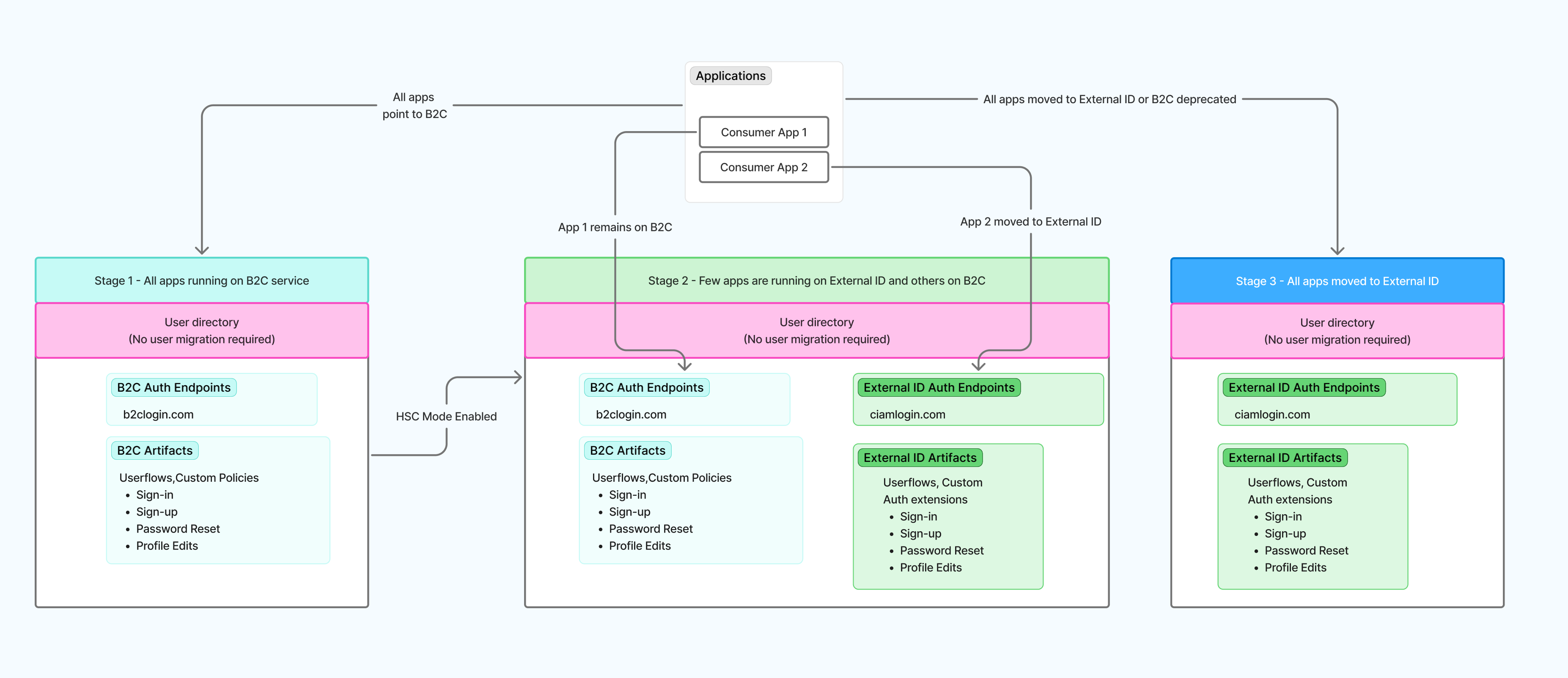
Stage 3: All apps completely moved over to External ID and your tenant is ready for Azure AD B2C retirement.
Important
Application migration is always performed by you. HSC mode doesn't automatically move applications.
Configuration instructions
If you've decided to use High Scale Compatibility (HSC) mode, continue to Enable External ID High Scale Compatibility (HSC) mode for step-by-step instructions on enabling HSC mode for your tenant and guidance on how to configure your environment for coexistence.
If after reviewing the HSC mode limitations you'd prefer the standard approach instead, see Migrate from Azure AD B2C to Microsoft Entra External ID.
HSC mode limitations
Review these limitations carefully before enabling HSC mode. They apply in addition to the general External ID service limits. Some features might be partially available but haven't been fully validated in HSC mode, and feature availability timelines can differ between HSC mode and standard deployment. Refer to the official roadmap for the latest status.
Authentication and access control
- Advanced Conditional Access scenarios, including authentication context, step-up authentication, and session-based controls.
- Application assignment via groups.
- Passkeys aren't currently available in Microsoft Entra External ID or HSC mode.
Federation and ecosystem integrations
- Social identity providers (Google, Facebook, Apple, and any other social identity providers configured in Azure AD B2C).
- Third-party identity providers configured through Azure AD B2C custom policies.
- Custom OIDC federation as configured in Azure AD B2C custom policies (enterprise OIDC identity providers are supported).
Security and fraud prevention
- Third-party fraud protection integration.
User experience and compliance
- Age gating. Azure AD B2C tenants that use custom policies to derive or store age-based attributes (such as minor or major classification) need to plan for alternate approaches.
Admin portal experience
- Administrative configuration and management are currently performed programmatically using Microsoft Graph and automation.
For the authoritative capability comparison, see Capability support by scale and deployment mode.
Get help from a migration partner
Microsoft works with services and integration partners who specialize in Azure AD B2C to Microsoft Entra External ID migrations. Partners can help with advisory, implementation, and engineering-led delivery across both the standard and HSC mode approaches. For a list of partners and how to engage them, see Services and integration partners for External ID.