Note
Access to this page requires authorization. You can try signing in or changing directories.
Access to this page requires authorization. You can try changing directories.
Use this article after you complete the shared setup in Configure Azure Monitor pipeline. This method is best for automation, custom tables, persistent storage, and other advanced scenarios.
When to use this method
Use CLI or ARM templates when you need a repeatable deployment process or more control over the pipeline resources. If you want the fastest guided experience for a standard deployment, use Configure Azure Monitor pipeline with the Azure portal.
| Need | Why use CLI or ARM templates |
|---|---|
| Automation | Deploy the same configuration across multiple clusters. |
| Advanced configuration | Configure custom tables, persistent storage, and more detailed resource settings. |
| Infrastructure as code | Store and review configuration in templates and deployment pipelines. |
| Repeatable deployments | Standardize pipeline deployments for testing and production environments. |
Configuration workflow
Follow these tasks to configure a pipeline by using CLI or ARM templates.
| Step | Purpose | Output |
|---|---|---|
| Prepare workspace tables | Create destination tables in Log Analytics workspace. | Tables ready for incoming data |
| Add the pipeline extension | Enable Azure Monitor pipeline support on the cluster. | Pipeline extension resource |
| Create a custom location | Make the Arc-enabled Kubernetes cluster targetable by Azure resources. | Custom location resource |
| Create a data collection endpoint | Define the ingestion endpoint in Azure Monitor. | DCE resource and logs ingestion URL |
| Create a data collection rule | Define the schema, routing, and optional transformations in Azure Monitor. | DCR resource and immutable ID |
| Give the pipeline access to the DCR | Allow the pipeline extension to send data to the DCR. | Role assignment |
| Create the pipeline configuration | Deploy the pipeline instance and dataflows. | Running pipeline instance |
| Configure clients | Point your data sources to the pipeline endpoint. | Data flowing through the pipeline |
Prepare workspace tables
Before you configure the data collection process for the pipeline, confirm or create the destination tables in the Log Analytics workspace. The Azure Monitor pipeline supports sending data to the following tables:
- Syslog
- CommonSecurityLog
- Any custom table in the Log Analytics workspace
If you're sending data to a new custom table, create that table before you create any data flows that send to it. The schema of the table must match the data that it receives but not necessarily the schema of the source data that you're collecting from. Multiple steps in the collection process allow you to modify the incoming data before it's received. The only requirement for the table in the Log Analytics workspace is that it has a TimeGenerated column.
For details on different methods for creating a table, see Add or delete tables and columns in Azure Monitor Logs. For example, use the following CLI command to create a table with the three columns called Body, TimeGenerated, and SeverityText.
az monitor log-analytics workspace table create --workspace-name my-workspace --resource-group my-resource-group --name OTelLogs_CL --columns TimeGenerated=datetime Body=string SeverityText=string
Create pipeline resources
Use the following tasks to configure the Azure Monitor pipeline resources on your cluster.
Add the pipeline extension
Start by adding the pipeline extension to your Arc-enabled Kubernetes cluster. Use the same namespace for the pipeline extension and the Azure Monitor pipeline instance that you deploy later in this article. The releaseNamespace that you specify for the extension must match the namespace used by the pipeline instance.
az k8s-extension create --name <pipeline-extension-name> --extension-type microsoft.monitor.pipelinecontroller --scope cluster --cluster-name <cluster-name> --resource-group <resource-group> --cluster-type connectedClusters --release-train Preview

## Example
az k8s-extension create --name my-pipeline --extension-type microsoft.monitor.pipelinecontroller --scope cluster --cluster-name my-cluster --resource-group my-resource-group --cluster-type connectedClusters --release-train Preview
Create a custom location
An Azure custom location lets Azure treat the Arc-enabled Kubernetes clusters as targetable locations for Azure resources.
az customlocation create --name <custom-location-name> --resource-group <resource-group-name> --namespace <name of namespace> --host-resource-id <connectedClusterId> --cluster-extension-ids <extensionId>

## Example
az customlocation create --name my-cluster-custom-location --resource-group my-resource-group --namespace my-cluster-custom-location --host-resource-id /subscriptions/aaaa0a0a-bb1b-cc2c-dd3d-eeeeee4e4e4e/resourceGroups/my-resource-group/providers/Microsoft.Kubernetes/connectedClusters/my-cluster --cluster-extension-ids /subscriptions/aaaa0a0a-bb1b-cc2c-dd3d-eeeeee4e4e4e/resourceGroups/my-resource-group/providers/Microsoft.Kubernetes/connectedClusters/my-cluster/providers/Microsoft.KubernetesConfiguration/extensions/my-cluster
Create a data collection endpoint (DCE)
Use the following command to create the data collection endpoint (DCE) required for the pipeline to connect to the cloud. You can use an existing DCE if you already have one in the same region.
az monitor data-collection endpoint create --name <dce-name> --resource-group <resource-group-name> --location <location> --public-network-access "Enabled"

## Example
 az monitor data-collection endpoint create --name strato-06-dce --resource-group strato --location eastus --public-network-access "Enabled"
Create a data collection rule (DCR)
Azure Monitor stores the DCR and defines how to process the received data from the pipeline. The pipeline configuration specifies the immutable ID of this DCR and the stream in the DCR that processes the data.
Define the DCR
You need to create the DCR before you can create the pipeline configuration. The pipeline configuration needs the immutable ID of the DCR, which is automatically generated when you create the DCR. Define DCRs in JSON. Start with the following sample DCR and update the sections outlined in the table. Then create the DCR by using one of the following methods.
| Parameter | Description |
|---|---|
name |
Name of the DCR. Must be unique for the subscription. |
location |
Location of the DCR. Must match the location of the DCE. |
dataCollectionEndpointId |
Resource ID of the DCE that you previously created. |
streamDeclarations |
Schema of the data being received. One stream is required for each dataflow in the pipeline configuration. The name must be unique in the DCR and must begin with Custom-. The column sections in the following samples should be used for the OTLP and Syslog data flows. If the schema for your destination table is different, modify it by using a transformation defined in the transformKql parameter. |
destinations |
Details of one or more Log Analytics workspaces where the data is sent. |
dataFlows |
One or more data flows that each match a set of streams and destinations. The data flow can include an optional transformation to modify the data before it's sent to the destination. The output stream specifies the destination table in the Log Analytics workspace. The table must already exist in the workspace. For custom tables, prefix the table name with Custom-. For Azure tables, prefix the table name with Microsoft-. |
Replace the properties in the sample template and save them in a JSON file before running the CLI command to create the DCR. For more information about the structure of a DCR, see Structure of a data collection rule in Azure Monitor.
az monitor data-collection rule create --name 'myDCRName' --location <location> --resource-group <resource-group> --rule-file '<dcr-file-path.json>'

## Example
az monitor data-collection rule create --name my-pipeline-dcr --location westus2 --resource-group 'my-resource-group' --rule-file 'C:\MyDCR.json'
Expand for DCR sample
{
    "properties": {
        "dataCollectionEndpointId": "/subscriptions/aaaa0a0a-bb1b-cc2c-dd3d-eeeeee4e4e4e/resourceGroups/my-resource-group/providers/Microsoft.Insights/dataCollectionEndpoints/my-dce",
        "streamDeclarations": {
            "Custom-OTLP": {
                "columns": [
                    {
                        "name": "Body",
                        "type": "string"
                    },
                    {
                        "name": "TimeGenerated",
                        "type": "datetime"
                    },
                    {
                        "name": "SeverityText",
                        "type": "string"
                    }
                ]
            },
            "Custom-Syslog": {
                "columns": [
                    {
                        "name": "Body",
                        "type": "string"
                    },
                    {
                        "name": "TimeGenerated",
                        "type": "datetime"
                    },
                    {
                        "name": "SeverityText",
                        "type": "string"
                    }
                ]
            }
        },
        "dataSources": {},
        "destinations": {
            "logAnalytics": [
                {
                    "name": "LogAnayticsWorkspace01",
                    "workspaceResourceId": "/subscriptions/aaaa0a0a-bb1b-cc2c-dd3d-eeeeee4e4e4e/resourceGroups/my-resource-group/providers/Microsoft.OperationalInsights/workspaces/my-workspace",
                }
            ]
        },
        "dataFlows": [
            {
                "streams": [
                    "Custom-OTLP"
                ],
                "destinations": [
                    "LogAnayticsWorkspace01"
                ],
                "transformKql": "source",
                "outputStream": "Custom-OTelLogs_CL"
            },
            {
                "streams": [
                    "Custom-Syslog"
                ],
                "destinations": [
                    "LogAnayticsWorkspace01"
                ],
                "transformKql": "source",
                "outputStream": "Custom-Syslog_CL"
            }
        ]
    }
}
Give the pipeline access to the DCR
The Arc-enabled Kubernetes cluster must have access to the DCR to send data to the cloud. Provide this access by assigning the Monitoring Metrics Publisher role to the System Assigned Identity of the pipeline extension on your cluster.
You need the object ID of your cluster's System Assigned Identity. Get it from the Azure portal or use the following CLI command:
az k8s-extension show --name <extension-name> --cluster-name <cluster-name> --resource-group <resource-group> --cluster-type connectedClusters --query "identity.principalId" -o tsv

## Example:
az k8s-extension show --name my-pipeline-extension --cluster-name my-cluster --resource-group my-resource-group --cluster-type connectedClusters --query "identity.principalId" -o tsv
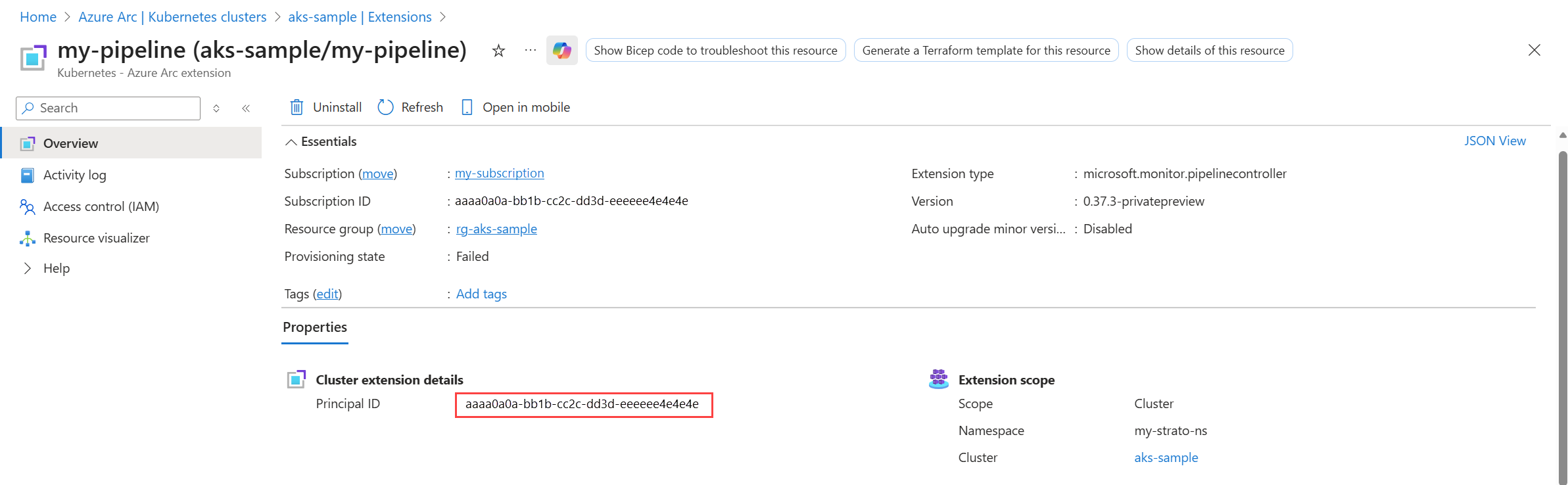
Use the output from this command as input to the following command. It gives Azure Monitor pipeline the authority to send its telemetry to the DCR.
az role assignment create --assignee "<extension principal ID>" --role "Monitoring Metrics Publisher" --scope "/subscriptions/<subscription-id>/resourceGroups/<resource-group>/providers/Microsoft.Insights/dataCollectionRules/<dcr-name>"

## Example:
az role assignment create --assignee "aaaaaaaa-bbbb-cccc-1111-222222222222" --role "Monitoring Metrics Publisher" --scope "/subscriptions/aaaa0a0a-bb1b-cc2c-dd3d-eeeeee4e4e4e/resourceGroups/my-resource-group/providers/Microsoft.Insights/dataCollectionRules/my-dcr"
Create the pipeline configuration
The pipeline configuration defines the details of the pipeline instance and deploys the data flows necessary to receive and send telemetry to the cloud. Format the configuration in JSON, similar to the structure of a DCR. You can only install it by using an ARM template.
Data sources
To collect Syslog and CEF data, use the MicrosoftSyslog or MicrosoftCommonSecurityLog processors shown in the following samples. The incoming data is automatically converted to the appropriate format.
Expand for Syslog processor sample
"processors": [
    {
    "type": "MicrosoftSyslog",
    "name": "ms-syslog-processor"
    }
]
Expand for CEF processor sample
"processors": [
    {
    "type": "MicrosoftCommonSecurityLog",
    "name": "ms-cef-processor"
    }
]
Destinations
To send data to the Azure Syslog and CommonSecurityLog tables, use either Microsoft-Syslog-FullyFormed or Microsoft-CommonSecurityLog-FullyFormed for the stream. This outputs all columns for the table without requiring any record mapping. The following samples include complete record mappings for sample purposes, but you can omit them if you're sending to the Azure tables.
The following table describes the sections of the pipeline configuration and critical properties. See the sample configuration files that follow the table for the structure of each section.
| Property | Description |
|---|---|
name |
Name of the pipeline instance. Must be unique in the subscription. |
location |
Location of the pipeline instance. |
extendedLocation |
The name property includes the resource ID of the custom location created above. The type property is always CustomLocation. |
receivers |
One entry for each receiver in the pipeline. Each receiver specifies the type of data being received, the port it will listen on, and a unique name that will be used in the pipelines section of the configuration. |
processors |
Processors modify the data in some way before it's sent to the cloud. This section should be empty if no processors are used. Valid processors include the following:MicrosoftSyslogConverts data to Syslog format. MicrosoftCommonSecurityLogConverts data to CEF format. BatchSpecifies the batch time in milliseconds. Default is one minute if this processor isn't specified. A batch processor is required to perform aggregation and customize its interval. Avoid using batch processor in all other scenarios if you want to send data with minimum latency. TransformLanguageSpecifies a transformation applied to the data before it's sent to the cloud. See Azure Monitor pipeline transformations. |
exporters |
Includes the details of the DCR that the pipeline will send data to. Includes the following properties.dataCollectionEndpointUrlLocate this in the Azure portal by navigating to the DCE and copying the Logs Ingestion value. dataCollectionRuleImmutable ID of the DCR that defines the data collection in the cloud. From the JSON view of your DCR in the Azure portal, copy the value of the immutable ID in the General section. streamName of the stream in your DCR that will accept the data. maxStorageUsageCapacity of the persistent volume. When 80% of this capacity is reached, the oldest data is pruned to make room for more data. retentionPeriodRetention period in minutes. Data is pruned after this amount of time. schema: Schema of the data being sent to the cloud. This must match the schema defined in the stream in the DCR. The schema used in the example is valid for both Syslog and OTLP. |
service |
pipelinesIncludes one entry for each pipeline instance. Each entry matches a receiver with an exporter, including any processors that should be used.persistenceSpecifies the name of the persistent volume if persistent storage is enabled. |
Expand for Syslog sample
{
    "$schema": "https://schema.management.azure.com/schemas/2019-04-01/deploymentTemplate.json#",
    "contentVersion": "1.0.0.0",
    "metadata": {
        "description": "This template deploys an edge pipeline for azure monitor."
    },
    "resources": [
        {
            "type": "Microsoft.monitor/pipelineGroups",
            "location": "eastus2euap",
            "apiVersion": "2026-04-01",
            "extendedLocation": {
                "name": "/subscriptions/aaaa0a0a-bb1b-cc2c-dd3d-eeeeee4e4e4e/resourceGroups/my-resource-group/providers/Microsoft.ExtendedLocation/customLocations/my-customlocation-eastus2",
                "type": "CustomLocation"
            },
            "name": "my-pipeline-eastus2euap",
            "properties": {
                "receivers": [
                    {
                        "type": "Syslog",
                        "name": "syslog-receiver",
                        "syslog": {
                            "endpoint": "0.0.0.0:514"
                        }
                    }
                ],
                "processors": [
                    {
                        "type": "MicrosoftSyslog",
                        "name": "ms-syslog-processor"
                    },
                    {
                        "type": "Batch",
                        "name": "batch-processor",
                        "batch": {
                            "timeout": 60000
                        }
                    },
                    {
                        "type": "TransformLanguage",
                        "name": "my-transform",
                        "transformLanguage": {
                            "transformStatement": "source"
                        }
                    }
                ],
                "exporters": [
                    {
                        "type": "AzureMonitorWorkspaceLogs",
                        "name": "syslog-eus2",
                        "azureMonitorWorkspaceLogs": {
                            "api": {
                                "dataCollectionEndpointUrl": "https://my-dce-eastus2-t9si.eastus2-1.ingest.monitor.azure.com",
                                "dataCollectionRule": "dcr-00000000000000000000000000000000",
                                "stream": "Microsoft-Syslog-FullyFormed",
                                "schema": {
                                    "recordMap": [
                                        {
                                            "from": "attributes.CollectorHostName",
                                            "to": "CollectorHostName"
                                        },
                                        {
                                            "from": "attributes.Computer",
                                            "to": "Computer"
                                        },
                                        {
                                            "from": "attributes.EventTime",
                                            "to": "EventTime"
                                        },
                                        {
                                            "from": "attributes.Facility",
                                            "to": "Facility"
                                        },
                                        {
                                            "from": "attributes.HostIP",
                                            "to": "HostIP"
                                        },
                                        {
                                            "from": "attributes.HostName",
                                            "to": "HostName"
                                        },
                                        {
                                            "from": "attributes.ProcessID",
                                            "to": "ProcessID"
                                        },
                                        {
                                            "from": "attributes.ProcessName",
                                            "to": "ProcessName"
                                        },
                                        {
                                            "from": "attributes.SeverityLevel",
                                            "to": "SeverityLevel"
                                        },
                                        {
                                            "from": "attributes.SourceSystem",
                                            "to": "SourceSystem"
                                        },
                                        {
                                            "from": "attributes.SyslogMessage",
                                            "to": "SyslogMessage"
                                        },
                                        {
                                            "from": "attributes.TimeGenerated",
                                            "to": "TimeGenerated"
                                        }
                                    ]
                                }
                            }
                        }
                    }
                ],
                "service": {
                    "pipelines": [
                        {
                            "name": "syslog-pipeline",
                            "receivers": [
                                "syslog-receiver"
                            ],
                            "processors": [
                                "ms-syslog-processor",
                                "batch-processor",
                                "my-transform"
                            ],
                            "exporters": [
                                "syslog-eus2"
                            ],
                            "type": "Logs"
                        }
                    ]
                }
            }
        }
    ]
}
Expand for CEF sample
{
"$schema": "https://schema.management.azure.com/schemas/2019-04-01/deploymentTemplate.json#",
"contentVersion": "1.0.0.0",
"metadata": {
"description": "This template deploys an edge pipeline for azure monitor."
},
"resources": [
{
"type": "Microsoft.monitor/pipelineGroups",
"location": "eastus2",
"apiVersion": "2026-04-01",
"extendedLocation": {
"name": "/subscriptions/aaaa0a0a-bb1b-cc2c-dd3d-eeeeee4e4e4e/resourceGroups/my-resource-group/providers/Microsoft.ExtendedLocation/customLocations/my-customlocation-eastus2",
"type": "CustomLocation"
},
"name": "my-pipeline-eastus2",
"properties": {
"receivers": [
{
"type": "Syslog",
"name": "cef-receiver",
"syslog": {
"endpoint": "0.0.0.0:515"
}
}
],
"processors": [
{
"type": "MicrosoftCommonSecurityLog",
"name": "ms-cef-processor"
},
{
"type": "Batch",
"name": "batch-processor",
"batch": {
"timeout": 60000
}
},
{
"type": "TransformLanguage",
"name": "my-transform",
"transformLanguage": {
"transformStatement": "source"
}
}
],
"exporters": [
{
"type": "AzureMonitorWorkspaceLogs",
"name": "cef-eus2",
"azureMonitorWorkspaceLogs": {
"api": {
"dataCollectionEndpointUrl": "https://my-dce-eastus2-t9si.eastus2-1.ingest.monitor.azure.com",
"dataCollectionRule": "dcr-9f8a459b3c224fddb626170fc08d66f9",
"stream": "Microsoft-CommonSecurityLog-FullyFormed",
"schema": {
"recordMap": [
{
"from": "attributes.Computer",
"to": "Computer"
},
{
"from": "attributes.TimeGenerated",
"to": "TimeGenerated"
},
{
"from": "attributes.CollectorHostName",
"to": "CollectorHostName"
},
{
"from": "attributes.DeviceVendor",
"to": "DeviceVendor"
},
{
"from": "attributes.DeviceProduct",
"to": "DeviceProduct"
},
{
"from": "attributes.DeviceVersion",
"to": "DeviceVersion"
},
{
"from": "attributes.DeviceEventClassID",
"to": "DeviceEventClassID"
},
{
"from": "attributes.Activity",
"to": "Activity"
},
{
"from": "attributes.LogSeverity",
"to": "LogSeverity"
},
{
"from": "attributes.OriginalLogSeverity",
"to": "OriginalLogSeverity"
},
{
"from": "attributes.AdditionalExtensions",
"to": "AdditionalExtensions"
},
{
"from": "attributes.ApplicationProtocol",
"to": "ApplicationProtocol"
},
{
"from": "attributes.EventCount",
"to": "EventCount"
},
{
"from": "attributes.DestinationDnsDomain",
"to": "DestinationDnsDomain"
},
{
"from": "attributes.DestinationServiceName",
"to": "DestinationServiceName"
},
{
"from": "attributes.DestinationTranslatedAddress",
"to": "DestinationTranslatedAddress"
},
{
"from": "attributes.DestinationTranslatedPort",
"to": "DestinationTranslatedPort"
},
{
"from": "attributes.CommunicationDirection",
"to": "CommunicationDirection"
},
{
"from": "attributes.DeviceDnsDomain",
"to": "DeviceDnsDomain"
},
{
"from": "attributes.DeviceExternalID",
"to": "DeviceExternalID"
},
{
"from": "attributes.DeviceFacility",
"to": "DeviceFacility"
},
{
"from": "attributes.DeviceInboundInterface",
"to": "DeviceInboundInterface"
},
{
"from": "attributes.DeviceName",
"to": "DeviceName"
},
{
"from": "attributes.DeviceNtDomain",
"to": "DeviceNtDomain"
},
{
"from": "attributes.DeviceOutboundInterface",
"to": "DeviceOutboundInterface"
},
{
"from": "attributes.DevicePayloadId",
"to": "DevicePayloadId"
},
{
"from": "attributes.ProcessName",
"to": "ProcessName"
},
{
"from": "attributes.DeviceTranslatedAddress",
"to": "DeviceTranslatedAddress"
},
{
"from": "attributes.DestinationHostName",
"to": "DestinationHostName"
},
{
"from": "attributes.DestinationMACAddress",
"to": "DestinationMACAddress"
},
{
"from": "attributes.DestinationNTDomain",
"to": "DestinationNTDomain"
},
{
"from": "attributes.DestinationProcessId",
"to": "DestinationProcessId"
},
{
"from": "attributes.DestinationUserPrivileges",
"to": "DestinationUserPrivileges"
},
{
"from": "attributes.DestinationProcessName",
"to": "DestinationProcessName"
},
{
"from": "attributes.DestinationPort",
"to": "DestinationPort"
},
{
"from": "attributes.DestinationIP",
"to": "DestinationIP"
},
{
"from": "attributes.DeviceTimeZone",
"to": "DeviceTimeZone"
},
{
"from": "attributes.DestinationUserID",
"to": "DestinationUserID"
},
{
"from": "attributes.DestinationUserName",
"to": "DestinationUserName"
},
{
"from": "attributes.DeviceAddress",
"to": "DeviceAddress"
},
{
"from": "attributes.DeviceMacAddress",
"to": "DeviceMacAddress"
},
{
"from": "attributes.ProcessID",
"to": "ProcessID"
},
{
"from": "attributes.ExternalID",
"to": "ExternalID"
},
{
"from": "attributes.ExtID",
"to": "ExtID"
},
{
"from": "attributes.FileCreateTime",
"to": "FileCreateTime"
},
{
"from": "attributes.FileHash",
"to": "FileHash"
},
{
"from": "attributes.FileID",
"to": "FileID"
},
{
"from": "attributes.FileModificationTime",
"to": "FileModificationTime"
},
{
"from": "attributes.FilePath",
"to": "FilePath"
},
{
"from": "attributes.FilePermission",
"to": "FilePermission"
},
{
"from": "attributes.FileType",
"to": "FileType"
},
{
"from": "attributes.FileName",
"to": "FileName"
},
{
"from": "attributes.FileSize",
"to": "FileSize"
},
{
"from": "attributes.ReceivedBytes",
"to": "ReceivedBytes"
},
{
"from": "attributes.Message",
"to": "Message"
},
{
"from": "attributes.OldFileCreateTime",
"to": "OldFileCreateTime"
},
{
"from": "attributes.OldFileHash",
"to": "OldFileHash"
},
{
"from": "attributes.OldFileID",
"to": "OldFileID"
},
{
"from": "attributes.OldFileModificationTime",
"to": "OldFileModificationTime"
},
{
"from": "attributes.OldFileName",
"to": "OldFileName"
},
{
"from": "attributes.OldFilePath",
"to": "OldFilePath"
},
{
"from": "attributes.OldFilePermission",
"to": "OldFilePermission"
},
{
"from": "attributes.OldFileSize",
"to": "OldFileSize"
},
{
"from": "attributes.OldFileType",
"to": "OldFileType"
},
{
"from": "attributes.SentBytes",
"to": "SentBytes"
},
{
"from": "attributes.EventOutcome",
"to": "EventOutcome"
},
{
"from": "attributes.Protocol",
"to": "Protocol"
},
{
"from": "attributes.Reason",
"to": "Reason"
},
{
"from": "attributes.RequestURL",
"to": "RequestURL"
},
{
"from": "attributes.RequestClientApplication",
"to": "RequestClientApplication"
},
{
"from": "attributes.RequestContext",
"to": "RequestContext"
},
{
"from": "attributes.RequestCookies",
"to": "RequestCookies"
},
{
"from": "attributes.RequestMethod",
"to": "RequestMethod"
},
{
"from": "attributes.ReceiptTime",
"to": "ReceiptTime"
},
{
"from": "attributes.SourceHostName",
"to": "SourceHostName"
},
{
"from": "attributes.SourceMACAddress",
"to": "SourceMACAddress"
},
{
"from": "attributes.SourceNTDomain",
"to": "SourceNTDomain"
},
{
"from": "attributes.SourceDnsDomain",
"to": "SourceDnsDomain"
},
{
"from": "attributes.SourceServiceName",
"to": "SourceServiceName"
},
{
"from": "attributes.SourceTranslatedAddress",
"to": "SourceTranslatedAddress"
},
{
"from": "attributes.SourceTranslatedPort",
"to": "SourceTranslatedPort"
},
{
"from": "attributes.SourceProcessId",
"to": "SourceProcessId"
},
{
"from": "attributes.SourceUserPrivileges",
"to": "SourceUserPrivileges"
},
{
"from": "attributes.SourceProcessName",
"to": "SourceProcessName"
},
{
"from": "attributes.SourcePort",
"to": "SourcePort"
},
{
"from": "attributes.SourceIP",
"to": "SourceIP"
},
{
"from": "attributes.SourceUserID",
"to": "SourceUserID"
},
{
"from": "attributes.SourceUserName",
"to": "SourceUserName"
},
{
"from": "attributes.EventType",
"to": "EventType"
},
{
"from": "attributes.DeviceEventCategory",
"to": "DeviceEventCategory"
},
{
"from": "attributes.DeviceCustomIPv6Address1",
"to": "DeviceCustomIPv6Address1"
},
{
"from": "attributes.DeviceCustomIPv6Address1Label",
"to": "DeviceCustomIPv6Address1Label"
},
{
"from": "attributes.DeviceCustomIPv6Address2",
"to": "DeviceCustomIPv6Address2"
},
{
"from": "attributes.DeviceCustomIPv6Address2Label",
"to": "DeviceCustomIPv6Address2Label"
},
{
"from": "attributes.DeviceCustomIPv6Address3",
"to": "DeviceCustomIPv6Address3"
},
{
"from": "attributes.DeviceCustomIPv6Address3Label",
"to": "DeviceCustomIPv6Address3Label"
},
{
"from": "attributes.DeviceCustomIPv6Address4",
"to": "DeviceCustomIPv6Address4"
},
{
"from": "attributes.DeviceCustomIPv6Address4Label",
"to": "DeviceCustomIPv6Address4Label"
},
{
"from": "attributes.DeviceCustomFloatingPoint1",
"to": "DeviceCustomFloatingPoint1"
},
{
"from": "attributes.DeviceCustomFloatingPoint1Label",
"to": "DeviceCustomFloatingPoint1Label"
},
{
"from": "attributes.DeviceCustomFloatingPoint2",
"to": "DeviceCustomFloatingPoint2"
},
{
"from": "attributes.DeviceCustomFloatingPoint2Label",
"to": "DeviceCustomFloatingPoint2Label"
},
{
"from": "attributes.DeviceCustomFloatingPoint3",
"to": "DeviceCustomFloatingPoint3"
},
{
"from": "attributes.DeviceCustomFloatingPoint3Label",
"to": "DeviceCustomFloatingPoint3Label"
},
{
"from": "attributes.DeviceCustomFloatingPoint4",
"to": "DeviceCustomFloatingPoint4"
},
{
"from": "attributes.DeviceCustomFloatingPoint4Label",
"to": "DeviceCustomFloatingPoint4Label"
},
{
"from": "attributes.DeviceCustomNumber1",
"to": "DeviceCustomNumber1"
},
{
"from": "attributes.FieldDeviceCustomNumber1",
"to": "FieldDeviceCustomNumber1"
},
{
"from": "attributes.DeviceCustomNumber1Label",
"to": "DeviceCustomNumber1Label"
},
{
"from": "attributes.DeviceCustomNumber2",
"to": "DeviceCustomNumber2"
},
{
"from": "attributes.FieldDeviceCustomNumber2",
"to": "FieldDeviceCustomNumber2"
},
{
"from": "attributes.DeviceCustomNumber2Label",
"to": "DeviceCustomNumber2Label"
},
{
"from": "attributes.DeviceCustomNumber3",
"to": "DeviceCustomNumber3"
},
{
"from": "attributes.FieldDeviceCustomNumber3",
"to": "FieldDeviceCustomNumber3"
},
{
"from": "attributes.DeviceCustomNumber3Label",
"to": "DeviceCustomNumber3Label"
},
{
"from": "attributes.DeviceCustomString1",
"to": "DeviceCustomString1"
},
{
"from": "attributes.DeviceCustomString1Label",
"to": "DeviceCustomString1Label"
},
{
"from": "attributes.DeviceCustomString2",
"to": "DeviceCustomString2"
},
{
"from": "attributes.DeviceCustomString2Label",
"to": "DeviceCustomString2Label"
},
{
"from": "attributes.DeviceCustomString3",
"to": "DeviceCustomString3"
},
{
"from": "attributes.DeviceCustomString3Label",
"to": "DeviceCustomString3Label"
},
{
"from": "attributes.DeviceCustomString4",
"to": "DeviceCustomString4"
},
{
"from": "attributes.DeviceCustomString4Label",
"to": "DeviceCustomString4Label"
},
{
"from": "attributes.DeviceCustomString5",
"to": "DeviceCustomString5"
},
{
"from": "attributes.DeviceCustomString5Label",
"to": "DeviceCustomString5Label"
},
{
"from": "attributes.DeviceCustomString6",
"to": "DeviceCustomString6"
},
{
"from": "attributes.DeviceCustomString6Label",
"to": "DeviceCustomString6Label"
},
{
"from": "attributes.DeviceCustomDate1",
"to": "DeviceCustomDate1"
},
{
"from": "attributes.DeviceCustomDate1Label",
"to": "DeviceCustomDate1Label"
},
{
"from": "attributes.DeviceCustomDate2",
"to": "DeviceCustomDate2"
},
{
"from": "attributes.DeviceCustomDate2Label",
"to": "DeviceCustomDate2Label"
},
{
"from": "attributes.FlexDate1",
"to": "FlexDate1"
},
{
"from": "attributes.FlexDate1Label",
"to": "FlexDate1Label"
},
{
"from": "attributes.FlexNumber1",
"to": "FlexNumber1"
},
{
"from": "attributes.FlexNumber1Label",
"to": "FlexNumber1Label"
},
{
"from": "attributes.FlexNumber2",
"to": "FlexNumber2"
},
{
"from": "attributes.FlexNumber2Label",
"to": "FlexNumber2Label"
},
{
"from": "attributes.FlexString1",
"to": "FlexString1"
},
{
"from": "attributes.FlexString1Label",
"to": "FlexString1Label"
},
{
"from": "attributes.FlexString2",
"to": "FlexString2"
},
{
"from": "attributes.FlexString2Label",
"to": "FlexString2Label"
},
{
"from": "attributes.DeviceAction",
"to": "DeviceAction"
},
{
"from": "attributes.SimplifiedDeviceAction",
"to": "SimplifiedDeviceAction"
},
{
"from": "attributes.RemoteIP",
"to": "RemoteIP"
},
{
"from": "attributes.RemotePort",
"to": "RemotePort"
},
{
"from": "attributes.SourceSystem",
"to": "SourceSystem"
}
]
}
}
}
}
],
"service": {
"pipelines": [
{
"name": "cef-pipeline",
"receivers": [
"cef-receiver"
],
"processors": [
"ms-cef-processor",
"batch-processor",
"my-transform"
],
"exporters": [
"cef-eus2"
],
"type": "Logs"
}
]
}
}
}
]
}
Expand for OpenTelemetry sample
{
    "properties": {
        "dataCollectionEndpointId": "/subscriptions/aaaa0a0a-bb1b-cc2c-dd3d-eeeeee4e4e4e/resourceGroups/my-resource-group/providers/Microsoft.Insights/dataCollectionEndpoints/my-dce",
        "streamDeclarations": {
            "Custom-OTLP": {
                "columns": [
                    {
                        "name": "Body",
                        "type": "string"
                    },
                    {
                        "name": "TimeGenerated",
                        "type": "datetime"
                    },
                    {
                        "name": "SeverityText",
                        "type": "string"
                    }
                ]
            }
        },
        "dataSources": {},
        "destinations": {
            "logAnalytics": [
                {
                    "name": "LogAnayticsWorkspace01",
                    "workspaceResourceId": "/subscriptions/aaaa0a0a-bb1b-cc2c-dd3d-eeeeee4e4e4e/resourceGroups/my-resource-group/providers/Microsoft.OperationalInsights/workspaces/my-workspace",
                }
            ]
        },
        "dataFlows": [
            {
                "streams": [
                    "Custom-OTLP"
                ],
                "destinations": [
                    "LogAnayticsWorkspace01"
                ],
                "transformKql": "source",
                "outputStream": "Custom-OTelLogs_CL"
            }
        ]
    }
}
Enable persistent storage
Edge devices in some environments might experience intermittent connectivity due to various factors such as network congestion, signal interference, power outage, or mobility. In these environments, you can configure the pipeline to write data to persistent storage by creating a persistent volume in your cluster. The process for this configuration varies based on your particular environment, but it must meet the following requirements:
- Metadata namespace must be the same as the specified instance of Azure Monitor pipeline.
- Access mode must support
ReadWriteMany.
| Persistent storage elements | Default value and units | Max value |
|---|---|---|
| persistence.RetentionPeriod (optional) | 2880 minutes (48 hours) | 2880 |
| persistence.MaxStorageUsage (optional) | no limit (in GB) | no max |
After you create the volume in the appropriate namespace, configure it by using parameters in the pipeline configuration file. The pipeline reads data from persistent storage by using first-in-first-out (FIFO). The pipeline discards any data that's older than the maximum retention period.
Caution
Each replica of the pipeline stores data in a location in the persistent volume specific to that replica. Decreasing the number of replicas while the cluster is disconnected from the cloud prevents that data from being backfilled when connectivity is restored.
Expand for persistent storage sample using the previous Syslog configuration
{
    "$schema": "https://schema.management.azure.com/schemas/2019-04-01/deploymentTemplate.json#",
    "contentVersion": "1.0.0.0",
    "metadata": {
        "description": "This template deploys an edge pipeline with a persistent volume for Azure Monitor."
    },
    "resources": [
        {
            "type": "Microsoft.monitor/pipelineGroups",
            "location": "eastus2",
            "apiVersion": "2026-04-01",
            "extendedLocation": {
                "name": "/subscriptions/aaaa0a0a-bb1b-cc2c-dd3d-eeeeee4e4e4e/resourceGroups/my-resource-group/providers/Microsoft.ExtendedLocation/customLocations/my-customlocation-eastus2",
                "type": "CustomLocation"
            },
            "name": "my-pipeline-eastus2",
            "properties": {
                "receivers": [
                    {
                        "type": "Syslog",
                        "name": "syslog-receiver",
                        "syslog": {
                            "endpoint": "0.0.0.0:514"
                        }
                    }
                ],
                "processors": [
                    {
                        "type": "MicrosoftSyslog",
                        "name": "ms-syslog-processor"
                    },
                    {
                        "type": "Batch",
                        "name": "batch-processor",
                        "batch": {
                            "timeout": 60000
                        }
                    },
                    {
                        "type": "TransformLanguage",
                        "name": "my-transform",
                        "transformLanguage": {
                            "transformStatement": "source"
                        }
                    }
                ],
                "exporters": [
                    {
                        "type": "AzureMonitorWorkspaceLogs",
                        "name": "syslog-eus2",
                        "azureMonitorWorkspaceLogs": {
                            "api": {
                                "dataCollectionEndpointUrl": "https://my-dce-eastus2-t9si.eastus2-1.ingest.monitor.azure.com",
                                "dataCollectionRule": "dcr-00000000000000000000000000000000",
                                "stream": "Custom-MyTableRawData_CL",
                                "schema": {
                                    "recordMap": [
                                        {
                                            "from": "attributes.CollectorHostName",
                                            "to": "CollectorHostName"
                                        },
                                        {
                                            "from": "attributes.Computer",
                                            "to": "Computer"
                                        },
                                        {
                                            "from": "attributes.EventTime",
                                            "to": "EventTime"
                                        },
                                        {
                                            "from": "attributes.Facility",
                                            "to": "Facility"
                                        },
                                        {
                                            "from": "attributes.HostIP",
                                            "to": "HostIP"
                                        },
                                        {
                                            "from": "attributes.HostName",
                                            "to": "HostName"
                                        },
                                        {
                                            "from": "attributes.ProcessID",
                                            "to": "ProcessID"
                                        },
                                        {
                                            "from": "attributes.ProcessName",
                                            "to": "ProcessName"
                                        },
                                        {
                                            "from": "attributes.SeverityLevel",
                                            "to": "SeverityLevel"
                                        },
                                        {
                                            "from": "attributes.SourceSystem",
                                            "to": "SourceSystem"
                                        },
                                        {
                                            "from": "attributes.SyslogMessage",
                                            "to": "SyslogMessage"
                                        },
                                        {
                                            "from": "attributes.TimeGenerated",
                                            "to": "TimeGenerated"
                                        }
                                    ]
                                }
                            },
                            "persistence": {
                              "maxStorageUsage": 100,
                              "retentionPeriod": 10
                            }
                        }
                    }
                ],
                "service": {
                    "pipelines": [
                        {
                            "name": "syslog-pipeline",
                            "receivers": [
                                "syslog-receiver"
                            ],
                            "processors": [
                                "ms-syslog-processor",
                                "batch-processor",
                                "my-transform"
                            ],
                            "exporters": [
                                "syslog-eus2"
                            ],
                            "type": "Logs"
                        }
                    ],
                    "persistence": {
                        "persistentVolumeName": "my-pv"
                    }
                }
            }
        }
    ]
}
Related articles
- Configure a Kubernetes gateway to expose the pipeline to external clients.
- Configure TLS to encrypt incoming traffic.
- Modify data before it's sent to the cloud.
- Set up a gateway for clients outside the cluster.
- Configure Azure Monitor pipeline with the Azure portal if you want a simpler guided experience.